Functions

Configuring regions for Vercel Functions
Configuring Functions
In a globally distributed application, the physical distance between your function and its data source can impact latency and response times. Therefore, Vercel allows you to specify the region in which your functions execute, ideally close to your data source (such as your database).
- By default, Vercel Functions execute in Washington, D.C., USA (iad1)for all new projects to ensure they are located close to most external data sources, which are hosted on the East Coast of the USA. You can set a new default region through your project's settings on Vercel
- You can define the region in your vercel.json using the regions setting
- You can set your region in the Vercel CLI
- You can override regions for individual functions using the functions property in your project configuration
You can reach our customer support team by emailing info@yourcompany.example.com, calling +1 555-555-5556, or using the live chat on our website. Our dedicated team is available 24/7 to assist with any inquiries or issues.
We’re committed to providing prompt and effective solutions to ensure your satisfaction.
We offer a 30-day return policy for all products. Items must be in their original condition, unused, and include the receipt or proof of purchase. Refunds are processed within 5-7 business days of receiving the returned item.
The Function Regions setting in a Vercel project's dashboard
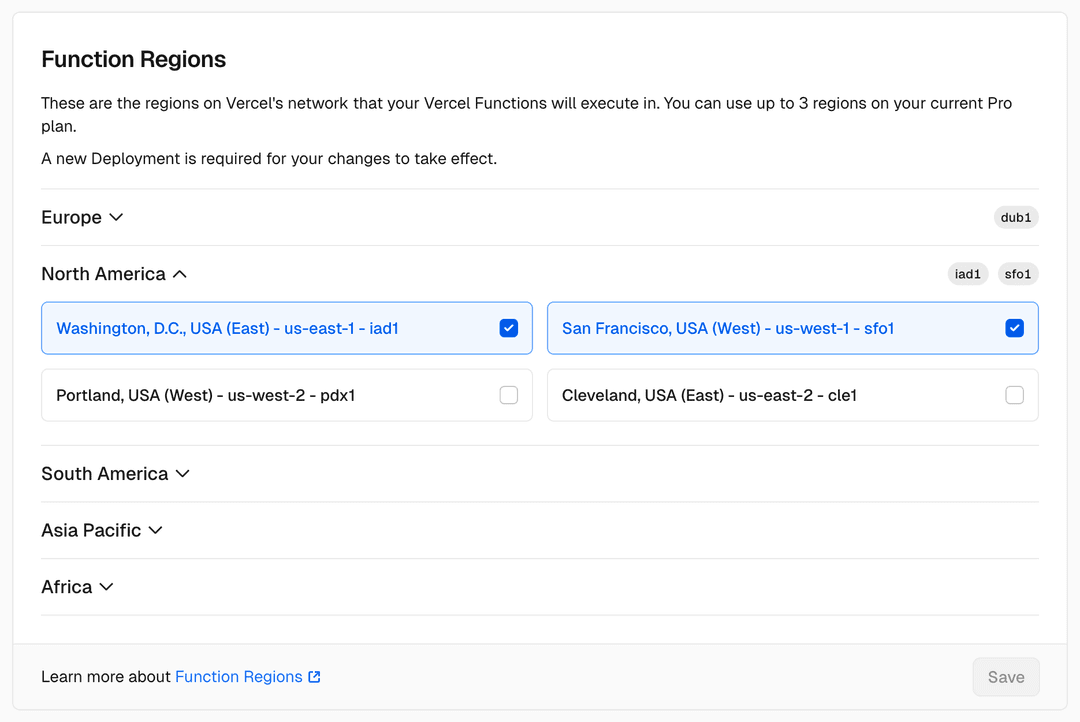
To change the default region in your vercel.json configuration file, add the region code(s) to the "regions" key:

{
"$schema":"https://openapi.vercel.sh/vercel.json",
"regions": ["sfo1"]
}
Additionally, Pro and Enterprise teams can deploy Vercel Functions to multiple regions. See Limits for the number of regions available on each plan.
Enterprise users can also use functionFailoverRegions to specify regions that a Vercel Function should failover to if the default region is out of service.
You can override the project-level regions and functionFailoverRegions settings for individual functions using the functions property in your project configuration. This is useful when different functions access different data sources in different regions.
{
}
"functions": {
"api/eu-data.js": {
"regions": ["cdg1"],
"regions": ["iad1"],
"functionFailoverRegions": ["cle1"],
},
}
"api/us-west.js": {
"regions": ["sfo1"],
"functionFailoverRegions": ["lhr1"]
"functionFailoverRegions": ["pdx1"]
In this example:
- api/eu-data.js runs in Paris ( cdg1) and fails over to London ( lhr1)
- api/us-west.js runs in San Francisco ( sfo1) and fails over to Portland ( pdx1)
- All other functions use the project-level defaults: Washington, D.C. ( iad1) with Cleveland ( cle1) as failover
Per-function regions accepts an array of region identifiers. Per-function functionFailoverRegions is Enterprise only and accepts up to 4 region identifiers. When set on a function, these values completely override the corresponding project-level setting for that function.
Pass --regions to vercel deploy (or the default vercel command) from your project's root directory with a region value, for example vercel --regions sfo1. The flag requires a region value; running vercel --regions on its own fails with option requires argument: --regions. Learn more about setting regions with the --regions flag in the CLI docs.
Plan
Hobby
Limits
Deploying to more regions than your plan allows causes the deployment to fail before the build step.
Function regions
Single region
Pro
Vercel deploys Routing Middleware to all regions by default, regardless of your region settings. On the Hobby plan, Routing Middleware runs in fewer regions.
Enterprise
The number of regions your functions can run in depends on your plan:
5 regions
All regions

Available regions
To learn more about the regions that you can set for your Functions, see the region list.
Automatic failover
Vercel Functions have multiple availability zone redundancy by default. Multi-region redundancy is available depending on your runtime.

Enterprise teams can enable multi-region redundancy for Vercel Functions using Node.js.
To automatically failover to the closest region in the event of an outage:
Enable the Function Failover toggle:
To manually specify the fallback region, you can pass one or more regions to the functionFailoverRegions property in your vercel.json file:
{
"$schema":"https://openapi.vercel.sh/vercel.json",
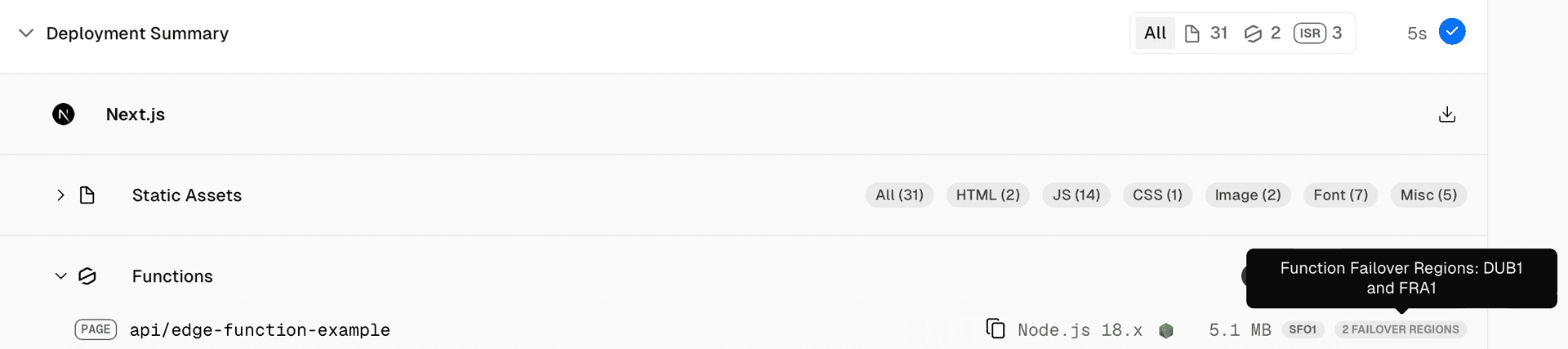
"functionFailoverRegions": ["dub1","fra1"]
}
You can also set functionFailoverRegions on a per-function basis using the functions property. See per-function configuration above.
The region(s) set in the functionFailoverRegions property must be different from the default region(s) specified in the regions property.
During an automatic failover, Vercel will reroute application traffic to the next closest region, meaning the order of the regions in functionFailoverRegions does not matter. For more information on how failover routing works, see functionFailoverRegions.
You can view your default and failover regions through the deployment summary:


Last updated August 11, 2026
Region failover is supported with Secure Compute. See Region Failover to learn more.
Previous
Was this helpful?
Cross-link map: Configuring regions for Vercel Functions (/docs/functions/configuring-functions/region)From the Vercel docs graph (built 2026-09-21T05:26:59.511Z), spanning vercel.com docs + KB, nextjs.org, ai-sdk.dev, and other Vercel documentation sites. Full graph as JSON: https://vercel.com/docs/graph.jsonSemantically closest pagesGlobal network and regions — View the list of regions supported by Vercel's CDN and learn about our global infrastructure.Improved resiliency for Vercel Functions with inter-region failover supportConfiguring Functions — Learn how to configure the runtime, region, maximum duration, and memory for Vercel Functions.Runtimes — Runtimes transform your source code into Functions, which are served by our CDN. Learn about the official runtimes suppoVercel Functions — Build API routes, webhooks, and agent request handlers with Vercel Functions, then test and debug them with Vercel CLI.PrerequisitesConfiguring Functions — Learn how to configure the runtime, region, maximum duration, and memory for Vercel Functions.This page links to (9)Configuring a Build — Vercel automatically configures the build settings for many front-end frameworks, but you can also customize the build aVercel CDN Cache — Learn how Vercel's CDN cache stores your content across a global network to reduce latency and origin load.vercel deploy — Learn how to deploy your Vercel projects using the vercel deploy CLI command.Deploying to Vercel — Create, verify, and manage preview and production deployments on Vercel from Git, Vercel CLI, or the REST API.Secure Compute — Secure Compute provides dedicated private networks with VPC peering for Enterprise teams.Washington D.C., USA \(iad1\) pricing — Vercel pricing for the Washington D.C., USA \(iad1\) region.Static Configuration with vercel.json — Learn how to use vercel.json to configure and override the default behavior of Vercel from within your project.Global network and regions — View the list of regions supported by Vercel's CDN and learn about our global infrastructure.Routing Middleware — Learn how you can use Routing Middleware, code that executes before a request is processed on a site, to provide speed aPages that link here (44)By site: flags-sdk (1) · vercel-changelog (5) · vercel-kb (5) · vercel-web (8) · vercel-docs (25)From flags-sdkData LocalityFrom vercel-changelogImproved resiliency for Vercel Functions with inter-region failover supportManage multiple Vercel Function regions in the dashboardOpenAI will not support the Hong Kong region (hkg1) for FunctionsPro customers can now configure up to 3 regions for Vercel FunctionsVercel Edge Functions can now be regional or globalFrom vercel-kbHosting your API on Vercel — Learn how to build and scale performant APIs on Vercel.How to migrate from Fastly to Vercel with zero downtime — Consolidate your CDN infrastructure on Vercel to reduce latency, simplify your configuration, and improve your developerHow can I improve function cold start performance on Vercel? — Learn how to confirm whether cold starts cause function latency on Vercel, and how Fluid compute reduces how often theyHow to choose a Salesforce Commerce Cloud storefront: PWA Kit, Storefront Next, or Next.js — Compare PWA Kit, Storefront Next, and a Next.js storefront on Vercel for Salesforce Commerce Cloud. Learn how caching, pTroubleshooting request ECONNRESET errors — Understand what ECONNRESET means in Vercel runtime logs, why it happens when calling external APIs, how to diagnose it,From vercel-webDeploying AI-driven apps on VercelEffortless high availability for dynamic frontendsEvolving Vercel FunctionsRegional execution for ultra-low latency rendering at the edgeThe Frontend Cloud: Powering resiliency for global web applicationsUnderstanding Vercel FunctionsUpdate regarding Vercel service disruption on October 20, 2025Vercel Functions are now faster—and powered by RustFrom vercel-docsCaching — Learn how Vercel caches content across multiple layers to deliver fast responses and reduce load on your backend.Optimize Deployment Storage — Set retention periods, review remaining usage, and reduce deployment output size.Fluid compute — Learn about fluid compute, an execution model for Vercel Functions that provides a more flexible and efficient way to ruSvelteKit on Vercel — Deploy SvelteKit applications to Vercel and configure the adapter, rendering, streaming, ISR, analytics, and Routing MidVercel Functions — Build API routes, webhooks, and agent request handlers with Vercel Functions, then test and debug them with Vercel CLI.Configuring Functions — Learn how to configure the runtime, region, maximum duration, and memory for Vercel Functions.Functions API Reference — Learn about available APIs when working with Vercel Functions.Vercel Functions Limits — Learn about the limits and restrictions of using Vercel Functions.Runtimes — Runtimes transform your source code into Functions, which are served by our CDN. Learn about the official runtimes suppoLegacy Usage & Pricing for Functions — Learn about legacy usage and pricing for Vercel Functions.How Vercel builds your application — Learn how Vercel transforms your source code into optimized assets ready to serve globally.What is Compute? — Learn how compute works on Vercel with Fluid compute, and how it compares to traditional server and serverless models.How Vercel CDN works — Learn how Vercel's CDN processes requests through routing, caching, and compute layers to deliver your content with lowIncremental Static Regeneration \(ISR\) — ISR serves cached static pages while regenerating content in the background. Vercel\\ISR Usage and Pricing — Learn about ISR costs, usage metrics, and strategies to optimize your ISR reads and writes.Storage on Vercel Marketplace — Connect Postgres, Redis, NoSQL, and other storage solutions through the Vercel Marketplace. Run SQL queries, edit data,Secure Compute — Secure Compute provides dedicated private networks with VPC peering for Enterprise teams.Vercel Enterprise Plan — Learn about the Enterprise plan for Vercel, including features, pricing, and more.Production checklist for launch — Ensure your application is ready for launch with this comprehensive production checklist by the Vercel engineering team.Static Configuration with vercel.json — Learn how to use vercel.json to configure and override the default behavior of Vercel from within your project.Programmatic Configuration with vercel.ts — Define your Vercel configuration in vercel.ts with @vercel/config for type-safe routing and build settings.Projects overview — A project is where you deploy and operate frontend apps, APIs, backends, containers, and agent workloads on Vercel.Global network and regions — View the list of regions supported by Vercel's CDN and learn about our global infrastructure.Security & Compliance Measures — Learn about the protection and compliance measures Vercel takes to ensure the security of your data, including DDoS mitiVercel Workflows — Build agents and applications that retry failed steps, wait for external events, and resume across crashes and deploymen


