Skip to Content

Deploy and verify applications on Vercel

Create preview and production deployments from Git, Vercel CLI, or the REST API. Verify each deployment URL before you send changes to production.

Deployment Methods

Vercel supports multiple ways to create a deployment:

On Pro and Enterprise teams, you can set a deployment policy to control which Git sources and deployment mechanisms can deploy to each environment.

You can reach our customer support team by emailing info@yourcompany.example.com, calling +1 555-555-5556, or using the live chat on our website. Our dedicated team is available 24/7 to assist with any inquiries or issues.

We’re committed to providing prompt and effective solutions to ensure your satisfaction.

We offer a 30-day return policy for all products. Items must be in their original condition, unused, and include the receipt or proof of purchase. Refunds are processed within 5-7 business days of receiving the returned item.

The most common way to create a deployment is by pushing code to a connected Git repository. When you import a Git repository to Vercel, each commit or pull request (on supported Git providers) automatically triggers a new deployment.

Vercel supports the following providers:

You can also create deployments from a Git reference using the Vercel Dashboard if you need to deploy specific commits or branches manually.

Vercel Drop

Vercel Drop lets you deploy a file or folder by dragging it into your browser. You don't need Git, the CLI, or any local setup.

  1. Go to vercel.com/drop.
  2. Drag a project folder onto the page.
  3. Choose a team and project name, then select Deploy.

Vercel detects your framework and builds it, or deploys your files as-is when there's no framework. Vercel Drop is useful for static sites, build output, and prototypes. For the full walkthrough, see Deploying with Vercel Drop.

Vercel CLI

Use Vercel CLI to create deployments from a terminal, CI pipeline, or coding agent with terminal access. This method works whether your project is connected to Git or not.

Install Vercel CLI:


npm i-gvercel

Initial Deployment:

In your project's root directory, run:

vercel --prod


This links your local directory to your Vercel Project and creates a Production Deployment. A .vercel directory is added to store Project and Organization IDs.

Vercel CLI can also integrate with custom CI/CD workflows or third-party pipelines. Learn more about the different environments on Vercel.

Deploy Hooks

Deploy Hooks let you trigger deployments with a unique URL. You must have a connected Git repository to use this feature, but the deployment doesn't require a new commit.

  1. From your Project settings, create a Deploy Hook
  2. Vercel generates a unique URL for each Project
  3. Make an HTTP GET or POST request to this URL to trigger the deployment

Refer to the Deploy Hooks documentation for more information.

Vercel REST API

Use the Vercel REST API when a service or agent needs to create deployments through HTTP rather than a local checkout. In this workflow:

  1. Generate a SHA for each file you want to deploy
  2. Upload those files to Vercel
  3. Send a request to create a new deployment with those file references

This method is especially useful for custom workflows, multi-tenant applications, or integrating with third-party services not officially supported by Vercel. For more details, see the API reference and How do I generate an SHA for uploading a file.

Accessing Deployments

Vercel provides three default environments: Local, Preview, and Production.

  1. Local Development: developing and testing code changes on your local machine
  2. Preview: deploying for further testing, QA, or collaboration without impacting your live site
  3. Production: deploying the final changes to your user-facing site with the production domain

Learn more about environments.

Using the Dashboard

Vercel’s dashboard provides a centralized way to view, manage, and gain insights into your deployments.

Resources Tab and Deployment Summary

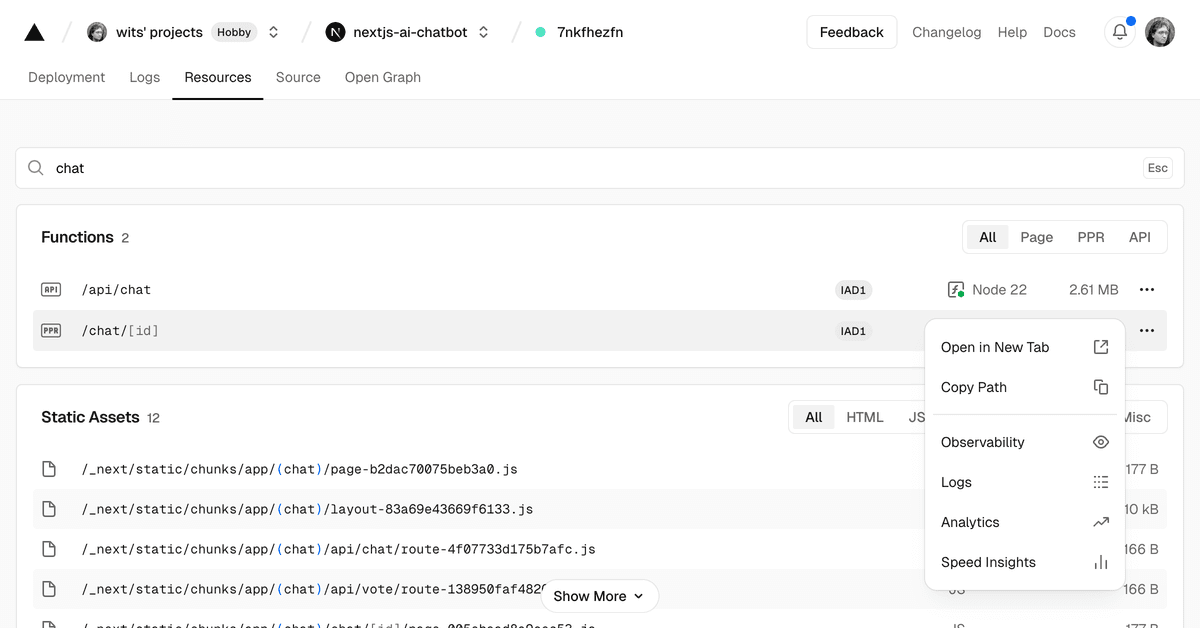
When you select a deployment from your Project → Deployments page, you can Open Resources in the sidebar to view and search:

  • Middleware: Any configured matchers.
  • Static Assets: Files (HTML, CSS, JS) and their sizes.
  • Functions: The type, runtime, size, and regions.

You can use the three dot (…) menu for a given function to jump to that function in Logs, Analytics, Speed Insights, or the Observability section in the sidebar.

Example of a deployment resources page with a search applied.
You can also see a summary of these resources by expanding the Deployment Summary section on a Deployment Details page. To visit the Deployment Details page for a deployment, select it from your Project → Deployments page.

Example of an open deployment summary.
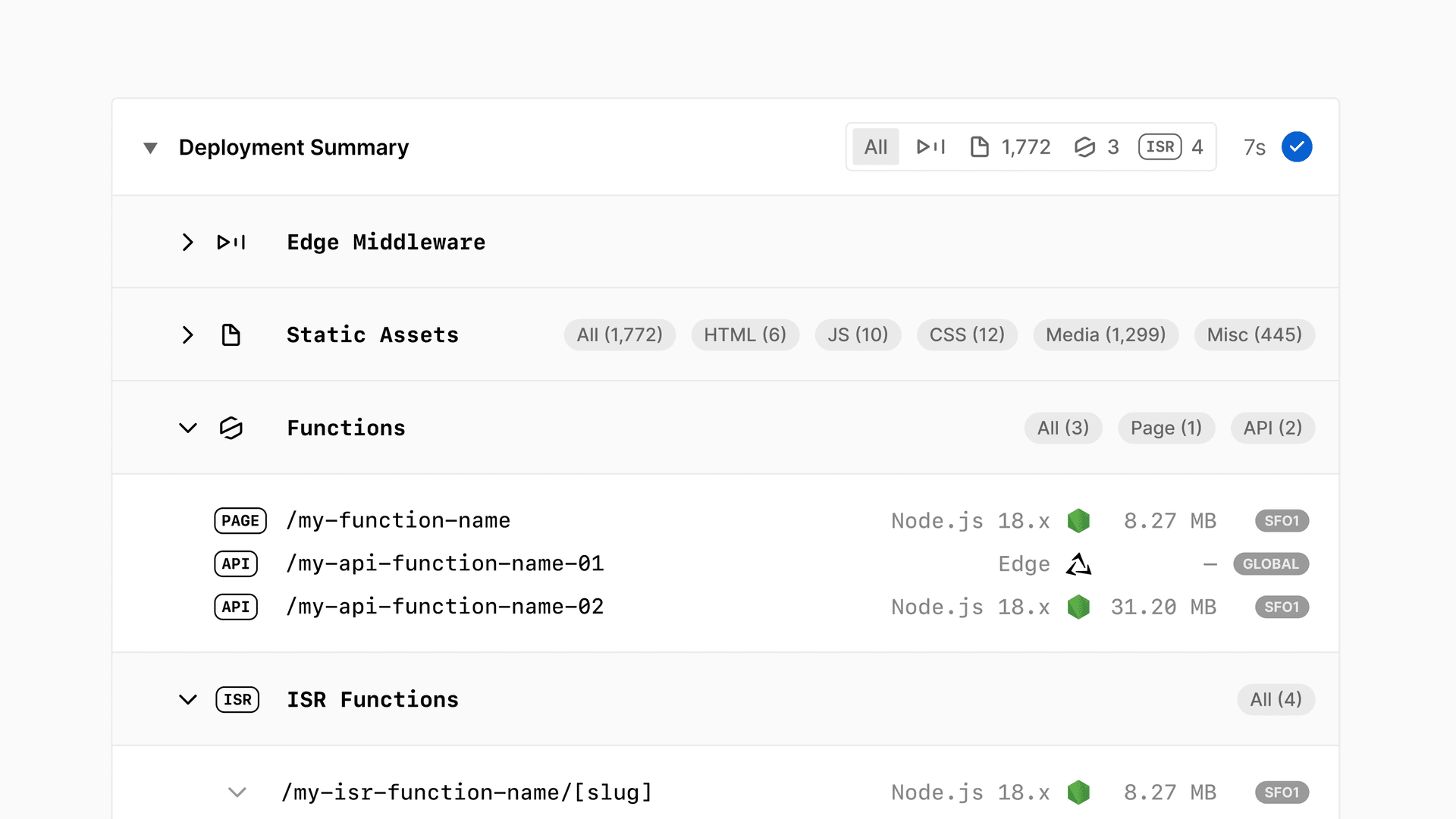
You’ll also see your build time, detected framework, and any relevant logs or errors.

Project Overview

On your Project Overview page, you can see the latest production deployment, including the generated URL and commit details, and deployment logs for debugging.

Managing Deployments

From the Deployments section in the sidebar, you can:

  • Redeploy: Re-run the build for a specific commit or configuration.
  • Inspect: View logs and build outputs.
  • Assign a Custom Domain: Point custom domains to any deployment.
  • Promote to Production: Convert a preview deployment to production (if needed).

For more information on interacting with your deployments, see Managing Deployments.

CLI workflows

For step-by-step workflows using the Vercel CLI to manage deployments, see:

Explore deployments

Cross-link map: Deploying to Vercel (/docs/deployments)From the Vercel docs graph (built 2026-09-21T05:26:59.511Z), spanning vercel.com docs + KB, nextjs.org, ai-sdk.dev, and other Vercel documentation sites. Full graph as JSON: https://vercel.com/docs/graph.jsonSemantically closest pagesDeploying a project from the CLI — Set up and deploy a Vercel project using the CLI, from linking to production.Managing Deployments — Learn how to manage your current and previously deployed projects to Vercel through the dashboard. You can redeploy at aDeploying Projects from Vercel CLI — Learn how to deploy your Vercel Projects from Vercel CLI using the vercel or vercel deploy commands.Deploying Git Repositories with Vercel — Vercel automatically deploys supported Git repositories on every branch push and when changes merge into the productionProjects overview — A project is where you deploy and operate frontend apps, APIs, backends, containers, and agent workloads on Vercel.This page links to (17)Vercel CLI Overview — Learn how to use the Vercel command-line interface \(CLI\) to manage and configure your Vercel Projects from the commandCreating & Triggering Deploy Hooks — Learn how to create and trigger deploy hooks to integrate Vercel deployments with other systems.Deployment Policies — Use a deployment policy to control which Git sources and deployment mechanisms can deploy to your team and projects, perEnvironments — Environments are for developing locally, testing changes in a pre-production environment, and serving end-users in produManaging Deployments — Learn how to manage your current and previously deployed projects to Vercel through the dashboard. You can redeploy at aRolling back a production deployment — Recover from a bad production deployment by rolling back, investigating the root cause, and redeploying a fix.Deploying with Vercel Drop — Vercel Drop lets you deploy a file or folder by dragging it into your browser, with no Git or CLI required.Deploying Git Repositories with Vercel — Vercel automatically deploys supported Git repositories on every branch push and when changes merge into the productionDeploying from Azure DevOps with Vercel — ​Vercel for Azure DevOps allows you to deploy from Azure Pipelines to Vercel automatically.Deploying Bitbucket Projects with Vercel — ​Vercel for Bitbucket automatically deploys your Bitbucket projects with Vercel, providing Preview Deployment URLs, andDeploying GitHub Projects with Vercel — Vercel for GitHub automatically deploys your GitHub projects with Vercel, providing Preview Deployment URLs, and automatDeploying GitLab Projects with Vercel — ​Vercel for GitLab automatically deploys your GitLab projects with Vercel, providing Preview Deployment URLs, and automaDeploying a project from the CLI — Set up and deploy a Vercel project using the CLI, from linking to production.Vercel REST API Reference — Interact programmatically with your Vercel account using the SDK or direct HTTP requests.Create a new deployment — POST /v13/deployments — Creates a new deployment for the authenticated team or user. For non-git deployments, upload filRouting Middleware API — Learn how you can use Routing Middleware, code that executes before a request is processed on a site, to provide speed aHow do I generate an SHA for uploading a file to the Vercel API? — When using the Vercel API to create a deployment, you first need to upload your files. An SHA is required to upload thesPages that link here (31)By site: turborepo (1) · vercel-changelog (1) · vercel-kb (3) · vercel-web (2) · vercel-docs (24)From turborepoRemote Caching — Share a single Turborepo cache across your team and CI to avoid duplicated work.From vercel-changelogResources tab allows instant searching and filtering of functions, middleware, and static assetsFrom vercel-kbAre Vercel Preview Deployments indexed by search engines? — Vercel Preview Deployments aren't indexed by default. Learn how the noindex header works, how to confirm it, and the cusMigrate to Vercel from Cloudflare — Migrate your website's configuration from Cloudflare Pages or Workers to VercelHow to test a container image in Vercel Sandbox before deploying — Validate a container image before deploying by booting it as a custom Sandbox image from Vercel Container Registry \(VCRFrom vercel-webAgentic InfrastructureIntroducing the new Vercel AgentFrom vercel-docsTools — Available tools in Vercel MCP for searching docs, managing teams, projects, deployments, Web Analytics, runtime logs andAudit Logs — Learn how to track and analyze your team members' activities.Configuring a Build — Vercel automatically configures the build settings for many front-end frameworks, but you can also customize the build aWorking with Checks — Vercel automatically keeps an eye on various aspects of your web application using the Checks API. Learn how to use ChecDeployment Policies — Use a deployment policy to control which Git sources and deployment mechanisms can deploy to your team and projects, perAccessing Deployments through Generated URLs — When you create a new deployment, Vercel will automatically generate a unique URL which you can use to access that partiAccessing Build Logs — Learn how to use Vercel's build logs to monitor the progress of building or running your deployment, and check for possiFrameworks on Vercel — Vercel supports a wide range of the most popular frameworks, optimizing how your application builds and runs no matter wConfiguring regions for Vercel Functions — Learn how to configure regions for Vercel Functions.Runtimes — Runtimes transform your source code into Functions, which are served by our CDN. Learn about the official runtimes suppoLegacy Usage & Pricing for Functions — Learn about legacy usage and pricing for Vercel Functions.How Vercel builds your application — Learn how Vercel transforms your source code into optimized assets ready to serve globally.Deploying from Azure DevOps with Vercel — ​Vercel for Azure DevOps allows you to deploy from Azure Pipelines to Vercel automatically.Response headers — Learn about the response headers sent to each Vercel deployment and how to use them to process responses before sendingDeploy a Lovable app on Vercel — Deploy your Lovable project to Vercel using GitHub sync and zero-configuration TanStack Start detection.Limits — Look up account limits, usage summaries, rate limits, and resource constraints for every Vercel plan.Fair Use Guidelines — Learn how Vercel applies fair use guidelines across plans and usage-based resources.Microfrontends Routing — Configure which microfrontend handles each path and understand how Vercel selects deployments.Notifications — Learn how to use Notifications to view and manage important alerts about your deployments, domains, integrations, accounProducts — Browse Vercel products for building, deploying, securing, observing, and scaling web applications.Project settings — Use the project settings, to configure custom domains, environment variables, Git, integrations, deployment protection,Projects overview — A project is where you deploy and operate frontend apps, APIs, backends, containers, and agent workloads on Vercel.Transferring a project — Learn how to transfer a project between Vercel teams.Access Roles — Learn about the different roles available for team members on a Vercel account.

You can reach our customer support team by emailing info@yourcompany.example.com, calling +1 555-555-5556, or using the live chat on our website. Our dedicated team is available 24/7 to assist with any inquiries or issues.

We’re committed to providing prompt and effective solutions to ensure your satisfaction.

We offer a 30-day return policy for all products. Items must be in their original condition, unused, and include the receipt or proof of purchase. Refunds are processed within 5-7 business days of receiving the returned item.