Projects

Environment variables are key-value pairs configured outside your source code so that each value can change depending on the Environment. These values are encrypted at rest and visible to any user that has access to the project. It is safe to use both non-sensitive and sensitive data, such as tokens. When you need to replace an API key, token, or other credential, follow the steps for rotating environment variables to update it without downtime.
Environment Variables
Your source code can read these values to change behavior during the Build Step or during Function execution.
Environment variables
When adding variables in the dashboard or with the CLI, choose Config or Secret for each variable. Config values stay readable to authorized members while Secret values are write-only after saving. Learn more in Sensitive environment variables.
Copy page
Any change you make to environment variables are not applied to previous deployments, they only apply to new deployments.
Creating environment variables
Environment variables can either be declared at the team or project level. When declared at the team level, they are available to all projects within the team. When declared at the project level, they are only available to that project.
To learn how to create and manage environment variables, see Managing environment variables.
Environment variable size
Developers on all plans using the runtimes stated below can use a total of 64 KB in Environments Variables per-Deployment on Vercel. This limit is for all variables combined, and so no single variable can be larger than 64 KB. The total size includes any variables configured through the dashboard or the CLI.
With support for 64 KB of environment variables, you can add large values for authentication tokens, JWTs, or certificates.
Deployments using the following runtimes can support environment variables up to 64 KB:
- Node.js
- Python
- Ruby
- Go
- PHP Community Runtime
Vercel also provides support for custom runtimes, through the Build Output API. For information on creating custom runtime support, see the following guides:
 edge runtime are limited to 5KB per
Environment Variable.
edge runtime are limited to 5KB per
Environment Variable.
Environments
For each Environment Variable, you can select one or more Environments to apply the Variable to:
Description
When selected, the Environment Variable will be applied to your next Production Deployment. To create a Production Deployment, push a commit to the Production Branch (usually main) or run vercel --prod.
The Environment Variable is applied to your next Preview Deployment. Preview Deployments are created when you push to a branch that is not the Production Branch or run vercel.
With custom environments you can choose to import environment variables from another environment and detach when you need to update the environment variable for your custom environment
The Environment Variable is used when running your project locally with vercel dev or your preferred development command. To download Development Environment Variables, run vercel env pull.
Preview environment variables
Preview environment variables are applied to deployments from any Git branch that does not match the Production Branch. When you add a preview environment variable, you can choose to apply to all non-production branches or you can select a specific branch.
Adding an Environment Variable
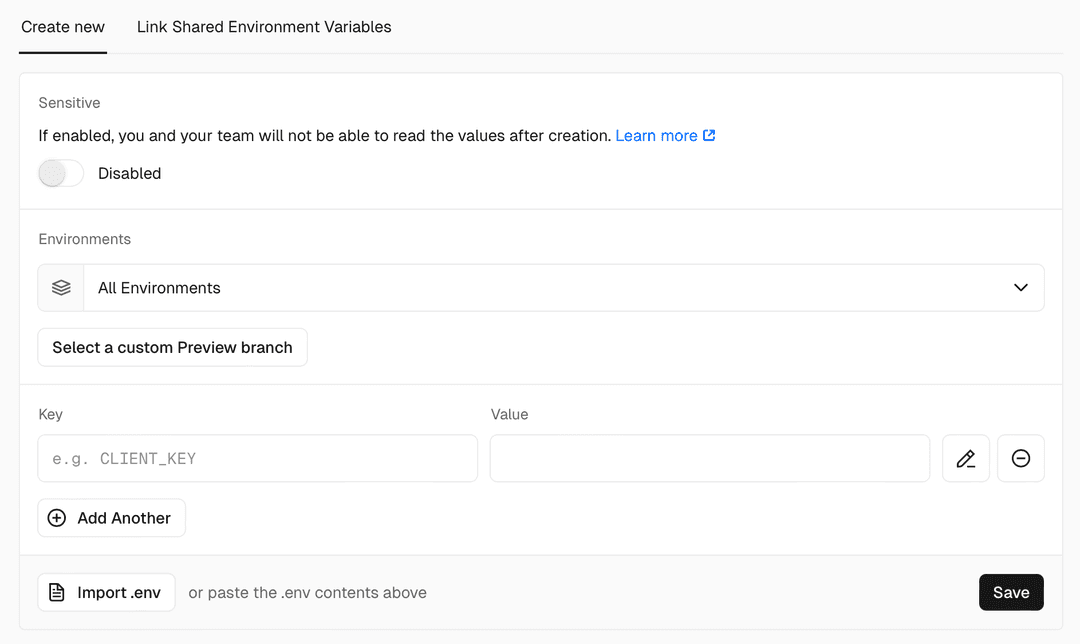
Any branch-specific variables will override other preview environment variables with the same name. This means you don't need to replicate all your existing preview environment variables for each branch – you only need to add the values you wish to override.
Development environment variables
Environment variables for local development are defined in the .env.local file. This is a plain text file that contains key=value pairs of environment variables, that you can manually create in your project's root directory to define specific variables.
You can use the vercel env pull command to automatically create and populate the .env file (which serves the same purpose as .env.local) with the environment variables from your Vercel project:
vercel env pull Downloading Development Environment Variables for Project my-lovely-project ✅ Created .env file [510ms]
This command creates a .env file in your project's current directory with the environment variables from your Vercel project's Development environment.
If you're using vercel dev, there's no need to run vercel env pull, as vercel dev automatically downloads the Development Environment Variables into memory. For more information on the vercel env command, see the CLI docs.
For more information, see Environment variables for local development.
Integration environment variables
Integrations can automatically add environment variables to your Project Settings. In that case, the Integration that added the Variable will be displayed in your project settings:





Last updated September 17, 2026
Cross-link map: Environment variables (/docs/environment-variables)From the Vercel docs graph (built 2026-09-21T05:26:59.511Z), spanning vercel.com docs + KB, nextjs.org, ai-sdk.dev, and other Vercel documentation sites. Full graph as JSON: https://vercel.com/docs/graph.jsonSemantically closest pagesManaging environment variables — Learn how to create and manage environment variables for Vercel.How to add and manage environment variables on Vercel — Add environment variables to Vercel through the dashboard, CLI, or REST API, scope them to each environment, and pull thManaging environment variables across environments — Add, sync, and verify environment variables across development, preview, production, and custom environments using the CEnvironments — Environments are for developing locally, testing changes in a pre-production environment, and serving end-users in produEnvironment Variables UIThis page links to (13)Vercel Primitives — Learn about the Vercel platform primitives and how they work together to create a Vercel Deployment.Configuring a Build — Vercel automatically configures the build settings for many front-end frameworks, but you can also customize the build aVercel CLI Overview — Learn how to use the Vercel command-line interface \(CLI\) to manage and configure your Vercel Projects from the commandvercel dev — Learn how to replicate the Vercel deployment environment locally and test your Vercel Project before deploying using thevercel env — Learn how to manage your environment variables in your Vercel Projects using the vercel env CLI command.Environments — Environments are for developing locally, testing changes in a pre-production environment, and serving end-users in produManaging environment variables — Learn how to create and manage environment variables for Vercel.Rotating environment variables — Safely rotate API keys, tokens, and other secrets in your Vercel environment variables.Vercel Functions — Build API routes, webhooks, and agent request handlers with Vercel Functions, then test and debug them with Vercel CLI.Deploying Git Repositories with Vercel — Vercel automatically deploys supported Git repositories on every branch push and when changes merge into the productionVercel Integrations — Learn how to extend Vercel's capabilities by integrating with your preferred providers for AI, databases, headless conteLimits — Look up account limits, usage summaries, rate limits, and resource constraints for every Vercel plan.Projects overview — A project is where you deploy and operate frontend apps, APIs, backends, containers, and agent workloads on Vercel.Pages that link here (84)By site: turborepo (1) · v0 (1) · vercel-changelog (8) · vercel-kb (24) · vercel-docs (50)From turborepoUsing environment variables — Account for environment variables in task hashing, configure environment modes, and handle .env files.From v0Deployments — Preview and publish v0 projects on Vercel, then manage domains, visibility, and production updates.From vercel-changelogEnvironment variables now use Config and Secret typesEnvironments Variables per Git branchImproved environment variables UINew deployments of vulnerable Next.js applications are now blocked by defaultNew deployments with vulnerable versions of the third-party package next-mdx-remote are now blocked by defaultSvelteKit projects can now be deployed with zero configurationSystem Environment Variables are now available by defaultVite projects can now be deployed with zero configurationFrom vercel-kbAdd structured application logs to Vercel Functions — Learn how to add structured application logs to Vercel Functions to help troubleshoot function issues in real time.Build AI agents with AI Gateway and AI SDK — Build AI agents on Vercel with AI Gateway and AI SDK, then make them reliable, capable, and durable with Sandbox, Chat SDeploy a Bolt.new app with Vercel Drop — Export your Bolt.new project as a .zip and deploy it to Vercel with Vercel Drop. Vercel detects the framework and buildsCost-aware model routing through AI Gateway — Route easy requests to a cheap model and escalate only hard ones to a frontier model through one AI Gateway endpoint, wiBuild a daily digest bot with Chat SDK and Workflow SDK — Build a daily digest bot that posts a daily digest of GitHub stats to Slack. Learn how to use Vercel Connect to set up SDeploy a headless Shopify storefront with Vercel — Deploy a headless Shopify storefront using the Next.js Commerce template on VercelHow to deploy a Shopify App to Vercel — Deploy the official Shopify CLI React Router app template to Vercel with the @vercel/react-router preset and Postgres seHow Docker Compose concepts map to Vercel — Translate your Docker Compose file to Vercel: Compose services become Vercel Services, networks become bindings, and volDoes Vercel Support Yarn? \(Versions 2, 3, and 4\) — Vercel supports Yarn 1, 2, 3, and 4. Learn which version your build uses by default, and how to pin Yarn 4 with CorepackHow to build and maintain HIPAA-compliant applications on Vercel — Deploy HIPAA-compliant healthcare apps on Vercel with built-in security, BAAs, and scalable serverless infrastructure.How to add and manage environment variables on Vercel — Add environment variables to Vercel through the dashboard, CLI, or REST API, scope them to each environment, and pull thTranslate Kubernetes manifests to vercel.json — Translate Kubernetes Deployments, Services, Ingress, ConfigMaps, and CronJobs into vercel.json configuration and VercelMigrate a Next.js app from Webflow Cloud to Vercel — Move your Next.js app from Webflow Cloud to Vercel: remove the OpenNext Cloudflare adapter, drop the base path, map storMigrate a TanStack Start app from Cloudflare to Vercel — Move your TanStack Start app off Cloudflare Workers and onto Vercel Functions, where Fluid compute scales it automaticalMigrate a TanStack Start app from Netlify to Vercel — Move your TanStack Start app off Netlify and onto Vercel Functions, where Fluid compute scales it automatically. Swap toMigrate an Astro app from Webflow Cloud to Vercel — Move your Astro app from Webflow Cloud to Vercel: swap the @astrojs/cloudflare adapter for @astrojs/vercel, drop the basMigrate self-hosted Next.js and containers from AWS to Vercel — Migrate containers from AWS to Vercel: deploy with Dockerfile.vercel, keep RDS, S3, and SQS in AWS over OIDC, and cut ovMigrate to Vercel from Cloudflare — Migrate your website's configuration from Cloudflare Pages or Workers to VercelInvestigate GitHub issues with \HarnessAgent\\ and Vercel Sandbox — Use HarnessAgent to run coding agent harnesses like Claude Code or Codex against untrusted code inside Vercel Sandbox. RHow to send emails from an application on Vercel — Send email from Vercel Functions over an HTTP API instead of SMTP. Match the right Next.js pattern to your trigger and fHow to ship a Nitro app on Vercel — Deploy a Nitro app to Vercel with zero configuration. Learn how to ship from a template, the Vercel CLI, or Git, and conTroubleshooting Build Error: "Serverless Function has exceeded the unzipped maximum size of 250 MB" — Learn how to troubleshoot builds failing due to exceeding the maximum function size limit on Vercel.Using coding agents to procure Vercel Marketplace integrations — Coding agents can now discover, provision, and manage third-party services from the Vercel Marketplace using the VercelDoes Vercel support Kubernetes? — Vercel doesn't run Kubernetes clusters. Learn how Kubernetes workloads like Deployments, Ingress, ConfigMaps, and CronJoFrom vercel-docsVercel & OpenAI Integration — Integrate your Vercel project with OpenAI's powerful suite of models.Build Features for Customizing Deployments — Learn how to customize your deployments using Vercel's build features.Configuring a Build — Vercel automatically configures the build settings for many front-end frameworks, but you can also customize the build avercel deploy — Learn how to deploy your Vercel projects using the vercel deploy CLI command.vercel env — Learn how to manage your environment variables in your Vercel Projects using the vercel env CLI command.vercel pull — Learn how to update your local project with remote environment variables using the vercel pull CLI command.Environments — Environments are for developing locally, testing changes in a pre-production environment, and serving end-users in produManaging Deployments — Learn how to manage your current and previously deployed projects to Vercel through the dashboard. You can redeploy at aPromoting a preview deployment to production — Test a preview deployment and promote it to production using the CLI.Troubleshooting Build Errors — Learn how to resolve common scenarios you may encounter during the Build step, including build errors that cancel a deplFramework environment variables — Framework environment variables are automatically populated by the Vercel, based on your project's framework.Managing environment variables across environments — Add, sync, and verify environment variables across development, preview, production, and custom environments using the CReserved environment variables — Reserved environment variables are reserved by Vercel Vercel Function runtimes.Rotating environment variables — Safely rotate API keys, tokens, and other secrets in your Vercel environment variables.Sensitive environment variables — Environment variables that cannot be decrypted once created.Shared environment variables — Learn how to use Shared environment variables, which are environment variables that you define at the Team level and canConcepts — Learn how eve agents, sessions, channels, tools, skills, connections, and sandboxes fit together.Nitro on Vercel — Deploy Nitro applications to Vercel with zero configuration. Learn about observability, ISR, and custom build configuratVite on Vercel — Deploy Vite projects to Vercel and configure environment variables, Vercel Functions, server-side rendering, and SPA rewDeploy a Django app on Vercel — Deploy a Django app on Vercel. Learn how the Python runtime, WSGI, ASGI, static assets, and Vercel Functions work togethSvelteKit on Vercel — Deploy SvelteKit applications to Vercel and configure the adapter, rendering, streaming, ISR, analytics, and Routing MidContainer Images — Deploy OCI container images with a Dockerfile or Containerfile on Vercel Functions.Vercel Functions Limits — Learn about the limits and restrictions of using Vercel Functions.Runtimes — Runtimes transform your source code into Functions, which are served by our CDN. Learn about the official runtimes suppoEdge Runtime — Learn about the Edge runtime, an environment in which Vercel Functions can run.Using the Go Runtime with Vercel Functions — Learn how to use the Go runtime to run Go APIs on Vercel.Advanced Node.js Usage — Learn about advanced configurations for Vercel functions on Vercel.How Vercel builds your application — Learn how Vercel transforms your source code into optimized assets ready to serve globally.Getting started with Vercel — Install the Vercel CLI, add the Vercel Plugin or agent skills, and deploy your first project.Deploying Git Repositories with Vercel — Vercel automatically deploys supported Git repositories on every branch push and when changes merge into the productionUsing Global Config with LaunchDarkly — Learn how to use Global Config with Vercel's LaunchDarkly integration.Using Global Config with Statsig — Learn how to use Global Config with Vercel's Statsig integration.Using Global Config — Learn how to use Global Configs in your projects.Building Integrations with Vercel REST API — Learn how to use Vercel REST API to build your integrations and work with redirect URLs.Integrating Vercel and Kubernetes — Deploy your frontend on Vercel alongside your existing Kubernetes infrastructure.Limits — Look up account limits, usage summaries, rate limits, and resource constraints for every Vercel plan.Storage on Vercel Marketplace — Connect Postgres, Redis, NoSQL, and other storage solutions through the Vercel Marketplace. Run SQL queries, edit data,Monorepos FAQ — Learn the answer to common questions about deploying monorepos on Vercel.Deploying Nx to Vercel — Nx is an extensible build system with support for monorepos, integrations, and Remote Caching on Vercel. Learn how to deConnect to Amazon Web Services \(AWS\) — Learn how to configure your AWS account to trust Vercel's OpenID Connect \(OIDC\) Identity Provider \(IdP\).Connect to Microsoft Azure — Learn how to configure your Microsoft Azure account to trust Vercel's OpenID Connect \(OIDC\) Identity Provider \(IdP\).Connect to Google Cloud Platform \(GCP\) — Learn how to configure your GCP project to trust Vercel's OpenID Connect \(OIDC\) Identity Provider \(IdP\).Project settings — Use the project settings, to configure custom domains, environment variables, Git, integrations, deployment protection,Static Configuration with vercel.json — Learn how to use vercel.json to configure and override the default behavior of Vercel from within your project.Projects overview — A project is where you deploy and operate frontend apps, APIs, backends, containers, and agent workloads on Vercel.Managing projects — Learn how to manage your projects through the Vercel Dashboard.Transferring a project — Learn how to transfer a project between Vercel teams.Access Roles — Learn about the different roles available for team members on a Vercel account.Shared Responsibility Model — Discover the essentials of our Shared Responsibility Model, outlining the key roles and responsibilities for customers,Managing the visibility of the Vercel Toolbar — Learn how to enable or disable the Vercel Toolbar for your team, project, and session.
Was this helpful?