Vercel Web Analytics

- To set up Web Analytics for your project, see the Quickstart.
- To monitor your site's performance, use Speed Insights.
Visitors tab data.
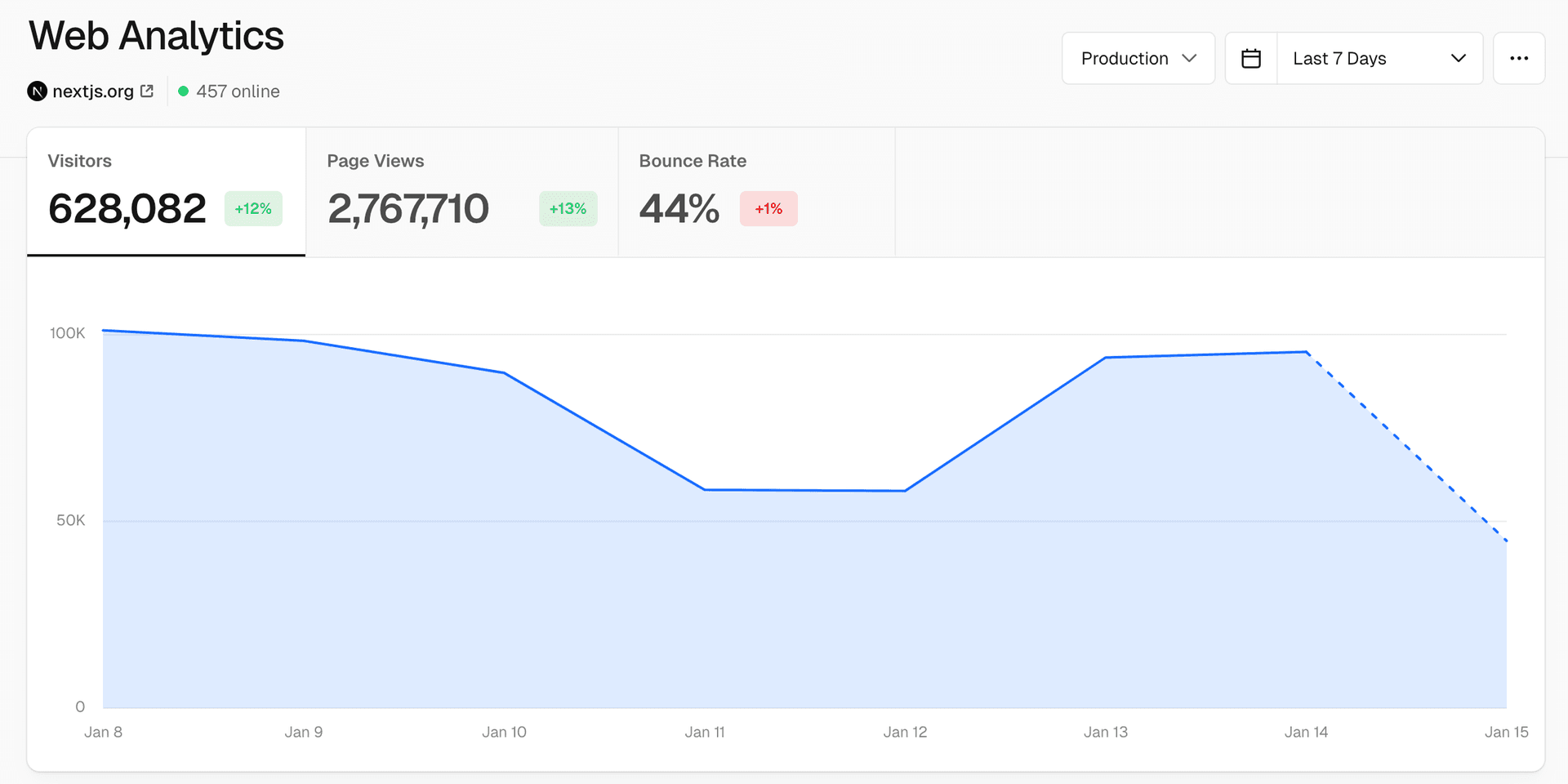
Web Analytics provides comprehensive insights into your website's visitors, allowing you to track the top visited pages, referrers for a specific page, and demographics like location, operating systems, and browser information. Vercel's Web Analytics offers:
- Privacy: Web Analytics only stores anonymized data and does not use cookies, providing data for you while respecting your visitors' privacy and web experience.
- Integrated Infrastructure: Web Analytics is built into the Vercel platform and accessible from your project's dashboard so there's no need for third-party services for detailed visitor insights.
- Customizable: You can configure Web Analytics to track custom events and feature flag usage to get a better understanding of how your visitors are using your website.
Visitors
The Visitors tab displays all your website's unique visitors within a selected timeframe. You can adjust the timeframe by selecting a value from the dropdown in the top right hand corner.
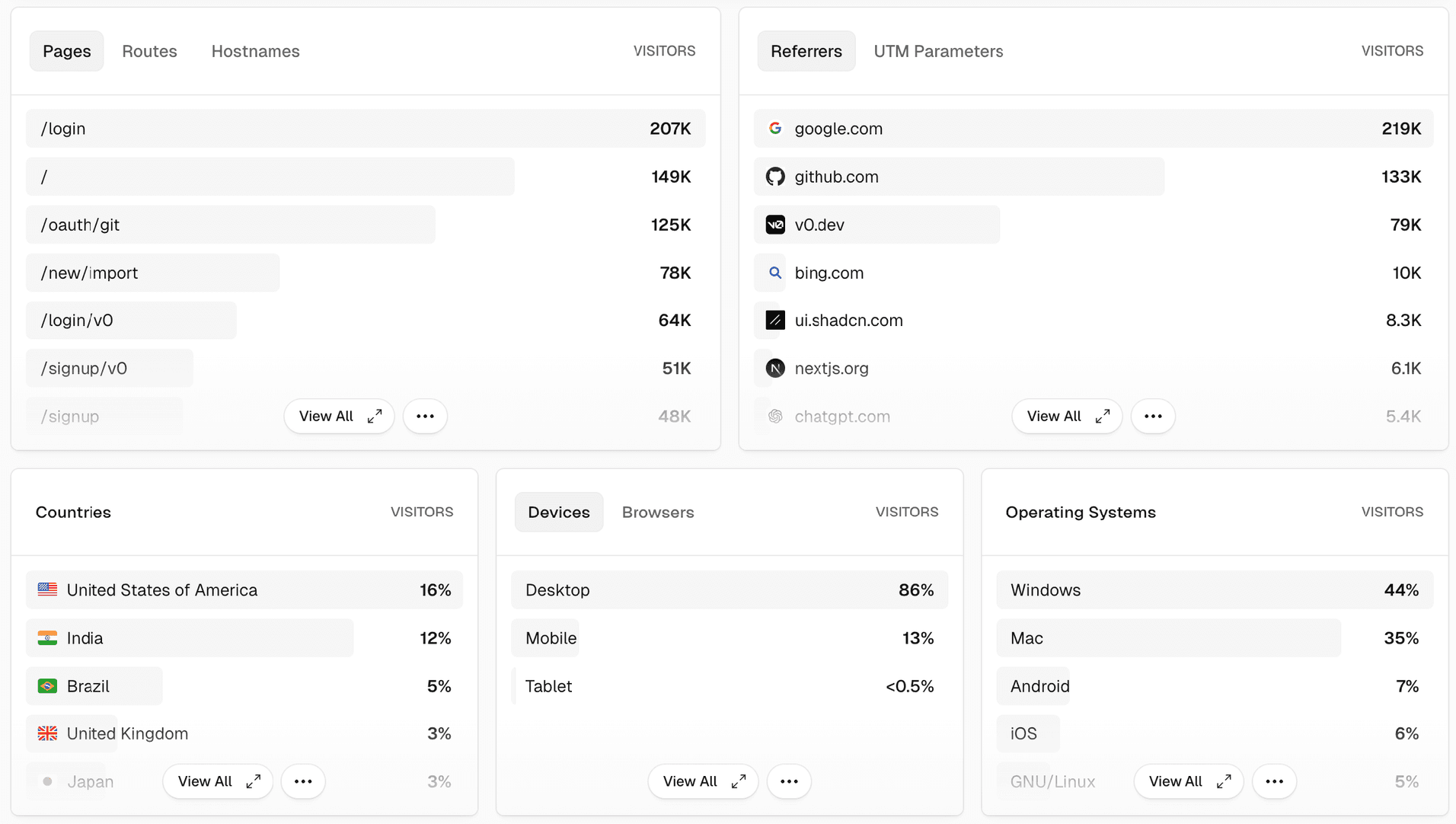
You can use the panels section to view a breakdown of specific information, organized by the total number of visitors.
Instead of relying on cookies like many analytics products, visitors are identified by a hash created from the incoming request. Using a generated hash provides a privacy-friendly experience for your visitors and means visitors can't be tracked between different days or different websites.
The generated hash is valid for a single day, at which point it is automatically reset.
If a visitor loads your website for the first time, we immediately track this visit as a page view. Subsequent page views are tracked through the native browser API.
Page views
The Page Views tab, like the Visitors tab, shows a breakdown of every page loaded on your website during a certain time period. Vercel counts page views by the total number of views on a page. For page views, the same visitor can view the same page multiple times resulting in multiple events.
You can use the panels section to view a breakdown of specific information, organized by the total number of page views.
Bounce rate
The Bounce rate is the percentage of visitors who land on a page and leave without taking any further action.
The higher the bounce rate, the less engaging the page is.

Web Analytics defines a session as a group or page views by the same visitor. Custom events don't count towards the bounce rate.
For that reason, when filtering the dashboard for a given custom event, the bounce rate will always be 0%.
Panels
Panels provide a way to view detailed analytics for Visitors and Page Views, such as top pages and referrers. They'll also show additional information such as the country, OS, and device or browser of your visitors, and configured options such as custom events and feature flag usage.
By default, panels provide you with a list of top entries, categorized by the number of visitors. Depending on the panel, the information is displayed either as a number or percentage of the total visitors. You can click View All to see all the data:


Bots
Last updated August 11, 2026
Panels showing a breakdown of page view data.
Web Analytics doesn't count traffic that comes from automated processes or accounts. Vercel determines this by inspecting the User Agent header for incoming requests.
Cross-link map: Vercel Web Analytics (/docs/analytics)From the Vercel docs graph (built 2026-09-21T05:26:59.511Z), spanning vercel.com docs + KB, nextjs.org, ai-sdk.dev, and other Vercel documentation sites. Full graph as JSON: https://vercel.com/docs/graph.jsonSemantically closest pagesUsing Web Analytics — Learn how to use Vercel's Web Analytics to understand how visitors are using your website.Privacy and Compliance — Learn how Vercel supports privacy and data compliance standards with Vercel Web Analytics.Filtering Analytics — Learn how filters allow you to explore insights about your website's visitors.Getting started with Vercel Web Analytics — Vercel Web Analytics provides you detailed insights into your website's visitors. This quickstart guide will help you geVercel Web Analytics is now generally availableThis page links to (5)Tracking custom events — Learn how to send custom analytics events from your application.Getting started with Vercel Web Analytics — Vercel Web Analytics provides you detailed insights into your website's visitors. This quickstart guide will help you geUsing Web Analytics — Learn how to use Vercel's Web Analytics to understand how visitors are using your website.Flags — Control feature visibility, run experiments, and ship with confidence using Vercel's feature flags platform.Speed Insights Overview — This page lists out and explains all the performance metrics provided by Vercel's Speed Insights feature.Pages that link here (56)By site: v0 (1) · vercel-changelog (12) · vercel-kb (15) · vercel-web (11) · vercel-docs (17)From v0Deployments — Preview and publish v0 projects on Vercel, then manage domains, visibility, and production updates.From vercel-changelogDevice type support and improved breakdowns in Web AnalyticsExport traces, web analytics events, and speed insights datapoints to any destinationFilter by custom date ranges in Web AnalyticsImproved data collection for Web Analytics and Speed Insights with resilient intakeNuxt analytics available on Vercel AnalyticsPreview your site's Firewall status and Web Analytics from the Project OverviewVercel Analytics are now real-timeSplit Web Analytics data by any dimensionVercel Agent can now install Web Analytics and Speed insights for youWeb Analytics and Speed Insights are now more cost-efficientPublic Web Analytics API now availableWeb Analytics now has route supportFrom vercel-kbAstro on Vercel vs Webflow Cloud — Compare running Astro on Vercel Functions with Fluid compute against Webflow Cloud on Cloudflare Workers. Learn how AstrHow to prepare your storefront for Black Friday traffic — A practical checklist for keeping your storefront fast and your checkout path healthy through Black Friday and Cyber MonDeploy a headless BigCommerce storefront with Vercel — Deploy a headless BigCommerce storefront using Catalyst and Next.js on VercelHow Splits Work in Vercel Flags — Use weighted splits in Vercel Flags to deterministically bucket users into variants by percentage for gradual rollouts aHow to Effectively Load Test Your Vercel Application — Learn how to safely load test your Next.js app on Vercel. This guide covers realistic, policy-compliant testing of routeHow to Utilize Vercel’s Bot Management Features — A practical, step-by-step guide to identifying unwanted automated traffic and securing your Vercel apps with Bot ProtectMigrate to Vercel from Cloudflare — Migrate your website's configuration from Cloudflare Pages or Workers to VercelThe Complete Guide to Vercel Agent — Learn what Vercel Agent does, how to set up Code Review, Investigation, Chat, and Installation, and what each feature coBuild Imgur-style image hosting with Nuxt and Vercel Blob — Learn how to build an Imgur-style paste-to-share image host using Nuxt and Vercel Blob, with direct-to-storage client upVercel vs Akamai — A detailed guide to Vercel vs Akamai: compute models, AI infrastructure, framework support, media streaming, CDN capabilVercel vs Fastly — A detailed guide to Vercel vs Fastly: full-stack application platform vs edge infrastructure layer, covering framework sVercel vs Netlify — A detailed guide to Vercel vs Netlify: runtimes, compute architecture, AI infrastructure, security, and when to choose eVercel vs Northflank — A detailed guide to Vercel vs Northflank: Fluid compute, CDN and caching, container image functions, security defaults,Vercel vs Railway — A detailed guide to Vercel vs Railway: serverless vs always-on containers, container images via Dockerfile.vercel, frameVercel vs Render — A detailed guide to Vercel vs Render: compute models, AI infrastructure, Docker and container image support, backgroundFrom vercel-webHow Core Web Vitals Will Impact Google Rankings in 2021Shipping safer and smarter: Integrating feature flags deeper in the Vercel workflowVercel Analytics for GatsbyHow to integrate AI into your businessHow v0 is building SEO-optimized sites by defaultHow we run Vercel's CDN in front of DiscourseHow we’re adapting SEO for LLMs and AI searchNuxt Analytics on VercelThe developer experience of the Frontend CloudVercel and Solara6 partner to build better ecommerce experiencesVercel Pricing — Choose a Vercel plan and compare features and usage pricing.From vercel-docsTools — Available tools in Vercel MCP for searching docs, managing teams, projects, deployments, Web Analytics, runtime logs andInstallation — Let AI automatically install Web Analytics and Speed Insights in your appAudit Logs — Learn how to track and analyze your team members' activities.vercel project — Perform the following commands from the terminal for your Vercel Projects: list, add, inspect, update settings, rename,Frameworks on Vercel — Vercel supports a wide range of the most popular frameworks, optimizing how your application builds and runs no matter wAstro on Vercel — Deploy Astro sites to Vercel and configure server-side rendering, ISR, Web Analytics, Image Optimization, and Routing MiCreate React App on Vercel — Deploy Create React App projects to Vercel and add Preview Deployments, Web Analytics, Speed Insights, and ObservabilityReact Router on Vercel — Deploy React Router applications with SSR or SPA mode, then configure the Vercel preset, streaming, caching, and analytiNext.js on Vercel — Vercel is the native Next.js platform, designed to enhance the Next.js experience.Remix on Vercel — Deploy Remix applications to Vercel and configure the Vercel Vite preset, SSR, streaming, caching, and analytics.SvelteKit on Vercel — Deploy SvelteKit applications to Vercel and configure the adapter, rendering, streaming, ISR, analytics, and Routing MidManage and optimize usage for Observability — Learn how to understand the different charts in the Vercel dashboard, how usage relates to billing, and how to optimizeManaging microfrontends — Learn how to manage your microfrontends on Vercel.Projects overview — A project is where you deploy and operate frontend apps, APIs, backends, containers, and agent workloads on Vercel.Transferring a project — Learn how to transfer a project between Vercel teams.Shared Responsibility Model — Discover the essentials of our Shared Responsibility Model, outlining the key roles and responsibilities for customers,Speed Insights Overview — This page lists out and explains all the performance metrics provided by Vercel's Speed Insights feature.
Drains
You can export up to 250 entries from the panel as a CSV file. See Exporting data as CSV for more information.
Previous
Was this helpful?


