Flags
Vercel provides a complete feature flags platform. Use Vercel as your feature flag provider, or connect your preferred provider from the Marketplace. Either way, you get a unified dashboard to manage all your flags, developer tools like the Flags Explorer, and built-in observability.
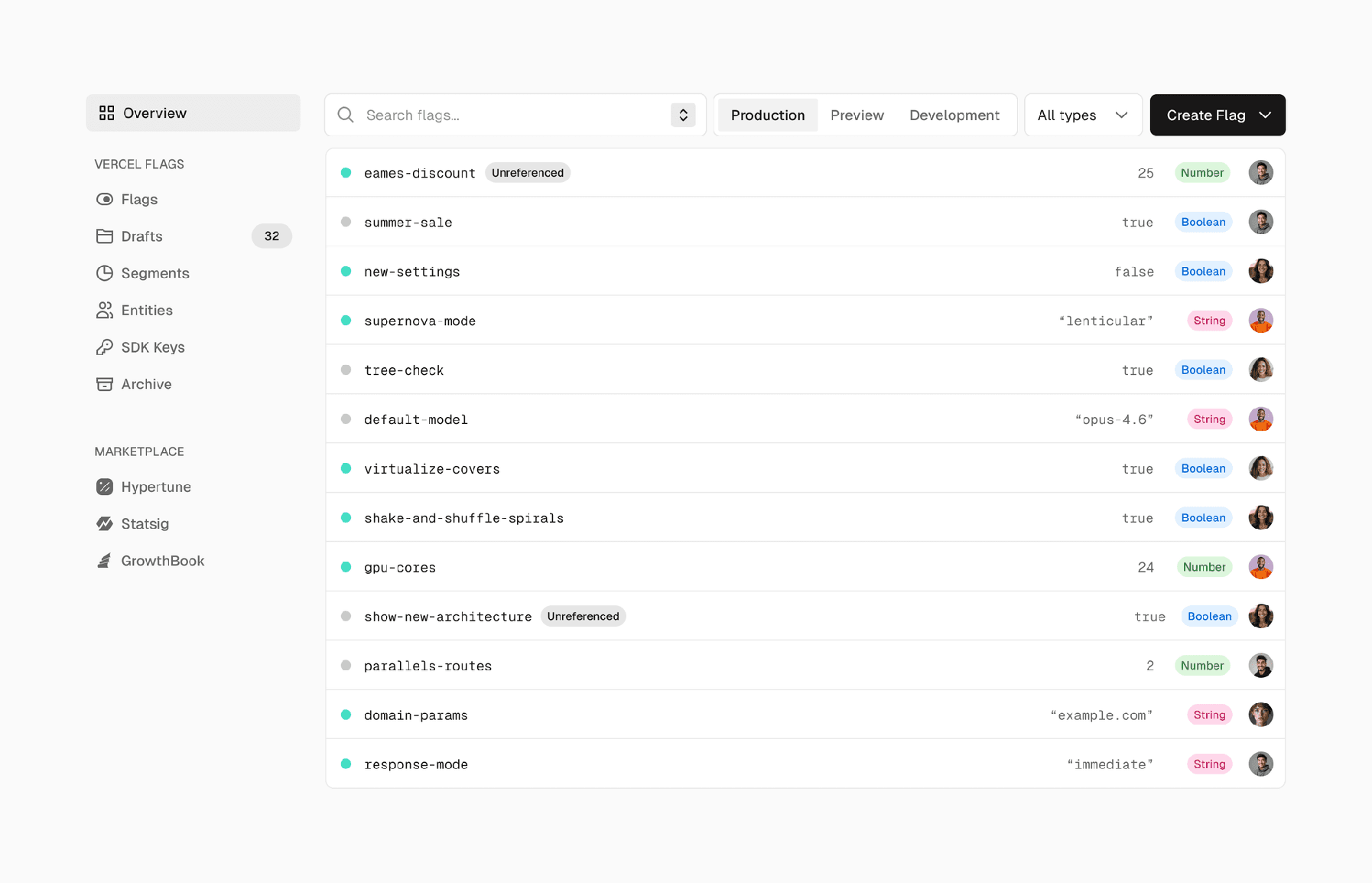
Flags in Vercel Dashboard
Why use feature flags?
- Roll out features gradually to specific users, teams, or environments
- Test in production safely before launching to everyone
- Run A/B tests to measure impact on conversion and performance
- Override flags locally with the Flags Explorer, with no code changes needed
- Ship and deploy independently from releasing features
Flags give you control over your application's behavior without redeploying:
Developer tools

The Flags section in your Vercel Dashboard shows all your flags in one place, regardless of which provider you use. You can filter, search, and see the status of every flag across your project.
Unified dashboard
This unified view lists all your flags in one place. Vercel Flags can be edited directly in the Vercel Dashboard. Marketplace flags link straight to their provider's dashboard. Since you're already signed in through Vercel, you can jump in and make changes immediately.

Observability

Last updated September 15, 2026
Cross-link map: Flags (/docs/flags)From the Vercel docs graph (built 2026-09-21T05:26:59.511Z), spanning vercel.com docs + KB, nextjs.org, ai-sdk.dev, and other Vercel documentation sites. Full graph as JSON: https://vercel.com/docs/graph.jsonSemantically closest pagesVercel Flags — Use Vercel as your feature flag provider to create and manage flags, define targeting rules, and run experiments directlMarketplace — Connect your preferred feature flag provider through the Vercel Marketplace for a unified flags experience.Managing flags in the dashboard — Learn how to manage your feature flags using the Vercel Dashboard.Vercel Flags: Platform-native feature flagsIntroducing the Flags Explorer, first-party integrations, and updates to the Flags SDK This page links to (5)Getting started with Flags Explorer — Learn how to set up the Flags Explorer so you can see and override your application's feature flagsFlags SDK Reference — API reference for the Flags SDK for Next.js and SvelteKit.Marketplace — Connect your preferred feature flag provider through the Vercel Marketplace for a unified flags experience.Observability — Track feature flag evaluations and analyze their impact with Web Analytics.Getting Started with Vercel Flags — Create your first feature flag and evaluate it in your application using the Flags SDK, OpenFeature, or the core libraryPages that link here (16)By site: vercel-changelog (4) · vercel-kb (1) · vercel-docs (11)From vercel-changelogVercel Flags no longer requires SDK Keys for Vercel deploymentsManage Vercel Flags segments with Vercel CLIManage Vercel Flags targeting rules from the CLIAutomate progressive rollouts with Vercel FlagsFrom vercel-kbAdd structured application logs to Vercel Functions — Learn how to add structured application logs to Vercel Functions to help troubleshoot function issues in real time.From vercel-docsVercel Web Analytics — With Web Analytics, you can get detailed insights into your website's visitors with new metrics like top pages, top refeFiltering Analytics — Learn how filters allow you to explore insights about your website's visitors.Glossary — Learn about the terms and concepts used in Vercel's products and documentation.Native Integration Flows — Learn how information flows between the integration user, Vercel, and the integration provider for Vercel native integraIntegrating Vercel and Kubernetes — Deploy your frontend on Vercel alongside your existing Kubernetes infrastructure.Microfrontends — Learn how to use microfrontends on Vercel to split apart large applications, improve developer experience and make increMicrofrontends Routing — Configure which microfrontend handles each path and understand how Vercel selects deployments.Products — Browse Vercel products for building, deploying, securing, observing, and scaling web applications.General settings — Configure basic settings for your Vercel project, including the project name, build and development settings, root direcVercel Toolbar — Learn how to use the Vercel Toolbar to leave feedback, navigate through important dashboard pages, share deployments, usAdd the Vercel Toolbar to local and production environments — Learn how to use the Vercel Toolbar in production and local environments.
Track flag evaluations in Runtime Logs and analyze their impact on user behavior in Web Analytics. See which flags affect conversion rates and application performance.

Was this helpful?


