
Flags Explorer

Getting started with Flags Explorer
Getting Started
This guide walks you through connecting your application to the Flags Explorer, so you can use it to view and override your application's feature flags. This works with any framework, any feature flag provider and even custom setups.

Help me set up Flags Explorer for this project. First, make sure the Vercel CLI is installed (`npm i -g vercel`). If I'm using Claude Code or Cursor, install the Vercel Plugin (`npx plugins add vercel/vercel-plugin`). For other agents, install Vercel Skills (`npx skills add vercel-labs/agent-skills`). Then: 1. Run `vercel link` and `vercel env pull` to sync flag configuration. 2. Configure the Flags SDK to report flag evaluations to Flags Explorer. Use `vercel flags` to verify flags are connected.
- Set up the Vercel Toolbar for development by following adding the Vercel Toolbar to local and production environments
- You should have the latest version of Vercel CLI installed. To check your version, use
vercel --version. To
install or update Vercel CLI, use:
pnpm
yarn
npm
bun

 pnpm i -g vercel@latest
 - Ensure your local directory
links to a Vercel project. You can use
vercel link from root of your project to link it to your Vercel account or use:
vercel link [path-to-directory]
-
Add the Flags SDK to your projectInstall the
flags package. This package provides convenience methods, components, and types that allow your application to communicate with the Flags Explorer.
pnpm
yarn
npm
bun
pnpm i flags
-
Adding a
FLAGS_SECRETThis secret is used to encrypt and sign overrides, and so Flags Explorer can make authenticated requests to the
/.well-known/vercel/flags Discovery Endpoint we'll create in the next step.Run your application locally with Vercel Toolbar enabled and open Flags Explorer from the toolbar. Click on "Start setup" to begin the onboarding flow, then click on "Create secret" to automatically generate and add a new
FLAGS_SECRET environment variable to your project.This generates a separate value for each environment (Development, Preview, and Production) and marks the Preview and Production values as Sensitive.Pull your environment variables to make them available to your project locally.
vercel envpull
If you prefer to create the secret manually, see the instructions in the Flags Explorer Reference. -
Creating the Flags Discovery EndpointYour application needs to expose an endpoint that Flags Explorer queries to get your feature flags. Flags Explorer will make an authenticated request to this Discovery Endpoint to receive your application's feature flag definitions. This endpoint can communicate the name, origin, description, and available options of your feature flags.Using the Flags SDK for Next.jsEnsure you completed the setup of the
Flags SDK for Next.js. You should have installed the
flags package and have a
flags.ts file at the root of your project which exposes your feature flags as shown below.
Next.js (/app)Next.js (/pages)
TypeScript


import { flag } from'flags/next';
exportconstexampleFlag=flag({
key:'example-flag',
description:'An example feature flag',
decide() {
returnfalse;
}, });Create your Flags Discovery Endpoint using the snippet below.Next.js (/app)Next.js (/pages)
TypeScript
import { getProviderData, createFlagsDiscoveryEndpoint } from'flags/next';
import*as flags from'../../../../flags';
exportconstGET=createFlagsDiscoveryEndpoint(() =>getProviderData(flags));
This endpoint uses verifyAccess to prevent unauthorized requests, and the getProviderData function to automatically generate the feature flag definitions based on the feature flags you have defined in code. See the Flags SDK API Reference for more information.If you are using the Flags SDK with adapters, use the getProviderData function exported by your flag provider's adapter to load flag metadata from your flag providers. See the Flags SDK Adapters API Reference for more information, and mergeProviderData to combine the feature flags defined in code with the metadata of providers.Using the Flags SDK for SvelteKitIf you are using the Flags SDK for SvelteKit then the createHandle function will automatically create the Discovery Endpoint for you. Learn more about using the Flags SDK for SvelteKit.Using a custom setupLearn how to manually return feature flag definitions in the Flags Explorer Reference. - Handling overridesYou can now use the Flags Explorer to create feature flag overrides. When you create an override Flags Explorer will set a cookie containing those overrides. Your application can then read this cookie and respect those overrides. You can optionally check the signature on the overrides cookie to ensure it originated from a trusted source.Using the Flags SDK for Next.jsFeature flags defined in code using the Flags SDK for Next.js will automatically handle overrides set by the Flags Explorer.Using the Flags SDK for SvelteKitFeature flags defined in code using the Flags SDK for SvelteKit will automatically handle overrides set by the Flags Explorer.Using a custom setupIf you have a custom feature flag setup, or if you are using the SDKs of feature flag providers directly, you need to manually handle the overrides set by the Flags Explorer.Learn how to read the overrides cookie in the Flags Explorer Reference.
- ReviewYou should now be able to see your feature flags in Flags Explorer. You should also be able to set overrides that your application can respect by using the Flags SDK or reading the vercel-flag-overrides cookie manually. If you added the FlagValues component, you should be able to see the actual value each flag resolved to while rendering the current page.
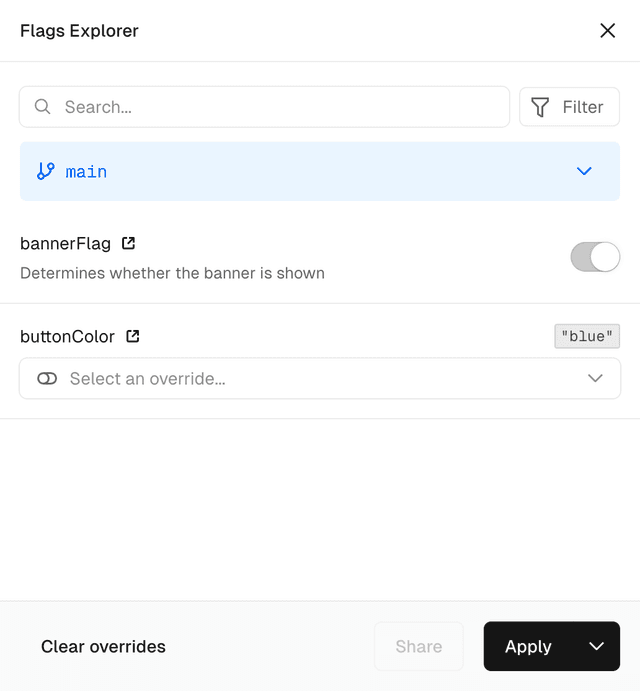
Flags Explorer showing flag values.
You can optionally make the Flags Explorer aware of the actual value each feature flag resolved to while rendering the current page by rendering a
If you emit flag values to the client it's further possible to annotate your Web Analytics events with the feature flags you emitted. Learn how to integrate with Web Analytics.
Last updated April 24, 2026
Cross-link map: Getting started with Flags Explorer (/docs/flags/flags-explorer/getting-started)From the Vercel docs graph (built 2026-09-21T05:26:59.511Z), spanning vercel.com docs + KB, nextjs.org, ai-sdk.dev, and other Vercel documentation sites. Full graph as JSON: https://vercel.com/docs/graph.jsonSemantically closest pagesGetting Started with Vercel Flags — Create your first feature flag and evaluate it in your application using the Flags SDK, OpenFeature, or the core libraryFlags SDK Reference — API reference for the Flags SDK for Next.js and SvelteKit.Quickstart — Using the Flags SDK in SvelteKitFlags Explorer — View and override your application's feature flags from the Vercel ToolbarVercel FlagsPrerequisitesFlags — Control feature visibility, run experiments, and ship with confidence using Vercel's feature flags platform.Flags Explorer — View and override your application's feature flags from the Vercel ToolbarThis page links to (10)flags — The flags package provides the core functionality for integrating with Vercel.flags/next — APIs for working with feature flags in Next.js.rewrites — Add rewrites to your Next.js app.Vercel CLI Overview — Learn how to use the Vercel command-line interface \(CLI\) to manage and configure your Vercel Projects from the commandvercel link — Learn how to link a local directory to a Vercel Project using the vercel link CLI command.Reference — In-depth reference for configuring the Flags ExplorerFlags SDK Reference — API reference for the Flags SDK for Next.js and SvelteKit.Integrate flags with Vercel Web Analytics — Learn how to tag your page views and custom events with feature flagsVercel Toolbar — Learn how to use the Vercel Toolbar to leave feedback, navigate through important dashboard pages, share deployments, usAdd the Vercel Toolbar to local and production environments — Learn how to use the Vercel Toolbar in production and local environments.Pages that link here (10)By site: vercel-docs (10)Flags — Control feature visibility, run experiments, and ship with confidence using Vercel's feature flags platform.Flags Explorer — View and override your application's feature flags from the Vercel ToolbarReference — In-depth reference for configuring the Flags ExplorerFlags SDK Reference — API reference for the Flags SDK for Next.js and SvelteKit.Marketplace — Connect your preferred feature flag provider through the Vercel Marketplace for a unified flags experience.Setting up Flags Explorer — Add the Flags Explorer to the Vercel Toolbar so you can override flag values on preview deployments without affecting otManaging flags in the dashboard — Learn how to manage your feature flags using the Vercel Dashboard.Draft Flags — Learn how draft flags work and how to promote them to Vercel Flags.Getting Started with Vercel Flags — Create your first feature flag and evaluate it in your application using the Flags SDK, OpenFeature, or the core libraryUsing the Flags SDK with Vercel Flags — Integrate Vercel Flags into your Next.js or SvelteKit application using the Flags SDK.
Was this helpful?


