


- To set up Speed Insights for your project, see the Quickstart.
- To understand who is visiting your site, use Web Analytics.
Vercel Speed Insights provides you with a detailed view of your website's performance metrics, based on Core Web Vitals, enabling you to make data-driven decisions for optimizing your site. For granular visitor data, use Web Analytics.
The Speed Insights dashboard offers in-depth information about scores and individual metrics without the need for code modifications or leaving the Vercel dashboard.
Speed Insights is available on every plan for free and includes the Real Experience Score (RES). Upgrade a project to Speed Insights Plus to unlock all Core Web Vitals, breakdowns, and Drains. See limits and pricing for more information.
To learn more, see the dashboard view and metrics, or follow the quickstart.
 preview
and
production
environments.
preview
and
production
environments.
Dashboard view
A snapshot of the Speed Insights tab from the project view.
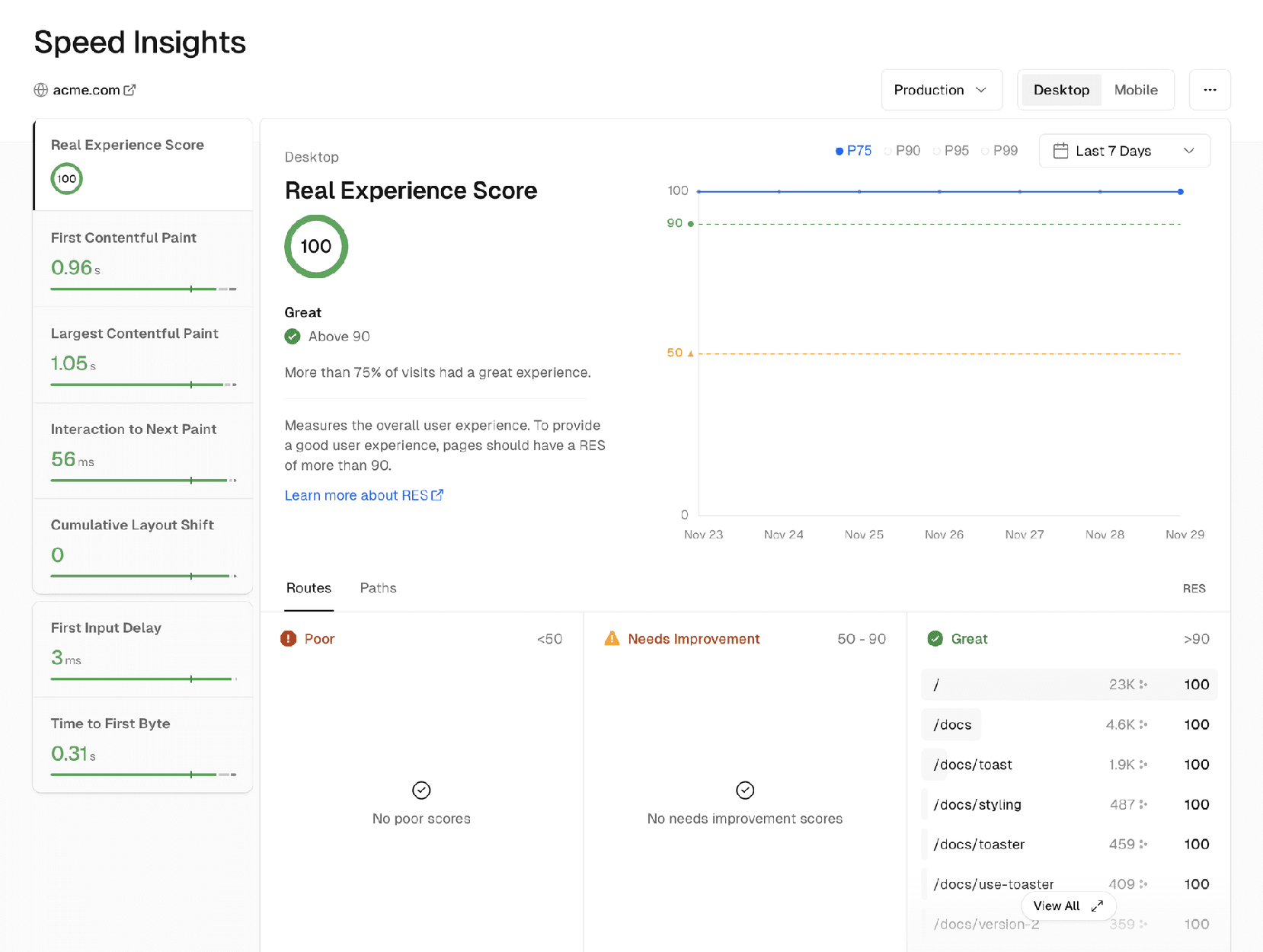
You can access the dashboard by selecting your project in the Vercel dashboard, and clicking Speed Insights in the sidebar.
The Speed Insights dashboard displays data that you can sort and inspect based on a variety of parameters:
Performance metric views
: When you select a performance metric, the dashboard displays three views:
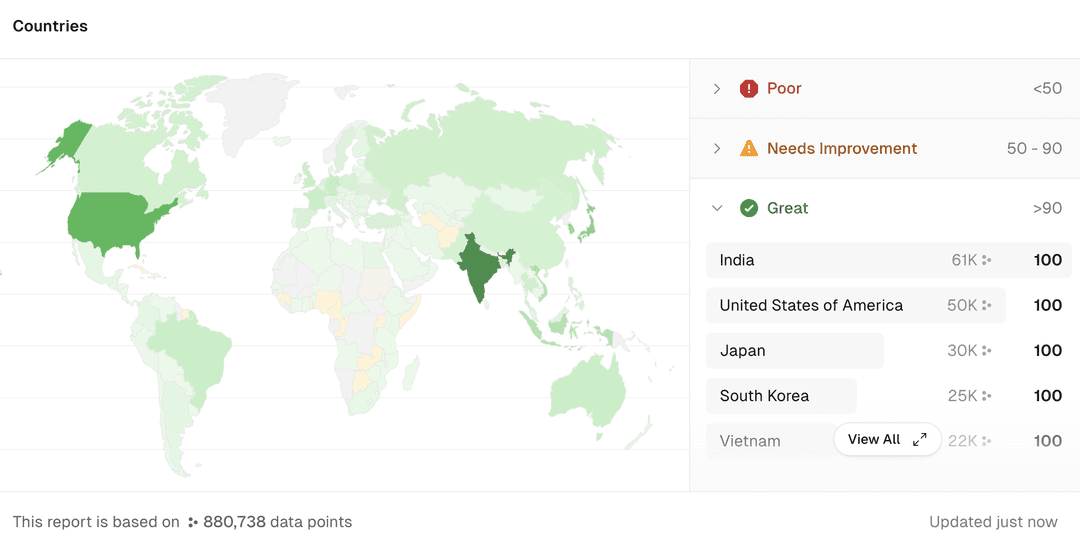
Geographical map
- Time-based line graph that, by default, shows the P75 percentile of data for the selected metric data points and time range. You can include P90, P95 and P99 in this view.
- Kanban board that shows which routes, paths, or HTML elements need improvement (URLs that make up less than 0.5% of visits are not shown by default). Poor rows and element selectors require Speed Insights Plus.
showing the experience metric by country. Requires Speed Insights Plus:
Geographic map of the P75 score where the color intensity indicates the relative amount of data points per country
More resources
Last updated September 1, 2026
Cross-link map: Speed Insights Overview (/docs/speed-insights)From the Vercel docs graph (built 2026-09-21T05:26:59.511Z), spanning vercel.com docs + KB, nextjs.org, ai-sdk.dev, and other Vercel documentation sites. Full graph as JSON: https://vercel.com/docs/graph.jsonSemantically closest pagesUsing Speed Insights — Learn how to use Speed Insights to analyze your application's performance data.Getting started with Speed Insights — Vercel Speed Insights provides you detailed insights into your website's performance. This quickstart guide will help yoSpeed Insights Metrics — Learn what each performance metric on Speed Insights means and how the scores are calculated.Limits and Pricing for Speed Insights — Learn about our limits and pricing when using Vercel Speed Insights. Different limitations are applied depending on yourManaging Usage & Costs — Learn how to measure and manage Speed Insights usage with this guide to reduce events and avoid unexpected costs.This page links to (6)Vercel Web Analytics — With Web Analytics, you can get detailed insights into your website's visitors with new metrics like top pages, top refeEnvironments — Environments are for developing locally, testing changes in a pre-production environment, and serving end-users in produWorking with Drains — Drains collect logs, traces, speed insights, and analytics from your applications. Forward observability data to customLimits and Pricing for Speed Insights — Learn about our limits and pricing when using Vercel Speed Insights. Different limitations are applied depending on yourSpeed Insights Metrics — Learn what each performance metric on Speed Insights means and how the scores are calculated.Getting started with Speed Insights — Vercel Speed Insights provides you detailed insights into your website's performance. This quickstart guide will help yoPages that link here (56)By site: vercel-changelog (11) · vercel-kb (19) · vercel-web (10) · vercel-docs (16)From vercel-changelogAutomatically detect and replay layout shifts from the Vercel ToolbarExport traces, web analytics events, and speed insights datapoints to any destinationFilter by custom date ranges in Speed InsightsImproved data collection for Web Analytics and Speed Insights with resilient intakeImproved Speed Insights experienceLonger history available in Speed InsightsRolling Releases are now generally availableSpeed Insights now has a free tierSpeed Insights usage can now be viewed by ProjectVercel Agent can now install Web Analytics and Speed insights for youWeb Analytics and Speed Insights are now more cost-efficientFrom vercel-kbAstro on Vercel vs Webflow Cloud — Compare running Astro on Vercel Functions with Fluid compute against Webflow Cloud on Cloudflare Workers. Learn how AstrHow to prepare your storefront for Black Friday traffic — A practical checklist for keeping your storefront fast and your checkout path healthy through Black Friday and Cyber MonImprove Cumulative Layout Shift \(CLS\) on Vercel — Read, diagnose, and fix Cumulative Layout Shift on Vercel using Speed Insights and Next.js best practices.Deploy a headless BigCommerce storefront with Vercel — Deploy a headless BigCommerce storefront using Catalyst and Next.js on VercelFirst Input Delay \(FID\) vs. Interaction to Next Paint \(INP\) — Learn about the differences between FID and INP and how to optimize your website's INP score.How do I reduce my build time with Next.js on Vercel? — Reduce Next.js build times on Vercel by pre-rendering fewer pages at build time, deferring generation with ISR and imageHow to Effectively Load Test Your Vercel Application — Learn how to safely load test your Next.js app on Vercel. This guide covers realistic, policy-compliant testing of routeHow to improve Core Web Vitals — Improve Core Web Vitals \(INP, LCP, CLS\) with metric-specific fixes, field-data measurement, and Next.js/Vercel performHow to migrate from Fastly to Vercel with zero downtime — Consolidate your CDN infrastructure on Vercel to reduce latency, simplify your configuration, and improve your developerHow to Optimize Next.js + Sitecore JSS — This guide covers performance and usage considerations when building and deploying your Next.js and Sitecore JSS applicaMigrate to Vercel from Cloudflare — Migrate your website's configuration from Cloudflare Pages or Workers to VercelSending a sample of events to Speed Insights — Learn how to send a sample of your data to Speed insights.The Complete Guide to Vercel Agent — Learn what Vercel Agent does, how to set up Code Review, Investigation, Chat, and Installation, and what each feature coVercel vs Akamai — A detailed guide to Vercel vs Akamai: compute models, AI infrastructure, framework support, media streaming, CDN capabilVercel vs Fastly — A detailed guide to Vercel vs Fastly: full-stack application platform vs edge infrastructure layer, covering framework sVercel vs Netlify — A detailed guide to Vercel vs Netlify: runtimes, compute architecture, AI infrastructure, security, and when to choose eVercel vs Northflank — A detailed guide to Vercel vs Northflank: Fluid compute, CDN and caching, container image functions, security defaults,Vercel vs Railway — A detailed guide to Vercel vs Railway: serverless vs always-on containers, container images via Dockerfile.vercel, frameVercel vs Render — A detailed guide to Vercel vs Render: compute models, AI infrastructure, Docker and container image support, backgroundFrom vercel-webFirst Input Delay (FID) vs. Interaction to Next Paint (INP)Guide to fast websites with Next.js: Tips for maximizing server speeds and minimizing client burdenHow Core Web Vitals affect SEOHow v0 is building SEO-optimized sites by defaultHow Vercel adopted microfrontendsHow we’re adapting SEO for LLMs and AI searchImproving INP with React 18 and SuspensePersonalization strategies that power ecommerce growthThe developer experience of the Frontend CloudVercel Pricing — Choose a Vercel plan and compare features and usage pricing.From vercel-docsInstallation — Let AI automatically install Web Analytics and Speed Insights in your appVercel Web Analytics — With Web Analytics, you can get detailed insights into your website's visitors with new metrics like top pages, top refeWorking with Checks — Vercel automatically keeps an eye on various aspects of your web application using the Checks API. Learn how to use ChecAnatomy of the Checks API — Learn how to create your own Checks with Vercel Integrations. You can build your own Integration to register any arbitravercel project — Perform the following commands from the terminal for your Vercel Projects: list, add, inspect, update settings, rename,Frameworks on Vercel — Vercel supports a wide range of the most popular frameworks, optimizing how your application builds and runs no matter wAstro on Vercel — Deploy Astro sites to Vercel and configure server-side rendering, ISR, Web Analytics, Image Optimization, and Routing MiCreate React App on Vercel — Deploy Create React App projects to Vercel and add Preview Deployments, Web Analytics, Speed Insights, and ObservabilityNext.js on Vercel — Vercel is the native Next.js platform, designed to enhance the Next.js experience.Nuxt on Vercel — Deploy Nuxt applications to Vercel and configure rendering, functions, middleware, routing, image optimization, and cachSvelteKit on Vercel — Deploy SvelteKit applications to Vercel and configure the adapter, rendering, streaming, ISR, analytics, and Routing MidManaging microfrontends — Learn how to manage your microfrontends on Vercel.Production checklist for launch — Ensure your application is ready for launch with this comprehensive production checklist by the Vercel engineering team.Projects overview — A project is where you deploy and operate frontend apps, APIs, backends, containers, and agent workloads on Vercel.Transferring a project — Learn how to transfer a project between Vercel teams.Rolling Releases — Learn how to use Rolling Releases for more cautious deployments.
The data in the Kanban and map views is selectable so that you can filter by country, route, path and HTML element. The red, orange and green colors in the map view indicate the P75 score.
Can you trust our partners?
Notebooks
Was this helpful?


