Skip to Content

'use workflow';

exportasyncfunctionaiContentWorkflow(topic:string) {

constdraft=awaitgenerateDraft(topic);

Vercel Workflows runs multi-step logic as durable code that can retry failed steps, wait for external events, and resume across crashes and deployments.

}

return { draft, summary };

constsummary=awaitsummarizeDraft(draft);

Vercel Workflows builds on the open-source Workflow SDK for JavaScript and TypeScript, and on workflow support in the vercel Python SDK to let your code pause, resume, and maintain state.

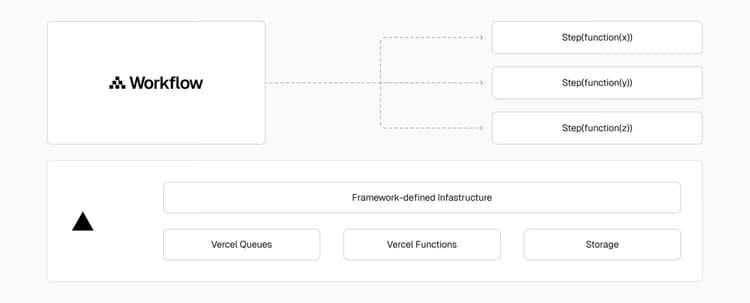
With Workflows, Vercel manages the infrastructure so you can focus on writing business logic. Vercel Functions execute your workflow and step code. Vercel Queues enqueue and execute those routes with reliability. Managed persistence stores all state and event logs in an optimized database.

Your workflows are:

  • Resumable: Pause for minutes or months, then resume from the exact point.
  • Durable: Survive deployments and crashes with deterministic replays.
  • Observable: Use built-in logs, metrics, and tracing and view them in your Vercel dashboard.
  • Write async JavaScript, TypeScript, or Python with familiar language primitives. No YAML or state machines.

Workflows diagram.
Getting started

Install the Workflow SDK package:


npm

pnpm i workflow

bun

Follow the Workflow SDK getting started guide to create your first workflow.

  • Workflows and steps: Write durable functions with 'use workflow' and 'use step' directives.
  • Sleep and hooks: Pause for minutes to months, or wait for external events.
  • Observability: Track runs in real time, trace failures, and analyze performance.
  • Streams: Stream data in and out of workflows with managed persistence.
  • Multi-region: Run workflows close to your users across all Vercel Function regions.
  • Skew Protection: Protect your workflows from version skew.
  • Usage-based pricing: Pay only for Events, Data Written, and Data Retained.

Multi-region

Workflows runs in every Vercel Function region. When a run starts, Workflows pins it to a single region and keeps its state, queue dispatch, and streams there for the run's lifetime. This avoids cross-region round trips on the hot path and contains the blast radius of a regional event to the runs pinned there.

Reads, hook resumes, and stream consumers can come from anywhere. The platform routes them to the run's region automatically.

Automatic region pinning

By default, Workflows pins a run to the region of the function that started it. No configuration needed:

  • Deploy your app to a single region and every run lives in that region.
  • Deploy your app to multiple regions and each run is pinned to the region that served the user who triggered it.

Explicit region selection

To pin a run to a specific region, pass the region option to start():

import { start } from'workflow/api';

import { myWorkflow } from'@/workflows/my-workflow';

construn=awaitstart(myWorkflow, [input], { region:'sfo1' });

The region option controls where the run's data is stored and where its queue messages are dispatched from. It does not deploy your code to that region. For step execution to happen in the selected region, deploy your app there. To do this, configure Function regions through the regions key in vercel.json or the Function Regions project setting. If you deploy your app to a region other than the requested one, the run's data stays in the requested region while its steps execute in the nearest deployed region.

Version and migration

Multi-region requires workflow version 5.0.0-beta.33 or later. Runs created by the 4.x release line always live in iad1. Workflows locks each run's region at creation. To run in a different region, start a new run. Upgrading the SDK does not migrate runs created before the upgrade.

Observability

Every step, input, output, sleep, and error inside a workflow is recorded automatically.

You can track runs in real time, trace failures, and analyze performance without writing extra code.

To inspect your runs, go to your Vercel dashboard , select your project and navigate to Observability, then Workflows.

Roles and permissions

Workflow run data can include recorded inputs, outputs, errors, and state.

Team owners can read decrypted Workflow run data. To grant a non-owner access to decrypted Workflow run data without granting owner-level access, assign the Workflow Run Data Viewer extended permission. For compatible roles and assignment details, see Extended Permissions.

Resources

Cross-link map: Vercel Workflows (/docs/workflows)From the Vercel docs graph (built 2026-09-21T05:26:59.511Z), spanning vercel.com docs + KB, nextjs.org, ai-sdk.dev, and other Vercel documentation sites. Full graph as JSON: https://vercel.com/docs/graph.jsonSemantically closest pagesWorkflow Concepts — Learn how workflows, steps, sleeps, and hooks work together to build durable applications.Python — Set up the Workflow Python SDK in your Python application.A new programming model for durable executionHow to run background jobs in Next.js — Learn the durable way to run background jobs in Next.js on Vercel with the Workflow SDK, and when to reach for Queues orHow to migrate from Cloudflare Workflows to Vercel Workflows — Migrate from Cloudflare Workflows to Vercel Workflows by mapping WorkflowEntrypoint, step.do, and waitForEvent to workflThis page links to (10)Configuring regions for Vercel Functions — Learn how to configure regions for Vercel Functions.Vercel Queues — Publish agent events and background work to durable topics with independent consumers, automatic retries, and at-least-oExtended permissions — Learn about extended permissions in Vercel's RBAC system. Understand how to combine roles and permissions for precise acGlobal network and regions — View the list of regions supported by Vercel's CDN and learn about our global infrastructure.Workflow Concepts — Learn how workflows, steps, sleeps, and hooks work together to build durable applications.Workflow Pricing and Limits — Understand how Vercel Workflows billing works and the limits that apply to runs, streams, and platform resources.Building Durable AI Agents — Convert a basic AI chat app into a durable, resumable agent using Workflow SDK.Streaming — Stream real-time data to clients without waiting for workflow completion.Getting Started — Choose a framework and start building your first workflow.Python — Set up the Workflow Python SDK in your Python application.Pages that link here (42)By site: vercel-changelog (6) · vercel-kb (27) · vercel-docs (9)From vercel-changelogAI Gateway now supports asynchronous video generationConfigure where run state lives in Vercel WorkflowsExpanded search for workflow runs in Vercel ObservabilityMeasure time between steps in Vercel WorkflowsRedesigned trace viewer for Vercel WorkflowsVercel Functions can now run up to 30 minutesFrom vercel-kbDurable agent approval workflows on Vercel — How enterprise architects choose a stack and decide where to run durable, human-in-the-loop agent approval workflows onHow to architect an AI evaluation dashboard on Vercel — Map eval orchestration, traces, and run storage to AI Gateway, Observability, and Marketplace Postgres, and learn when sBuild AI agents with AI Gateway and AI SDK — Build AI agents on Vercel with AI Gateway and AI SDK, then make them reliable, capable, and durable with Sandbox, Chat SBuilding an AI chat app with RAG and source citations on Vercel — A production stack for AI chat with retrieval, reranking, source citations, and background ingestion on Vercel using NexBuilding human-in-the-loop agents for community moderation with durable workflows — Learn how to build AI agents that escalate decisions to humans in Slack, pause and resume runs reliably, and stream progRun recurring security reviews with deepsec on Vercel — Learn how to run periodic security scans on your code with deepsec. Set up deepsec to review GitHub repositories and delDeploy a Node.js Fastify app on Vercel with Docker — Build a Node.js application with Fastify and Docker, then deploy it to Vercel Functions. Learn how to configure environmDeploy Rust on Vercel with Docker — Build a Rust application with Axum and Docker, then deploy it to Vercel Functions. Learn how to configure environment vaDeploy ASP.NET Core on Vercel with Docker — Build a .NET application with Docker and deploy it to Vercel Functions. Learn how to configure environment variables, inHow to run a multi-step research agent on Vercel — An end-to-end architecture for production research agents on Vercel using Sandbox, Workflows, and AI Gateway with isolatHow to run background jobs in Next.js — Learn the durable way to run background jobs in Next.js on Vercel with the Workflow SDK, and when to reach for Queues orBuild a ChatGPT Connector \(MCP server\) — Build a ChatGPT MCP server with mcp-handler and Fluid compute. Add search, fetch, and OAuth, deploy to Vercel, then valiHow to migrate from Cloudflare Workflows to Vercel Workflows — Migrate from Cloudflare Workflows to Vercel Workflows by mapping WorkflowEntrypoint, step.do, and waitForEvent to workflMigrate self-hosted Next.js and containers from AWS to Vercel — Migrate containers from AWS to Vercel: deploy with Dockerfile.vercel, keep RDS, S3, and SQS in AWS over OIDC, and cut ovBuild an agent with OpenAI Agents API on Vercel — Build and deploy an agent with OpenAI Agents API, Vercel Functions, Queues, and Sandbox for isolated code execution.Production architecture for a RAG chatbot on Vercel — Architect a production RAG chatbot on Vercel Functions with Fluid compute, AI Gateway, and a region-pinned vector store.Can I use SMTP with Vercel? — Vercel Functions can open SMTP connections on the Node.js runtime. Learn which ports are open, why you must await the seHow to ship an Express app on Vercel — Deploy an Express app to Vercel with zero configuration. Configure response streaming, middleware, cron jobs, the Bun ruHow to ship a FastAPI app on Vercel — Deploy a FastAPI app to Vercel with zero configuration. Learn how the Python runtime, Vercel Functions, streaming, middlHow to ship a Flask app on Vercel — Deploy a Flask app to Vercel with zero configuration. Learn how to ship from a template, the Vercel CLI, or Git, and conHow to ship an H3 app on Vercel — Deploy an H3 app to Vercel with zero configuration. Learn to configure streaming, middleware, cron jobs, the Bun runtimeHow to ship a Hono app on Vercel — Deploy a Hono app to Vercel with zero configuration. Learn how to ship from a template, the Vercel CLI, or Git, and confDeploy Python apps on Vercel using Docker — Deploy a Dockerized Python application that depends on native software, OCR engines, or small local models, plus a Next.Does Vercel support Kubernetes? — Vercel doesn't run Kubernetes clusters. Learn how Kubernetes workloads like Deployments, Ingress, ConfigMaps, and CronJoHow Vercel Services run on Fluid compute — The backends in a Vercel Services project run as Vercel Functions on Fluid compute by default. Learn how optimized concuVercel vs Webflow Cloud — Compare Vercel and Webflow Cloud for deploying Next.js and Astro apps, including runtime, framework support, storage, prHow to stop Vercel Functions from timing out — Vercel Functions that time out usually trace back to a few causes. Learn how Fluid Compute fixes most of them and how toFrom vercel-docseve — Build and deploy durable backend AI agents with eve, an open-source, filesystem-first framework.Concepts — Learn how eve agents, sessions, channels, tools, skills, connections, and sandboxes fit together.Vercel Functions — Build API routes, webhooks, and agent request handlers with Vercel Functions, then test and debug them with Vercel CLI.Glossary — Learn about the terms and concepts used in Vercel's products and documentation.Products — Browse Vercel products for building, deploying, securing, observing, and scaling web applications.Projects overview — A project is where you deploy and operate frontend apps, APIs, backends, containers, and agent workloads on Vercel.Vercel Queues — Publish agent events and background work to durable topics with independent consumers, automatic retries, and at-least-oQueues concepts — Learn delivery, retries, visibility timeouts, and deployment isolation in Vercel Queues.Quickstart — Set up Vercel Queues with the SDK.

You can reach our customer support team by emailing info@yourcompany.example.com, calling +1 555-555-5556, or using the live chat on our website. Our dedicated team is available 24/7 to assist with any inquiries or issues.

We’re committed to providing prompt and effective solutions to ensure your satisfaction.

We offer a 30-day return policy for all products. Items must be in their original condition, unused, and include the receipt or proof of purchase. Refunds are processed within 5-7 business days of receiving the returned item.