Fundamentals

What is Compute?
What is Compute?
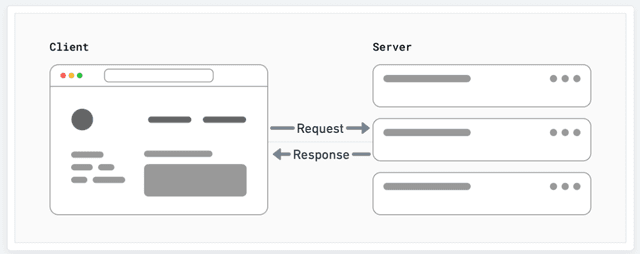
Web applications involve two main locations:
Copy page
Compute is the work a server performs to respond to a request, such as rendering a page, querying a database, or running an AI workload. Vercel runs this work on Fluid compute, an execution model for Vercel Functions that combines the automatic scaling of serverless with the concurrency and efficiency of a traditional server.
- Client: This is the browser on your user's device that sends a request to a server for your application code. It then turns the response it receives from the server into an interface the user can interact with. The term "client" could also be used for any device, including another server, that is making a request to a server.
- Server: This is the computer in a data center that stores your application code. It receives requests from a client, does some computation, and sends back an appropriate response. This server does not sit in complete isolation; it is usually part of a bigger network designed to deliver your application to users around the world.
- Origin Server: The server that stores and runs the original version of your app code. When the origin server receives a request, it does some computation before sending a response. The result of this computation work may be cached by a CDN.
- CDN (Content Delivery Network): This stores static content, such as HTML, in multiple locations around the globe, placed between the client who is requesting and the origin server that is responding. When a user sends a request, the closest CDN will respond with its cached response.
- Global Network: Vercel's global network consists of Points of Presence (PoPs) and compute regions distributed around the world. This architecture allows Vercel to cache content and execute code in the region closest to the user, reducing latency and improving performance.


Compute in practice
To demonstrate an example of what this looks like in practice, we'll use the example of a Next.js app deployed to Vercel.
When you start a deployment of your Next.js app to Vercel, Vercel's build process creates a build output that contains artifacts such as bundled Vercel Functions or static assets. It will then deploy either to Vercel's CDN or, in the case of a function, to a specified region.
Now that the deployment is ready to serve traffic, a user can visit your site. When they do, the request is sent to the closest region, which will then either serve the static assets or execute the function. The function will then run, and the response will be sent back to the user. At a very high-level this looks like:
- User Action: The user interacts with a website by clicking a link, submitting a form, or entering a URL.
- HTTP Request: The user's browser sends a request to the server, asking for the resources needed to display the webpage.
- Server Processing: The server receives the request, processes it, and prepares the necessary resources. For Vercel Functions, Vercel's gateway triggers a function execution in the region where the function was deployed.
- HTTP Response: The server sends back a response to the browser, which includes the requested resources and a status code indicating whether the request was successful. The browser then receives the response, interprets the resources, and displays the webpage to the user.
In this lifecycle, the "Server Processing" step depends on the compute model. On Vercel, that model is Fluid compute. The next section explains how it works, and the comparison with traditional compute models covers the tradeoffs it addresses.
Fluid compute
Fluid compute is the execution model for Vercel Functions, and the default for new projects created on or after April 23, 2025. It builds on the strengths of serverless computing, such as automatic scaling and zero infrastructure management, and addresses its main drawbacks, including single-request instances, cold starts, and paying for idle time.
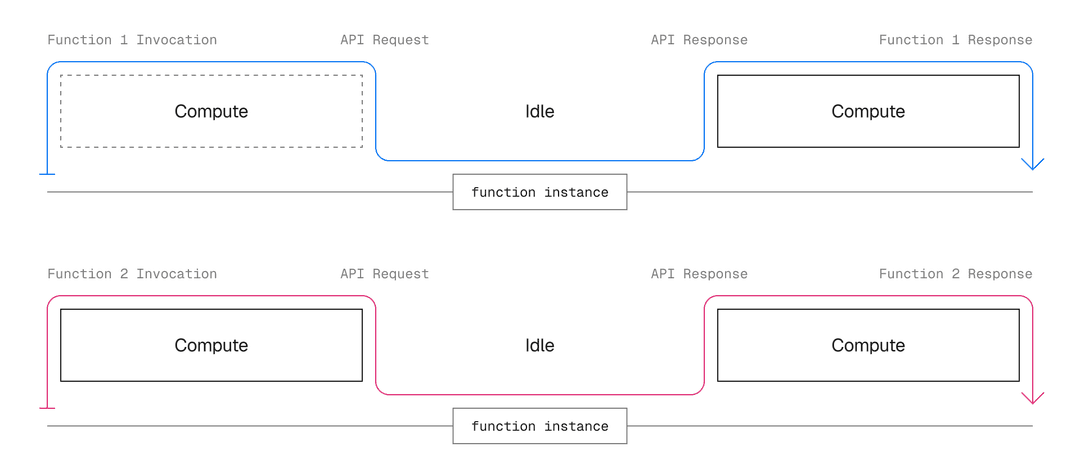
In the traditional serverless model, one instance processes one request at a time. When traffic increases, the platform starts more instances, even though a single instance rarely uses all of its resources while it waits on I/O. You pay for that unused capacity.
How multiple requests are processed in the traditional serverless compute model.
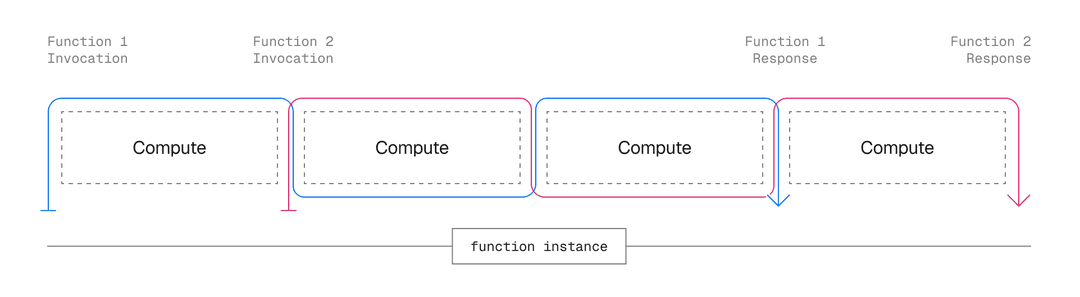
Fluid compute starts a new instance only when no running instance has spare capacity. Additional requests reuse existing instances while they're still processing work, so one instance serves many invocations concurrently. Vercel calls this optimized concurrency, and it's available with the Node.js and Python runtimes. Optimized concurrency reduces the number of running instances, makes fuller use of each instance's CPU, and lowers compute costs.
Feature Three
How multiple requests are processed in the Fluid compute model with optimized concurrency.
A single function instance handles multiple invocations at the same time, and Vercel routes traffic to instances based on load and availability. Compared to the one-request-per-instance serverless model, fewer instances run and each one does more work, which reduces compute costs.
A cold start is the initialization delay that happens when a request arrives and no warm function instance is available to serve it. Traditional serverless platforms pay this cost every time they add capacity. Fluid compute makes cold starts less frequent and shorter:
- Instance reuse: Optimized concurrency routes requests to instances that are already running, so new instances start less often.
- Bytecode caching: Vercel caches the compiled bytecode of your function code after its first execution, shortening initialization on production deployments.
- Pre-warmed instances: Vercel keeps function instances warm on production deployments, ready to handle requests without startup delay.
Cold starts can still happen, such as during periods of low traffic, but they're the exception rather than a constant of the model.
Fluid compute adjusts the number of running instances automatically based on traffic. You don't provision capacity ahead of high-traffic events, and you don't pay for idle capacity once traffic drops.
A function can keep working after it responds. Use waitUntil to run tasks like logging and analytics after your function sends its response, so users get a fast response while time-consuming work completes in the background.
Vercel Functions run with availability zone redundancy by default. If a zone goes down, Fluid compute automatically fails over to another zone in the same region. Enterprise teams can also enable multi-region failover, which reroutes traffic to the next closest region during a regional outage, and Pro and Enterprise teams can deploy functions to multiple regions.
Unlike traditional serverless, where each instance is fully isolated, Fluid compute lets multiple invocations share the same physical instance and its global state. Functions can reuse resources across invocations, such as in-memory caches and established database connections, which improves performance and reduces costs.
Fluid compute bills for what your code actually uses rather than for provisioned capacity:
- Active CPU: The CPU time your code actively consumes. Billing pauses while your code waits on external services.
- Provisioned Memory: The memory allocated to your function instances, billed for the lifetime of each instance.
- Invocations: Each incoming request.
You never pay for idle CPU, and you pay nothing between requests. See Fluid compute pricing for rates and included allowances.
Fluid compute is enabled by default for new projects created on or after April 23, 2025. For existing projects, you can enable it from the Functions settings section of your project. For step-by-step instructions, review how to enable Fluid compute.
Traditional compute models
Fluid compute evolved from two earlier models, traditional servers and serverless platforms such as AWS Lambda, Google Cloud Functions, and Azure Functions. The table below summarizes how the three models compare:
Characteristic
Full duration of each invocation, including I/O wait
Manual provisioning ahead of demand
Reduced through instance reuse, bytecode caching, and pre-warming
On every new instance
Servers
Automatic, one request per instance
Scaling
Cold starts
Full server uptime, including idle time
None, the server is always running
Fluid compute
Serverless
Constrained by short maximum durations
Long-running work
Automatic across availability zones, with multi-region options
Failover
Billing
Self-managed
Supported
Servers give you a dedicated environment and full control over its resources. Options include virtual machines such as Amazon EC2, Azure Virtual Machines, and Google Compute Engine, as well as Virtual Private Servers (VPS), dedicated hardware in a data center, and on-premises machines. In exchange for that control, you provision the infrastructure, upgrade the hardware, and pay for the entire duration of the server's uptime.
Servers work well for highly predictable workloads. You control the environment and security, set CPU and RAM for consistent performance, run long-running processes, and support applications that need persistent connections. With steady traffic, costs stay stable and predictable.
Traffic peaks require provisioning resources in advance, which leads to one of two outcomes:
- Under-provisioning: Performance degrades because compute capacity runs out.
- Over-provisioning: Costs increase because unused capacity sits idle.
Because scaling a server takes time, you need to plan capacity ahead of expected traffic peaks.
Serverless is a cloud computing model that lets you build and run applications without managing your own servers. Despite the name, servers are still involved, but the platform provisions and scales them for you. Cloud providers use the term for products such as AWS Lambda, Google Cloud Functions, and Azure Functions.
Instead of a single server assigned to your application, the platform spins up a computing instance when a request arrives and spins it down when the request completes. Your app handles unpredictable traffic, and you pay only for what you use. Vercel Functions started on this model and now run on Fluid compute, which keeps the advantages below while addressing the disadvantages.
Serverless platforms scale applications up and down automatically based on demand, which uses resources efficiently and removes the complexity of infrastructure management. For workloads with unpredictable or variable traffic, the pay-per-use model can be cost-effective.
Traditional serverless platforms share three structural drawbacks:
- Cold starts: Every new instance pays an initialization delay before it can serve its first request. Because each instance handles one request at a time and spins down when idle, traditional serverless platforms trigger cold starts often. Fluid compute reduces them through instance reuse, bytecode caching, and pre-warming, as described in cold starts.
- Single-region execution: Functions typically run in one region, placed close to your data store to keep the trip between compute and data short. Users far from that region experience higher latency, and failing over to another region requires manual setup.
- Duration limits: Functions terminate when they reach a maximum duration that you configure in advance. Long-running work, such as AI and streaming workloads, forces a tradeoff, because a low limit terminates tasks before they finish and a high limit risks excessive execution costs.
Fluid compute addresses each of these drawbacks with optimized concurrency, automatic failover, and background processing.
Last updated August 11, 2026
Cross-link map: What is Compute? (/docs/fundamentals/what-is-compute)From the Vercel docs graph (built 2026-09-21T05:26:59.511Z), spanning vercel.com docs + KB, nextjs.org, ai-sdk.dev, and other Vercel documentation sites. Full graph as JSON: https://vercel.com/docs/graph.jsonSemantically closest pagesIntroducing Fluid computeFluid compute — Learn about fluid compute, an execution model for Vercel Functions that provides a more flexible and efficient way to ruHow Fluid compute works on VercelFluid: How we built serverless serversHow Vercel Services run on Fluid compute — The backends in a Vercel Services project run as Vercel Functions on Fluid compute by default. Learn how optimized concuThis page links to (7)Builds — Understand how the build step works when creating a Vercel Deployment.Fluid compute — Learn about fluid compute, an execution model for Vercel Functions that provides a more flexible and efficient way to ruAdvanced Configuration — Learn how to add utility files to the /api directory, and bundle Vercel Functions.Configuring regions for Vercel Functions — Learn how to configure regions for Vercel Functions.@vercel/functions API Reference \(Node.js\) — Learn about available APIs when working with Vercel Functions.Fluid compute pricing — Learn about usage and pricing for fluid compute on Vercel.Behind the scenes of Vercel's infrastructure: Achieving optimal scalability and performancePages that link here (8)By site: vercel-kb (1) · vercel-docs (7)From vercel-kbEfficiently manage database connection pools with Fluid compute — How to create high-performance database connection pools without leaking connectionsFrom vercel-docsFluid compute — Learn about fluid compute, an execution model for Vercel Functions that provides a more flexible and efficient way to ruSvelteKit on Vercel — Deploy SvelteKit applications to Vercel and configure the adapter, rendering, streaming, ISR, analytics, and Routing MidVercel Functions — Build API routes, webhooks, and agent request handlers with Vercel Functions, then test and debug them with Vercel CLI.Runtimes — Runtimes transform your source code into Functions, which are served by our CDN. Learn about the official runtimes suppoVercel fundamental concepts — Learn about the core concepts of VercelHow requests flow through Vercel — Learn how Vercel routes, secures, and serves requests from your users to your application.Deploy MCP servers to Vercel — Learn how to deploy Model Context Protocol \(MCP\) servers on Vercel with OAuth authentication and efficient scaling.


