

A domain is a user-friendly way of referring to the address access a website on the internet. For example, the domain you're reading this on is vercel.com. Domains can be analogous to the address where your house is. When someone sends a letter to your house, they don't need to know exactly where it is, they just need the address and the relevant post office handles routing the letter.
The system that manages the details about where a site is located on the internet, is known as DNS or the Domain Name System. At its most basic, DNS maps human-readable domain names to computer-friendly IP addresses. When you request a site in your browser, the first step is converting the domain address to an IP address. That process is handled by DNS and called DNS Resolution. Understanding how DNS works is important to ensure that you are configuring your domain correctly.
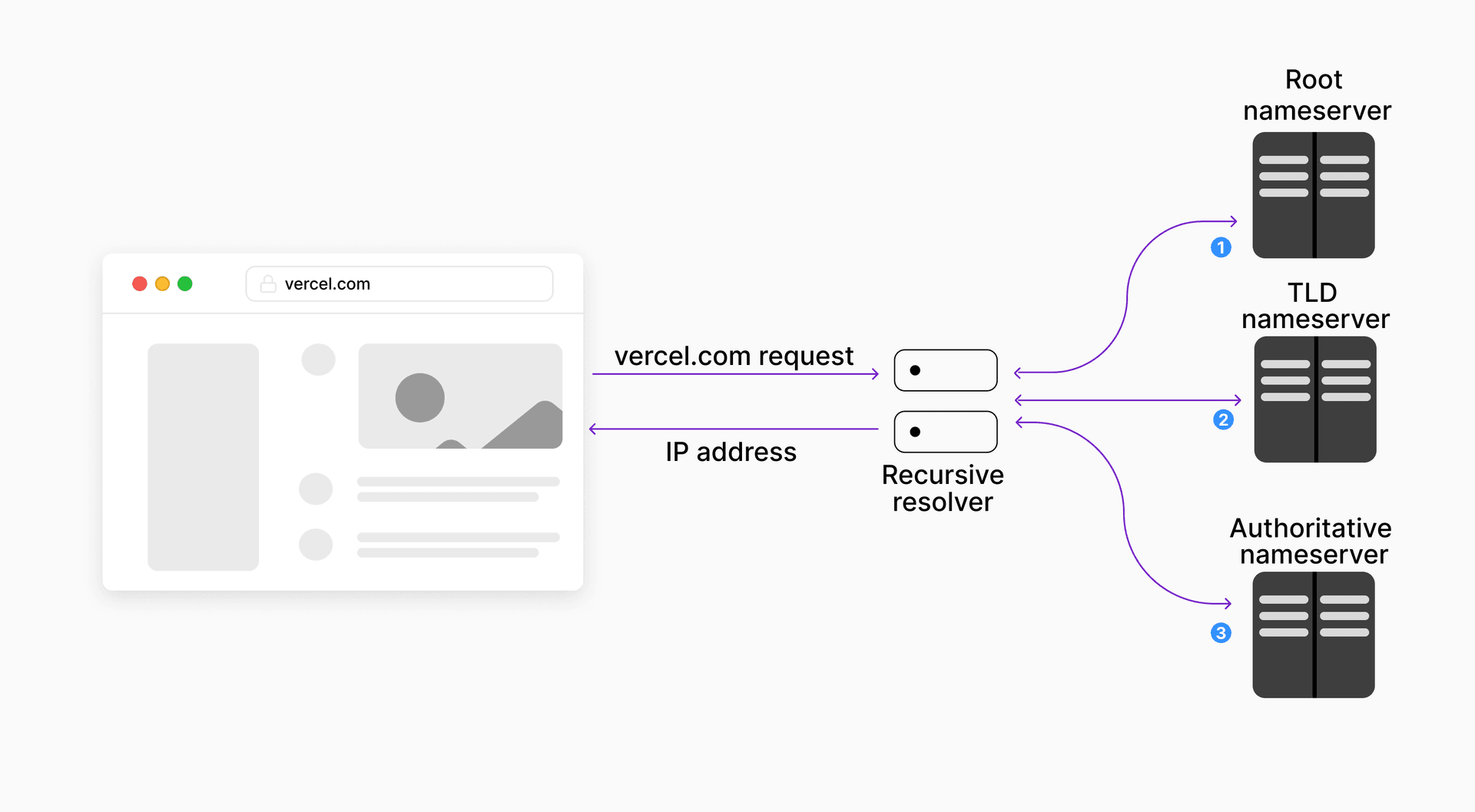


Diagram showing a basic DNS query.
- You enter vercel.com in your browser. Your browser will first check its local DNS cache to see if it knows the IP address of vercel.com. If it does, it will request the site from that address.
- Your browser initiates a DNS query through a server known as a recursive resolver, usually provided by your
ISP
or a third-party. The recursive resolver acts as a middleman between the browser and DNS server and is used to increase the speed and efficiency of the resolution process. The resolver will check its cache first to see if it already has the IP address. If it doesn't, it'll request the IP address from a DNS server.
- There is a network of DNS servers, in a hierarchy, located all around the world. The recursive resolver will query in the following pattern:
- At the entrance to the network are 13 root nameservers. These are the servers that will be contacted first. The root server will look at the domain name, and based on the TLD or top-level domain (.com, .co.uk, etc.), will direct the resolver to the correct TLD server.
- The TLD nameservers store information about domain names that belong to the same TLD. For example, when searching for vercel.com, once the recursive resolver receives a response from the root nameserver, it will query the .com TLD nameserver.
- This TLD server will then respond resolver with details about the authoritative nameserver that has the IP address mapping for vercel.com stored in an A record. The authoritative nameserver returns this record to the recursive resolver, which will cache the result and return it to your browser.
- Once your browser has the IP address, an HTTP request is made by the browser to the web server located at that IP address.

This overview shows a point of view of a user visiting your site. Here's what this looks like from the developer's perspective.
When you've created a project and deployed it on Vercel, your site is served from Vercel's anycast network. It's reachable at whatever IP address the domain's DNS records point to. In this example we'll use 76.76.21.21. The value you should actually use is the one on your project's Domains settings in your dashboard. None of this is visible from your user's perspective, because the browser only knows the domain, so it performs a DNS Lookup to map yoursiteaddress.com to the IP.
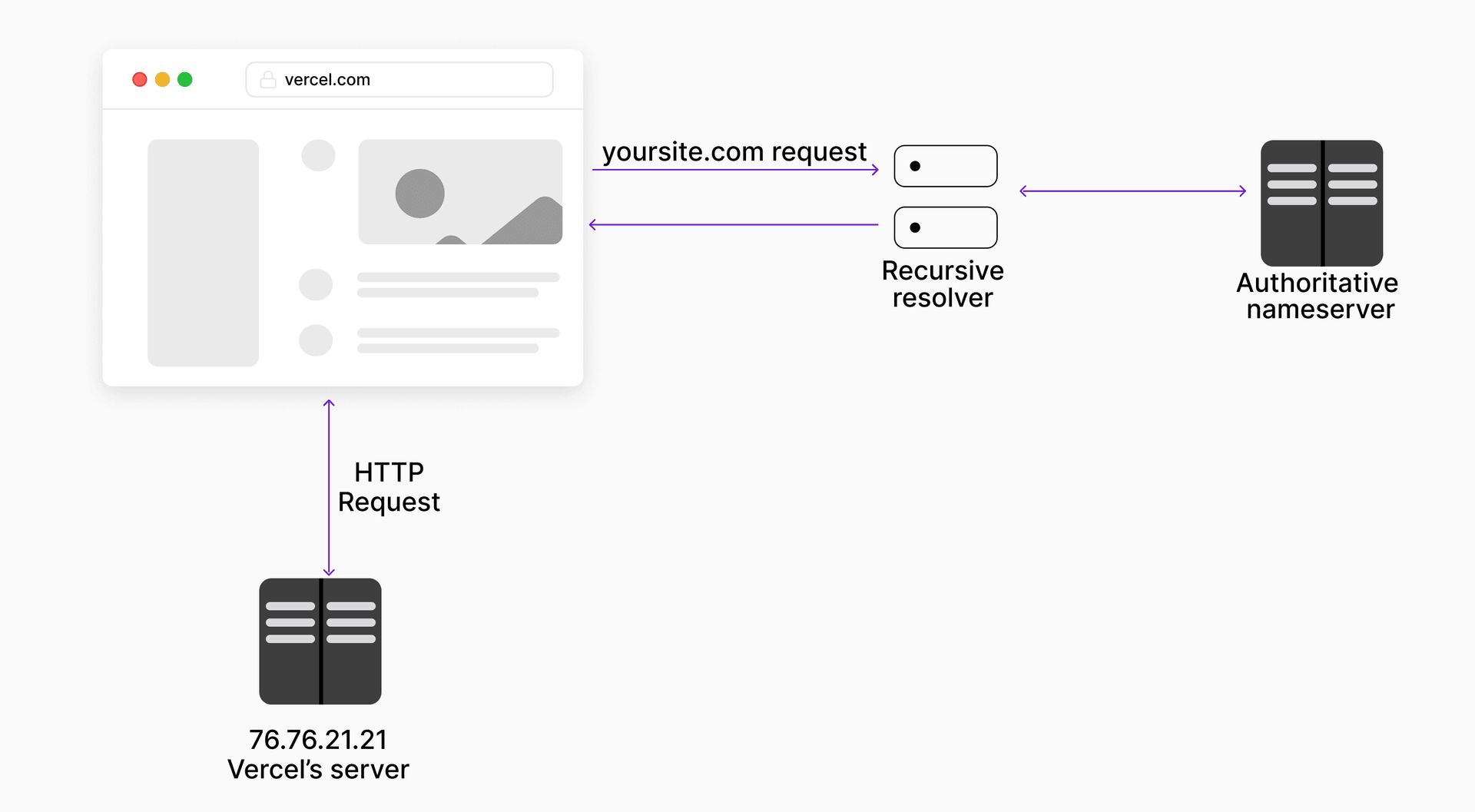
Diagram showing the Vercel-hosted query.
This is where, as a developer, you may have to configure the DNS settings to tell the authoritative server exactly where your site lives. Vercel guides you through exactly what information you need to set, within your dashboard. There are a number of different settings that you should be aware of:
More resources
Last updated August 11, 2026
Cross-link map: Domains Overview (/docs/domains)From the Vercel docs graph (built 2026-09-21T05:26:59.511Z), spanning vercel.com docs + KB, nextjs.org, ai-sdk.dev, and other Vercel documentation sites. Full graph as JSON: https://vercel.com/docs/graph.jsonSemantically closest pagesWorking with domains — Learn how domains work and the options Vercel provides for managing them.Working with DNS — Learn how DNS works to properly configure your domain.Working with nameservers — Learn about nameservers and the benefits Vercel nameservers provide.Setting up a custom domain — Add and configure a custom domain for your Vercel project using the CLI.Adding & Configuring a Custom Domain — Learn how to add a custom domain to your Vercel project, verify it, and correctly set the DNS or Nameserver values.This page links to (6)Programmatic Domain Management — Programmatically search, price, purchase, renew, and manage domains with Vercel's domains registrar API endpoints.Troubleshooting domains — Learn about common reasons for domain misconfigurations and how to troubleshoot your domain on Vercel.Working with DNS — Learn how DNS works to properly configure your domain.Working with domains — Learn how domains work and the options Vercel provides for managing them.Working with nameservers — Learn about nameservers and the benefits Vercel nameservers provide.Working with SSL Certificates — Learn how Vercel uses SSL certification to keep your site secure.Pages that link here (22)By site: v0 (1) · vercel-changelog (1) · vercel-kb (1) · vercel-docs (19)From v0Custom domain — Add custom domains to your v0 deployments to give your applications a professional, branded URL.From vercel-changelogImproved experience for managing project domainsFrom vercel-kbMigrate self-hosted Next.js and containers from AWS to Vercel — Migrate containers from AWS to Vercel: deploy with Dockerfile.vercel, keep RDS, S3, and SQS in AWS over OIDC, and cut ovFrom vercel-docsTools — Available tools in Vercel MCP for searching docs, managing teams, projects, deployments, Web Analytics, runtime logs andAudit Logs — Learn how to track and analyze your team members' activities.Build Output Configuration — Learn about the Build Output Configuration file, which is used to configure the behavior of a Deployment.Setting up a custom domain — Add and configure a custom domain for your Vercel project using the CLI.Working with DNS — Learn how DNS works to properly configure your domain.Working with domains — Learn how domains work and the options Vercel provides for managing them.Working with nameservers — Learn about nameservers and the benefits Vercel nameservers provide.Working with SSL Certificates — Learn how Vercel uses SSL certification to keep your site secure.How Vercel builds your application — Learn how Vercel transforms your source code into optimized assets ready to serve globally.Glossary — Learn about the terms and concepts used in Vercel's products and documentation.Integrating Vercel and Kubernetes — Deploy your frontend on Vercel alongside your existing Kubernetes infrastructure.Runtime Logs — Learn how to search, inspect, and share your runtime logs with the Logs tab.Notifications — Learn how to use Notifications to view and manage important alerts about your deployments, domains, integrations, accounVercel Enterprise Plan — Learn about the Enterprise plan for Vercel, including features, pricing, and more.Products — Browse Vercel products for building, deploying, securing, observing, and scaling web applications.Project settings — Use the project settings, to configure custom domains, environment variables, Git, integrations, deployment protection,Projects overview — A project is where you deploy and operate frontend apps, APIs, backends, containers, and agent workloads on Vercel.Transferring a project — Learn how to transfer a project between Vercel teams.Access Roles — Learn about the different roles available for team members on a Vercel account.
- DNS records: DNS records are an entry in a database that maps the domain with the IP address, which is then stored on the authoritative server. Some of the most common record types are: CNAME (Canonical name), A (Address), NS (nameserver), and MX (mail exchange). These are all described in more detail in Working with DNS.
- Nameserver: Nameservers are an important part of the DNS. They refer to the actual server that maintains and manages the DNS records. There are three types of nameservers: root nameserver, TLD nameserver, and the authoritative server. You can learn more about using a nameserver with Vercel in Working with nameservers.
- SSL Certificates: SSL Certificates are a way to show that there is a secure connection from your domain to your website. These are described in more detail in Working with SSL certificates.
Can you trust our partners?
Deployments
Was this helpful?


