AI Gateway

You can view these details in the AI Gateway Overview section in your Vercel dashboard sidebar:
Observability
The AI Gateway logs spend, model usage, and observability metrics related to your requests, which you can use to monitor and debug.
Copy page
- Usage: Graphs and metrics to track your AI Gateway usage and cost
- Requests: Summaries by project, API key, and a detailed log of all requests
You can view these metrics in two ways:
Observability and Spend
The Usage section displays four metrics to help you monitor your AI Gateway activity. For extended timeframes and further retention, you need Observability Plus.
AI Gateway Observability
- Team level: Stay in your team scope to see aggregated metrics across all projects
- Project level: Use the new dashboard view and select a specific project from the top project dropdown to see project-specific metrics
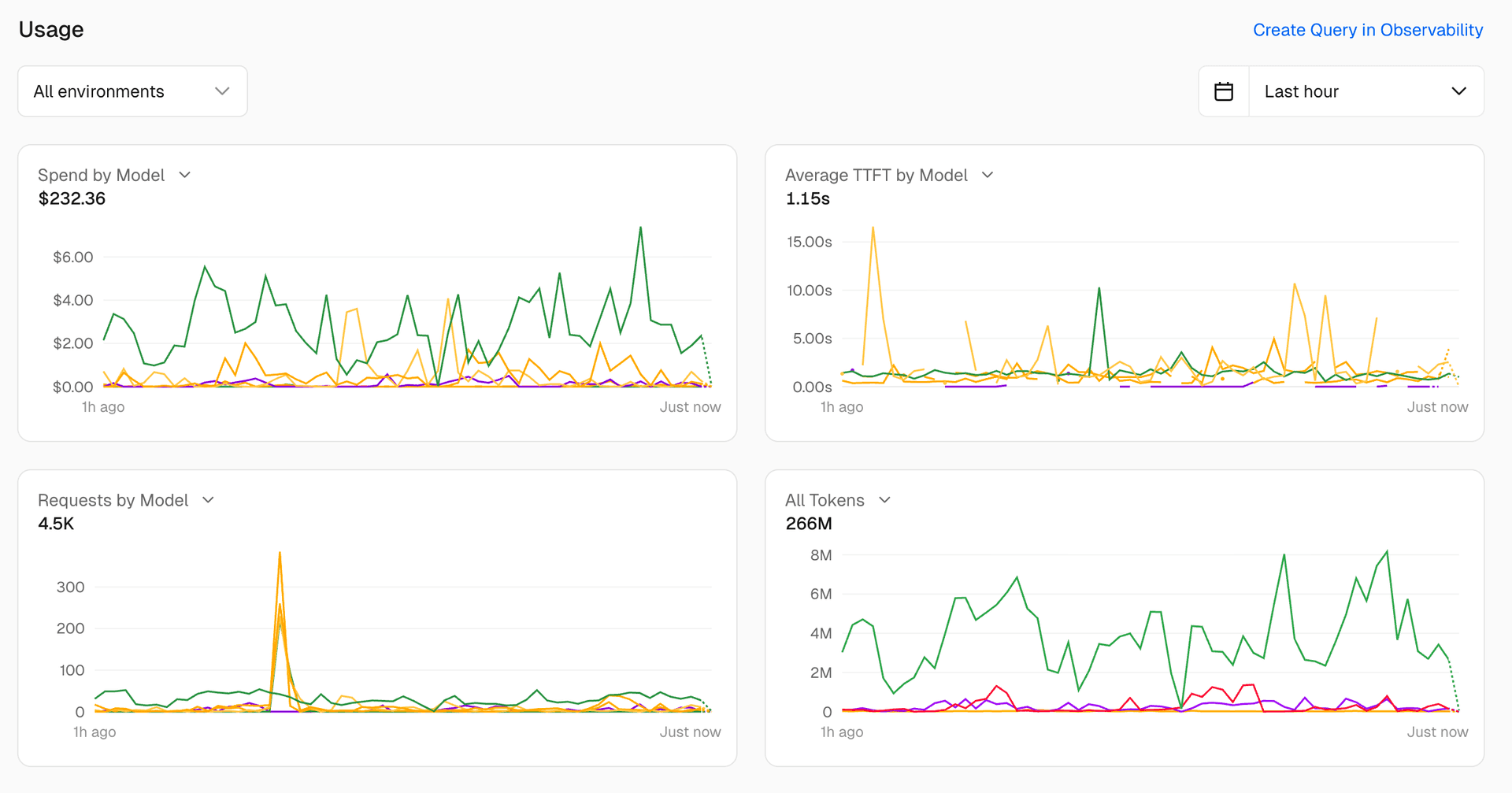


The Requests by Model chart shows the number of requests made to each model over time. This can help you identify which models are being used most frequently and whether there are any spikes in usage.
The Time to First Token chart shows the average time it takes for the AI Gateway to return the first token of a response. This can help you understand the latency of your requests and identify any performance issues.
The Input/Output Token Counts chart shows the number of input and output tokens for each request. This can help you understand the size of the requests being made and the responses being returned.
The Spend chart shows the total amount spent on AI Gateway requests over time. This can help you monitor your spending and identify any unexpected costs.
Requests
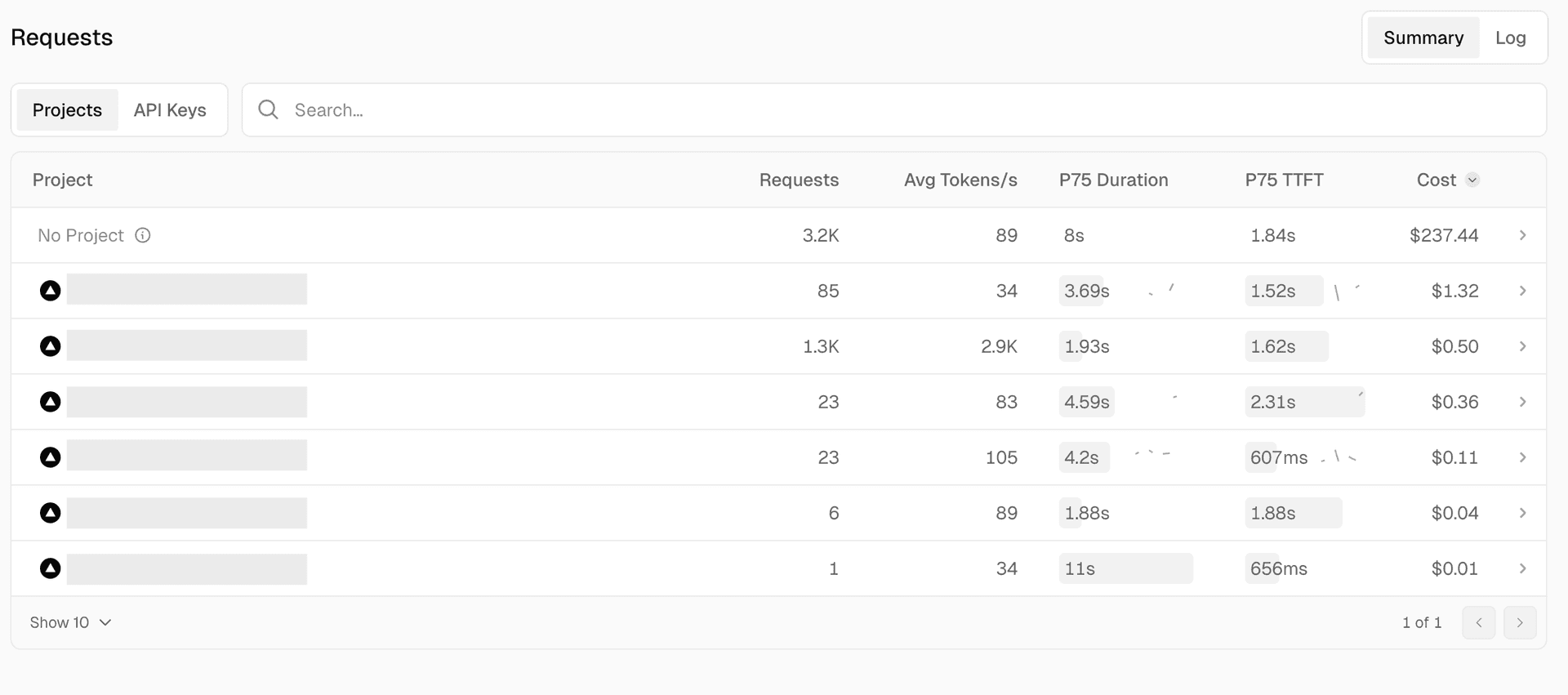
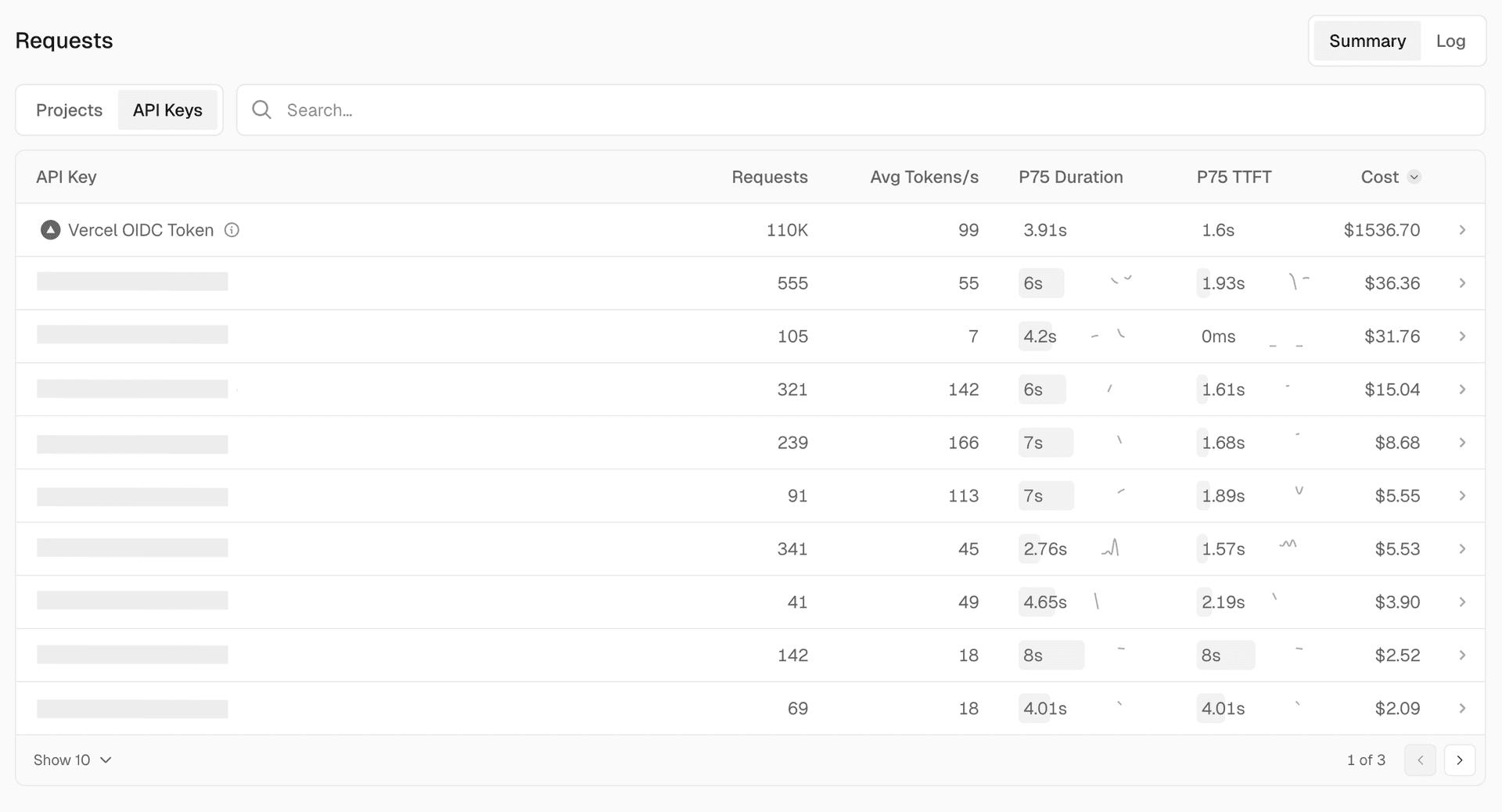
The Requests section displays summaries by project, API key, and a detailed log of all requests. Each summary includes request count, average tokens, P75 duration, P75 TTFT, and cost for the specified time frame.
View usage grouped by project. Use this view to associate usage and spend with specific projects. Click into a project for more detailed information.
API keys
View usage grouped by API key. Use this view to track usage by a specific person or part of your organization. Click into an API key for more detailed information.
Logs
Project scope
Once in project scope, you'll see the same metrics filtered to show only the activity for that specific project.
To view metrics for a specific project, you can access the project scope in two ways:
By default, when you access the AI Gateway Overview tab, you view metrics for all requests made across all projects in your team. This is useful for monitoring the overall usage and performance of the AI Gateway.
Logs
- Select the project from the top project dropdown in the dashboard
- Click into the project from the Projects view in the Requests section
Last updated September 8, 2026
Cross-link map: AI Gateway Observability (/docs/ai-gateway/observability-and-spend/observability)From the Vercel docs graph (built 2026-09-21T05:26:59.511Z), spanning vercel.com docs + KB, nextjs.org, ai-sdk.dev, and other Vercel documentation sites. Full graph as JSON: https://vercel.com/docs/graph.jsonSemantically closest pagesAI Gateway Observability and Spend — Monitor AI Gateway requests and control costs with logs, generation lookup, custom reporting, budgets, and OpenTelemetryAI Gateway Request Logs — Search, filter, and follow individual AI Gateway requests, inspect provider routing for one request, and export the resuVercel AI Gateway: Models, Routing, and Observability — Call AI models from any infrastructure through a managed gateway. Centralize credentials, request logs, spend budgets, rAI Gateway FAQ — Answers to common questions about AI Gateway, including request errors, pricing and markup, SDK and API compatibility, mAI Gateway Pricing — Understand AI Gateway token pricing, free and paid credits, BYOK costs, add-on charges, and payment fees. Manage creditThis page links to (2)AI Gateway Request Logs — Search, filter, and follow individual AI Gateway requests, inspect provider routing for one request, and export the resuObservability Plus — Learn about using Observability Plus and its limits.Pages that link here (35)By site: vercel-changelog (1) · vercel-kb (1) · vercel-web (1) · vercel-docs (32)From vercel-changelogSet up coding agents in one command with AI GatewayFrom vercel-kbHow to architect an AI evaluation dashboard on Vercel — Map eval orchestration, traces, and run storage to AI Gateway, Observability, and Marketplace Postgres, and learn when sFrom vercel-webBuild realtime voice agents on AI GatewayFrom vercel-docsAider with AI Gateway — Connect Aider to AI Gateway with the Vercel CLI or an OpenAI-compatible base URL, API key, and model metadata.Amp with AI Gateway — Connect Amp to AI Gateway through Amp's Model Routing settings. Add an AI Gateway API key, choose models for Amp's modesBlackbox AI with AI Gateway — Configure the Blackbox AI CLI to use AI Gateway for code generation and debugging. Set your API key and model and monitoChatbox with AI Gateway — Connect Chatbox to AI Gateway. Configure your API key, endpoint, and models to use multiple AI providers and monitor chaCline with AI Gateway — Connect Cline to AI Gateway through the Vercel CLI or VS Code settings. Configure model access and monitor usage and speContinue CLI with AI Gateway — Connect Continue CLI to AI Gateway with the Vercel CLI or a YAML model configuration that reads your API key from the enGitHub Copilot CLI with AI Gateway — Connect GitHub Copilot CLI to AI Gateway with the Vercel CLI or environment variables for the provider URL, API key, andCrush with AI Gateway — Configure the Crush terminal coding agent with AI Gateway. Set up provider credentials and models and monitor request usDeep Agents CLI with AI Gateway — Connect Deep Agents CLI to AI Gateway with the Vercel CLI or a TOML provider and model profiles.DeepSeek Harness with AI Gateway — Connect DeepSeek Harness to AI Gateway with the Vercel CLI or a YAML provider and model shortlist.Factory Droid with AI Gateway — Connect Factory Droid to AI Gateway with the Vercel CLI or bring-your-own-key custom model entries.ForgeCode with AI Gateway — Connect ForgeCode to AI Gateway with the Vercel CLI or custom provider and credential files.fx with AI Gateway — Connect fx to AI Gateway with the Vercel CLI or the AI_GATEWAY_API_KEY environment variable.Goose with AI Gateway — Connect Goose to AI Gateway with the Vercel CLI or a custom OpenAI-compatible provider.gptme with AI Gateway — Connect gptme to AI Gateway with the Vercel CLI or a TOML provider configuration.Harbor with AI Gateway — Evaluate coding-agent harnesses with Harbor and AI Gateway. Choose a harness, configure its connection, and pass separatHermes with AI Gateway — Connect Hermes to AI Gateway with the Vercel CLI or manual provider configuration. Set your API key, discover models, anJunie CLI with AI Gateway — Connect Junie CLI to AI Gateway with the Vercel CLI or custom model profiles.Kimi CLI with AI Gateway — Connect Kimi CLI to AI Gateway with the Vercel CLI or a TOML provider and model shortlist.Open WebUI with AI Gateway — Connect Open WebUI to AI Gateway. Configure your API key, endpoint, and models to use multiple AI providers and monitorOpenCode with AI Gateway — Connect OpenCode to AI Gateway with one CLI command, or configure it in-app.OpenHands with AI Gateway — Connect OpenHands to AI Gateway with the Vercel CLI or an OpenAI-compatible LLM configuration.Qwen Code with AI Gateway — Connect Qwen Code to AI Gateway with the Vercel CLI or OpenAI-compatible model provider entries.Roo Code with AI Gateway — Connect the Roo Code VS Code extension to AI Gateway. Configure your API key and models to access multiple providers andSuperset with AI Gateway — Configure Superset to use AI Gateway with terminal-based coding agents. Set provider credentials and route model requestMistral Vibe with AI Gateway — Connect Mistral Vibe to AI Gateway with the Vercel CLI or a TOML provider and model shortlist.ZCode with AI Gateway — Connect ZCode to AI Gateway with the Vercel CLI or an OpenAI-compatible custom provider.Zed with AI Gateway — Connect Zed to AI Gateway with the Vercel CLI or its built-in Vercel AI Gateway provider.AI Gateway Framework Integrations — Connect LangChain, LiteLLM, LlamaIndex, Mastra, Pydantic AI, TanStack AI, and other frameworks to Vercel AI Gateway withAI Gateway Observability and Spend — Monitor AI Gateway requests and control costs with logs, generation lookup, custom reporting, budgets, and OpenTelemetryAI Gateway Request Logs — Search, filter, and follow individual AI Gateway requests, inspect provider routing for one request, and export the resuAI Gateway SDKs and APIs — Connect to AI Gateway with the AI SDK, Python, REST, or compatible OpenAI, Anthropic Messages, OpenResponses, and Cohere
Was this helpful?


