
SAML SSO
SAML Single Sign-On

SAMLis availableon Enterprise and Pro plans

Those with the ownerrolecan access this feature
To manage the members of your team through a third-party identity provider like Okta or Auth0, you can set up the Security Assertion Markup Language (SAML) feature from your team's settings.
Once enabled, all team members will be able to log in or access Preview and Production Deployments using your selected identity provider. Any new users signing up with SAML will automatically be added to your team.
For Enterprise customers, you can also automatically manage team member roles and provisioning by setting up Directory Sync.
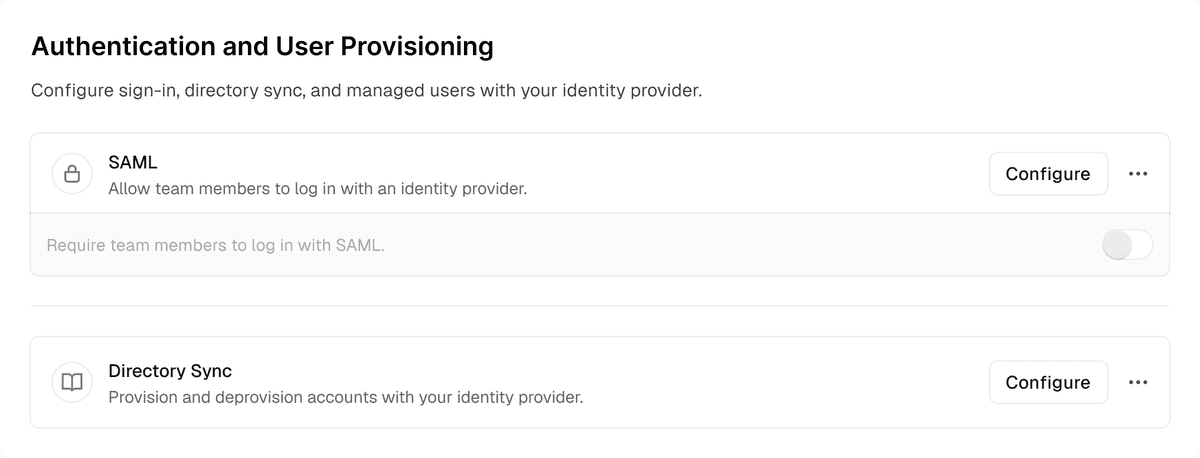
The SAML SSO settings for a Team.
Configuring SAML SSO
- To configure SAML SSO for your team, you must be an owner of the team
- From your dashboard, ensure your team is selected in the team switcher
- Open Settings in the sidebar and select Security & Privacy
- Navigate to the Authentication and User Provisioning section. In the SAML row, select Configure and follow the walkthrough to configure SAML SSO for your team with your identity provider of choice
- As a further step, you may want to enforce SAML SSO for your team
 Billing settings before it can be configured.
Custom Attributes
Use the optional session_lifetime attribute in your identity provider's SAML configuration to customize how long SAML SSO sessions last. Its value is an integer number of seconds between 86,400 (1 day) and 2,592,000 (30 days), inclusive, applied when the team member logs in. When session_lifetime is not used, sessions last 24 hours by default, after which team members must re-authenticate with the third-party SAML provider.
Enforcing SAML
For additional security, SAML SSO can be enforced for a team so that all team memberscannot access any team information unless their current session was authenticated with SAML SSO.
- To enforce SAML SSO for your team, you must be an owner and currently be authenticated with SAML SSO. This ensures that your configuration is working properly before tightening access to your team information
- From your dashboard, open Settings in the sidebar and select Security & Privacy. Then go to the Authentication and User Provisioning section
- Toggle the Require Team Members to login with SAML switch to Enabled

Media heading
SAML SSO configured and enforced.
Authenticating with SAML SSO
Once you have configured SAML, your team members can use SAML SSO to log in or sign up to Vercel. To login:
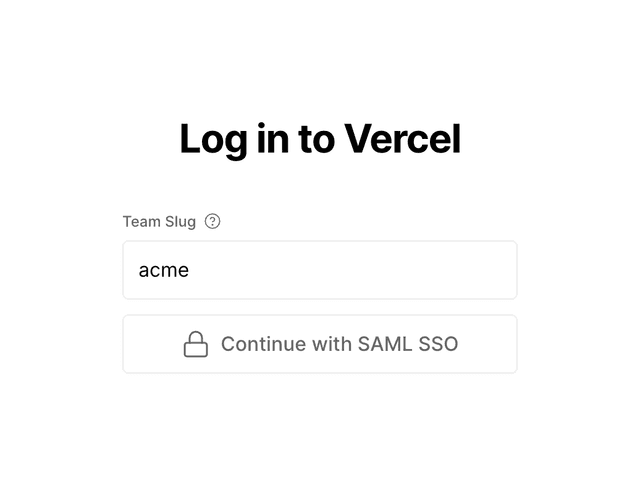
- Select the Continue with SAML SSO button on the authentication page, then enter your team's URL. Your team slug is the identifier in the URLs for your team. For example, the identifier for vercel.com/acme is acme.
- Select Continue with SAML SSO again to be redirected to the third-party authentication provider to finish authenticating. Once completed, you will be logged into Vercel.
You can choose to share a Vercel login page that only shows the option to log in with SAML SSO. This prevents your team members from logging in with an account that's not managed by your identity provider.
To use this page, you can set the saml query param to your team URL. For example:
https://vercel.com/login?saml=team_id
Vercel's login page showing only the SAML SSO login button.
When using SAML SSO, team members can authenticate through your identity provider, but team membership must be managed manually through the Vercel dashboard.
For automatic provisioning and de-provisioning of team members based on your identity provider, consider upgrading to Directory Sync, which is available on Enterprise plans.
Last updated August 28, 2026
Cross-link map: SAML Single Sign-On (/docs/saml)From the Vercel docs graph (built 2026-09-21T05:26:59.511Z), spanning vercel.com docs + KB, nextjs.org, ai-sdk.dev, and other Vercel documentation sites. Full graph as JSON: https://vercel.com/docs/graph.jsonSemantically closest pagesDirectory Sync — Learn how to configure Directory Sync for your Vercel Team.SAML Single Sign-On and Directory Sync now fully availableSign in with Vercel — Learn how to Sign in with VercelManage Sign in with Vercel from the Dashboard — Learn how to manage Sign in with Vercel from the DashboardManaging Team Members — Learn how to manage team members on Vercel, and how to assign roles to each member with role-based access control \(RBACThis page links to (4)Environments — Environments are for developing locally, testing changes in a pre-production environment, and serving end-users in produDirectory Sync — Learn how to configure Directory Sync for your Vercel Team.Team Level Roles — Learn about the different team level roles and the permissions they provide.Managing Team Members — Learn how to manage team members on Vercel, and how to assign roles to each member with role-based access control \(RBACPages that link here (15)By site: vercel-changelog (1) · vercel-kb (2) · vercel-docs (12)From vercel-changelogSAML SSO is now available to Pro teamsFrom vercel-kbDurable agent approval workflows on Vercel — How enterprise architects choose a stack and decide where to run durable, human-in-the-loop agent approval workflows onDoes Vercel have a SOC 2 Type 2 attestation? — Vercel holds a SOC 2 Type 2 attestation for Security, Confidentiality, and Availability. See what the report covers, howFrom vercel-docsAccount Management — Learn how to manage your Vercel account and team members.Audit Logs — Learn how to track and analyze your team members' activities.Directory Sync — Learn how to configure Directory Sync for your Vercel Team.Integrating Vercel and Kubernetes — Deploy your frontend on Vercel alongside your existing Kubernetes infrastructure.Account Plans on Vercel — Learn about the different plans available on Vercel.Vercel Enterprise Plan — Learn about the Enterprise plan for Vercel, including features, pricing, and more.Vercel Pro Plan — Learn about the Vercel Pro plan with credit-based billing, free viewer seats, and self-serve enterprise features for proPricing on Vercel — Learn about Vercel's pricing model, including the resources and services that are billed, and how they are priced.Production checklist for launch — Ensure your application is ready for launch with this comprehensive production checklist by the Vercel engineering team.Enterprise Managed Users \(EMU\) — Enterprise Managed Users \(EMU\) lets your Vercel team manage the sign-in identity of every member. Members sign in throTransition your Hobby team after EMU enrollment — Explains the account update screen EMU members see at SSO sign-in and how to complete it.Shared Responsibility Model — Discover the essentials of our Shared Responsibility Model, outlining the key roles and responsibilities for customers,


