

Vercel provides Instant Rollback as a way to quickly revert to a previous production deployment. This can be useful in situations that require a swift recovery from production incidents, like breaking changes or bugs. It's important to keep in mind that during a rollback:
- Vercel treats the rolled-back deployment as a restored version of a previous deployment
- The configuration used for the rolled-back deployment may become stale
- Vercel won't update environment variables if you change them in the project settings and will roll back to a previous build
- If the project uses cron jobs, they will be reverted to the state of the rolled back deployment
For teams on a Pro or Enterprise plan, all deployments previously aliased to a production domain are eligible to roll back. Hobby users can roll back to the immediately previous deployment.
How to roll back deployments
To initiate an Instant Rollback from the Vercel dashboard:
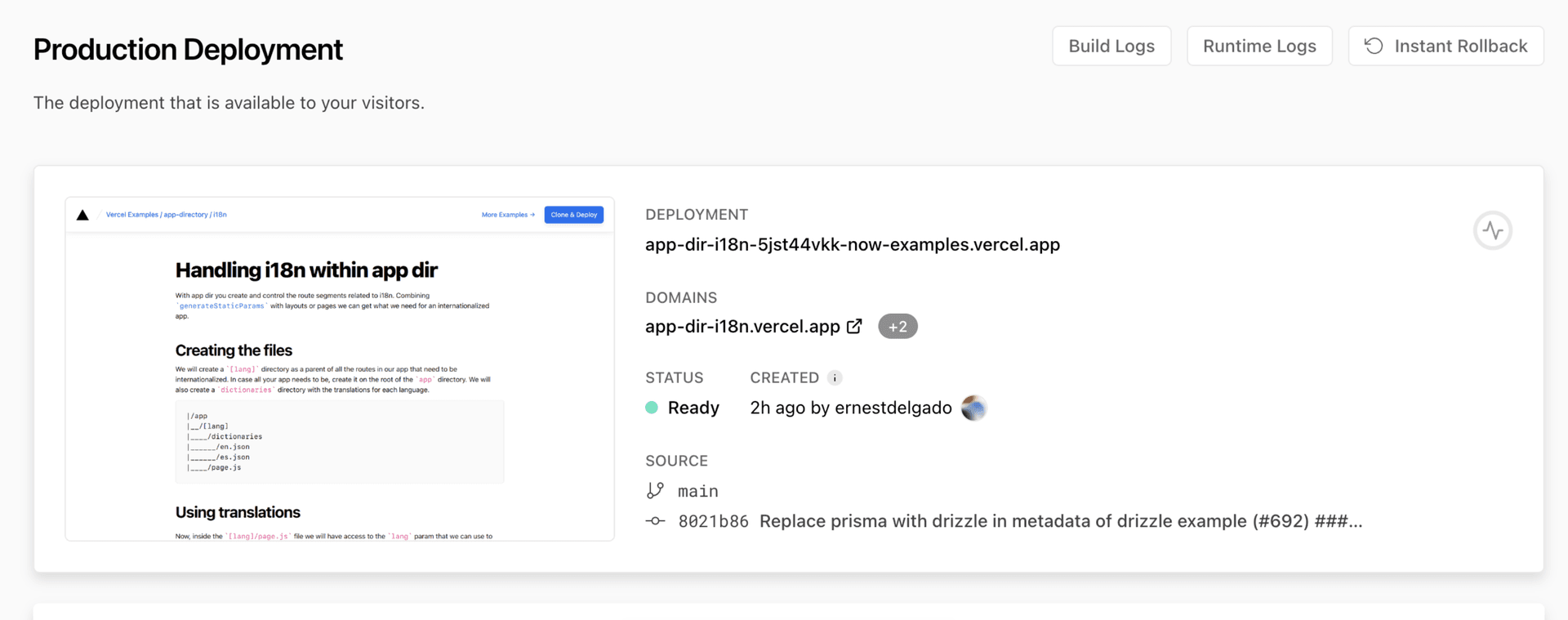
On the project's overview page, you will see the
Production Deployment tile

Access Instant Rollback from the production deployment tile.
Select your project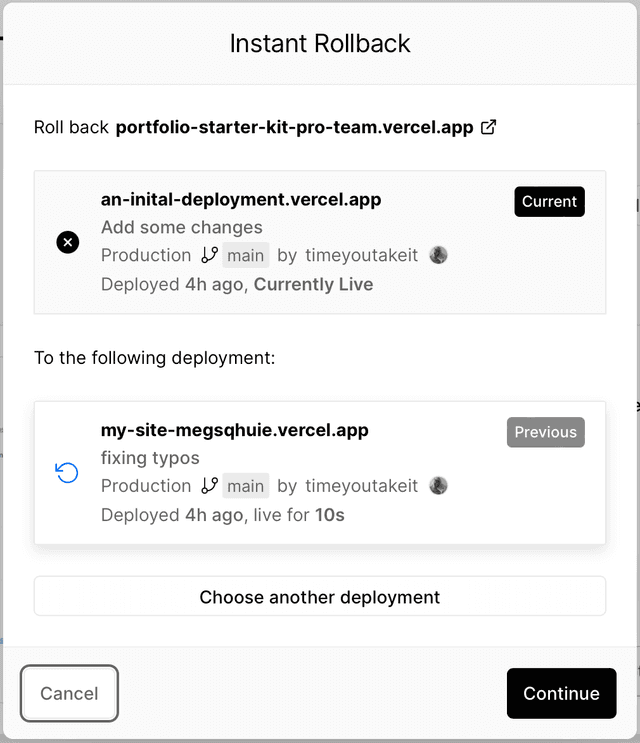
Dialog showing the current and previous deployments.
After selecting Instant Rollback, you'll see an dialog that displays your current production deployment and the eligible deployments that you can roll back to.
If you're on the Pro or Enterprise plans, you can also click the Choose another deployment button to display a list of all eligible deployments.
Select the deployment that you'd like to roll back to and click Continue.
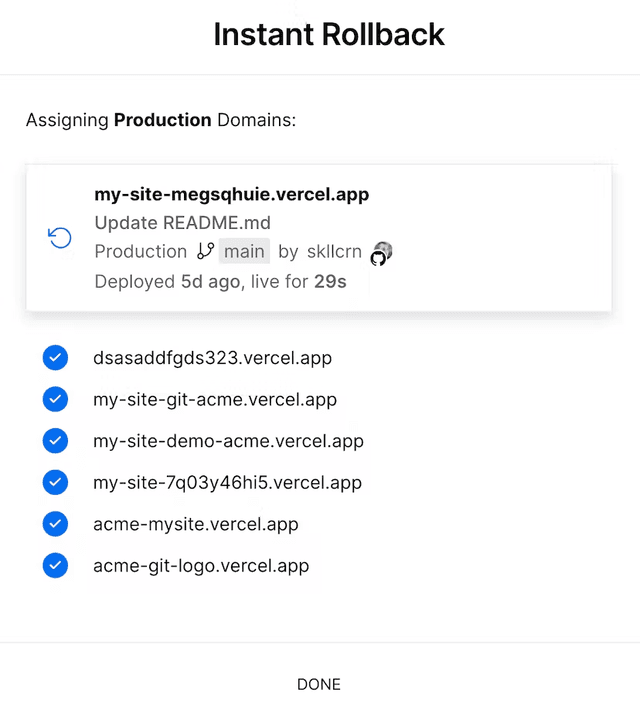
Verify the informationOnce you've selected the deployment to roll back to, verify the roll back information:
- The names of the domains and sub-domains that will be rolled back
- There are no change in Environment Variables, and they will remain in their original state
- A reminder about the changing behavior of external APIs, databases, and CMSes used in the current or previous deployments
Message for a successful roll back session.
Once you have verified the details, click the Confirm Rollback button. At this point, you'll get confirmation details about the successful rollback.

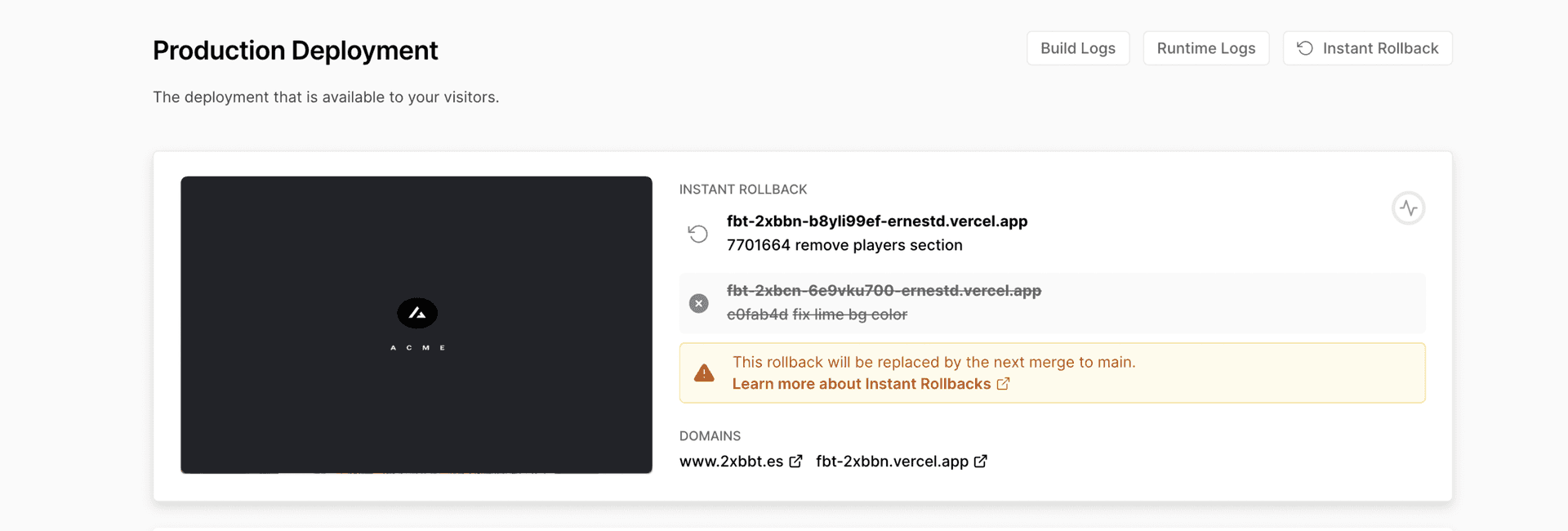
Production tile showing details about the rolled-back deployment.
The rollback happens instantaneously. Vercel points your domains back to the selected deployment, and the production deployment tile highlights the canceled and rolled-back commits.
After a rollback, Vercel turns off auto-assignment of production domains. This means new pushes to your production branch won't replace the rolled-back deployment. To restore normal deployment behavior, see Undo a rollback.
- You cannot run parallel roll backs on the same project
- Only one deployment can be rolled back at a time for every project. However, a rolled back deployment stays disabled in your deployment list and can be accessed and re-reverted whenever you want
Accessing Instant Rollback from Deployments tab
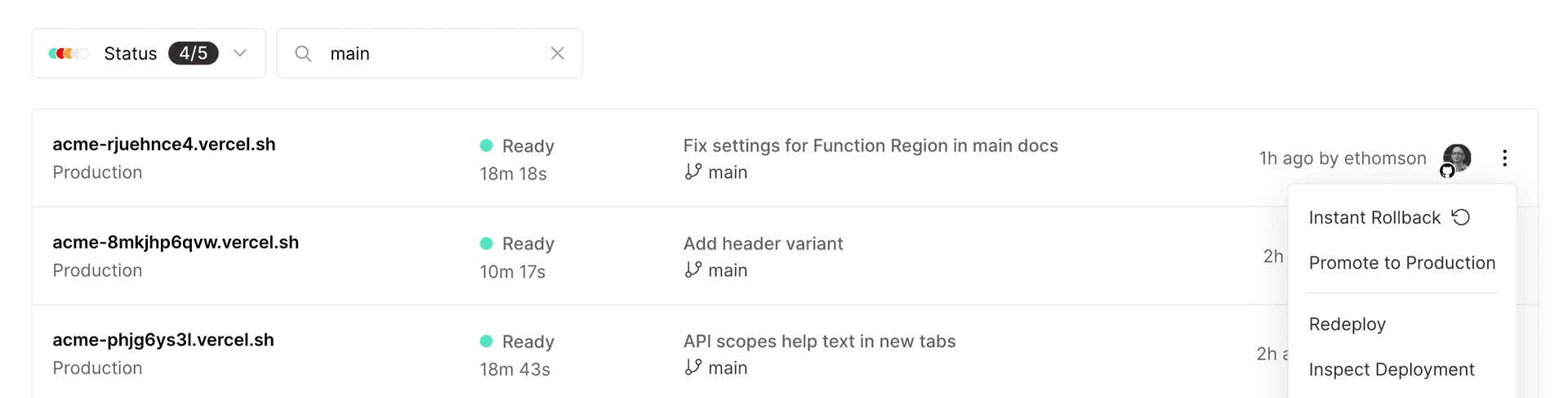
You can also roll back from the main Deployments section in your dashboard. Filtering the deployments list by main is recommended to view a list of eligible roll back deployments as this list all your current and previous deployments promoted to production.
Click the vertical ellipses (⋮) next to the deployment row and select the Instant Rollback option from the context menu.


Undo a rollback
After a rollback, Vercel turns off auto-assignment of production domains. This means new pushes to your production branch won't go live automatically. To restore normal deployment behavior, you need to undo the rollback by promoting a different deployment.
When your project is in a rolled-back state, an Undo Rollback button appears on the production deployment tile:
- On your project's overview page, click the Undo Rollback button on the production deployment tile
- In the dialog, select the deployment you'd like to promote
- Click Confirm to promote the selected deployment
This promotes the selected deployment to production and re-enables auto-assignment of production domains. New pushes to your production branch will go live automatically again.
To undo a rollback from the command line, promote a deployment with vercel promote:

vercel promote [deployment-id or url]
This has the same effect as undoing from the dashboard: it promotes the specified deployment and restores auto-assignment of production domains.
Who can roll back deployments?
- Hobby plan: On the hobby plan you can roll back to the previous deployment
- Pro and Enterprise plan: Owners, Members, and Developers on these plans can roll back to any eligible deployment.
Rollback can also be initiated by:
Eligible deployments
Last updated July 7, 2026
To compare the manual promotion options, see Manually promoting to Production.
Deployments previously aliased to a production domain are eligible for Instant Rollback. Deployments that have never been aliased to production a domain, e.g., most preview deployments, are not eligible.
Secure and govern / Firewall
- A Project Administrator on a given project
- Anyone with the Full Production Deployment permission set on an access group
Cross-link map: Performing an Instant Rollback on a Deployment (/docs/instant-rollback)From the Vercel docs graph (built 2026-09-21T05:26:59.511Z), spanning vercel.com docs + KB, nextjs.org, ai-sdk.dev, and other Vercel documentation sites. Full graph as JSON: https://vercel.com/docs/graph.jsonSemantically closest pagesRolling back a production deployment — Recover from a bad production deployment by rolling back, investigating the root cause, and redeploying a fix.vercel rollback — Learn how to roll back your production deployments to previous deployments using the vercel rollback CLI command.Promoting Deployments — Learn how to promote deployments to production on Vercel.Instant Rollback is now generally available to revert deploymentsPerforming a rolling release deployment — Gradually roll out a production deployment using traffic stages, monitoring, and automated abort.This page links to (7)vercel promote — Learn how to promote an existing deployment using the vercel promote CLI command.Cron Jobs — Learn about cron jobs, how they work, and how to use them on Vercel.Environments — Environments are for developing locally, testing changes in a pre-production environment, and serving end-users in produPromoting Deployments — Learn how to promote deployments to production on Vercel.Access Groups — Learn how to configure access groups for team members on a Vercel account.Access Roles — Learn about the different roles available for team members on a Vercel account.Extended permissions — Learn about extended permissions in Vercel's RBAC system. Understand how to combine roles and permissions for precise acPages that link here (34)By site: vercel-changelog (2) · vercel-kb (12) · vercel-web (3) · vercel-docs (17)From vercel-changelogDeployment Storage keeps your deployments rollback-readyAdd context when using Instant RollbackFrom vercel-kbHow to prepare your storefront for Black Friday traffic — A practical checklist for keeping your storefront fast and your checkout path healthy through Black Friday and Cyber MonDetect memory and OOM failures in Vercel Functions — Fix out-of-memory \(OOM\) errors and memory limit exceeded crashes in Vercel serverless functions. Debug 5xx errors, monHow to gradually roll out new versions of your backend — Incrementally release updates to your backend to minimize impact of mistakes.Build a ChatGPT Connector \(MCP server\) — Build a ChatGPT MCP server with mcp-handler and Fluid compute. Add search, fetch, and OAuth, deploy to Vercel, then valiHow to ship a Fastify app on Vercel — Deploy a Fastify app to Vercel with zero configuration, then add streaming, lifecycle hooks, cron jobs, and observabilitHow to ship a Koa app on Vercel — Deploy a Koa app to Vercel with zero configuration. Learn how to ship from the Vercel CLI or Git, and configure responseHow to ship a NestJS app on Vercel — Deploy a NestJS app to Vercel with zero configuration. Learn how to ship from a template, the Nest CLI, or Git, and confVercel vs Akamai — A detailed guide to Vercel vs Akamai: compute models, AI infrastructure, framework support, media streaming, CDN capabilVercel vs Fastly — A detailed guide to Vercel vs Fastly: full-stack application platform vs edge infrastructure layer, covering framework sVercel vs Netlify — A detailed guide to Vercel vs Netlify: runtimes, compute architecture, AI infrastructure, security, and when to choose eVercel vs Northflank — A detailed guide to Vercel vs Northflank: Fluid compute, CDN and caching, container image functions, security defaults,Vercel vs Railway — A detailed guide to Vercel vs Railway: serverless vs always-on containers, container images via Dockerfile.vercel, frameFrom vercel-webAgentic InfrastructureIntroducing eveLife of a Vercel request: Application-aware routingFrom vercel-docsvercel rollback — Learn how to roll back your production deployments to previous deployments using the vercel rollback CLI command.Managing Cron Jobs — Learn how to manage Cron Jobs effectively in Vercel. Explore cron job duration, error handling, deployments, concurrencyPromoting Deployments — Learn how to promote deployments to production on Vercel.Rolling back a production deployment — Recover from a bad production deployment by rolling back, investigating the root cause, and redeploying a fix.Backends on Vercel — Vercel supports a wide range of the most popular backend frameworks, optimizing how your application builds and runs noElysia on Vercel — Build fast TypeScript backends with Elysia and deploy to Vercel. Learn the project structure, plugins, middleware, and hExpress on Vercel — Deploy Express applications to Vercel with zero configuration. Learn about middleware and Vercel Functions.Fastify on Vercel — Deploy Fastify applications to Vercel with zero configuration.Koa on Vercel — Deploy Koa applications to Vercel with zero configuration.NestJS on Vercel — Deploy NestJS applications to Vercel with zero configuration.Glossary — Learn about the terms and concepts used in Vercel's products and documentation.Integrating Vercel and Kubernetes — Deploy your frontend on Vercel alongside your existing Kubernetes infrastructure.Deploy MCP servers to Vercel — Learn how to deploy Model Context Protocol \(MCP\) servers on Vercel with OAuth authentication and efficient scaling.Microfrontends Routing — Configure which microfrontend handles each path and understand how Vercel selects deployments.Production checklist for launch — Ensure your application is ready for launch with this comprehensive production checklist by the Vercel engineering team.Projects overview — A project is where you deploy and operate frontend apps, APIs, backends, containers, and agent workloads on Vercel.Rolling Releases — Learn how to use Rolling Releases for more cautious deployments.
Was this helpful?


