

Deployment Protection lets you control who can access your preview and production URLs. You configure it at the project level, choosing both a protection method (how you protect) and a protection scope (what you protect).
Deployment Protection requires authentication for all requests, including those to Routing Middleware.
Experience Vercel Pro for free
Unlock the full potential of Vercel Pro during your 14-day trial with $20 in credits. Benefit from Pro features like team collaboration and enhanced analytics.
What protection methods are available
You can choose from several methods to protect your deployments:
Choose which URLs to protect
- Vercel Authentication: Restricts access to only Vercel users with suitable access rights
- Passport: Restricts access to visitors who authenticate through your identity provider. Available on the Enterprise plan
- Password Protection: Restricts access to users with the correct password. Available on Pro for $20 per month per protected project and included on Enterprise at the team level. Not available on Hobby
- Trusted IPs: Restricts access to users with the correct IP address. Available on the Enterprise plan
The protection scope determines which URLs you protect:
- Standard Protection: Protects all deployments except production domains
- All Deployments: Protects all URLs, including production domains
- (Legacy) Standard Protection: Protects all preview URLs and deployment URLs. All up-to-date production URLs remain unprotected.
- (Legacy) Pre-Production Deployments: Protects only preview URLs. Does not protect past production deployments.
To protect only production URLs, use Trusted IPs. This option is only available on the Enterprise plan.
Restrict access to source maps
Protected Source Maps gates .map file requests behind Vercel Authentication, so you can ship browser source maps to production without exposing source code.
Where to find Deployment Protection settings
You manage Deployment Protection through your project settings:
- From the dashboard, select the project you want to configure
- Open Settings in the sidebar and select Deployment Protection
How team default settings apply to new projects
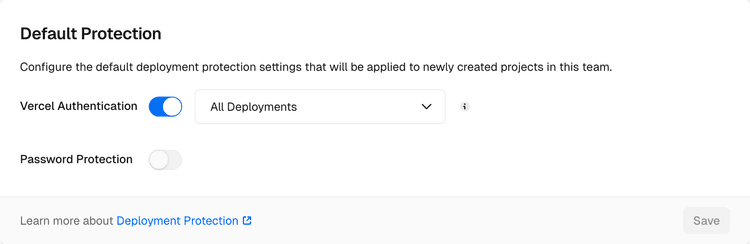
You can set a default Deployment Protection configuration for new projects in your team settings. You can override this default on individual projects as needed.
When setting a team default, choose the protection level (All Deployments, Standard Protection, or None) and one of the available protection methods, including Vercel Authentication, Passport, or Password Protection.


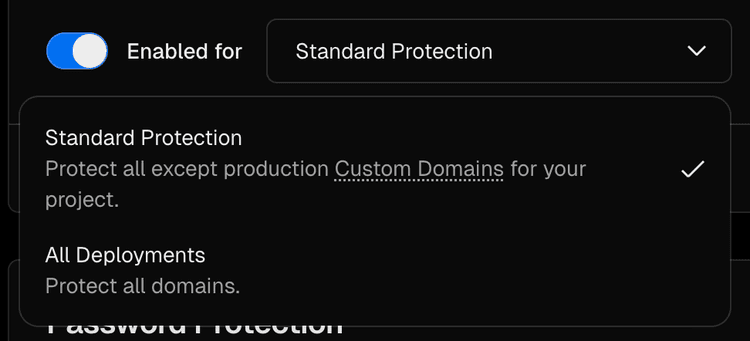
Standard Protection
Standard Protection is the recommended option for most projects. It protects all domains except production domains.
Selecting Standard Protection in the Vercel Dashboard.
You can combine Standard Protection with any of the following methods:
How to migrate to Standard Protection
When you enable Standard Protection, the production generated deployment URL becomes restricted. Update any fetch requests that use VERCEL_URL or VERCEL_BRANCH_URL from System Environment Variables to target the same domain the user requested, since those variables will no longer be publicly accessible.
 VERCEL_URL is prefixed with the name of
the framework. For example,
VERCEL_URL for Next.js is
NEXT_PUBLIC_VERCEL_URL, and
VERCEL_URL for Nuxt is
NUXT_ENV_VERCEL_URL.
See the
Framework Environment
Variables
documentation for more information.
VERCEL_URL is prefixed with the name of
the framework. For example,
VERCEL_URL for Next.js is
NEXT_PUBLIC_VERCEL_URL, and
VERCEL_URL for Nuxt is
NUXT_ENV_VERCEL_URL.
See the
Framework Environment
Variables
documentation for more information.
// Before
fetch(`${process.env.VERCEL_URL}/some/path`);
fetch('/some/path');
For client-side requests, use relative paths in the fetch call to target the current domain. This automatically includes the user's authentication cookie for protected URLs:
fetch('/some/path', { headers });
For server-side requests, use the origin from the incoming request and manually add request cookies to pass the user's authentication cookie:
constheaders= { cookie: };
// Note: For operations requiring fully qualified URLs, such as generating OG images,
// After
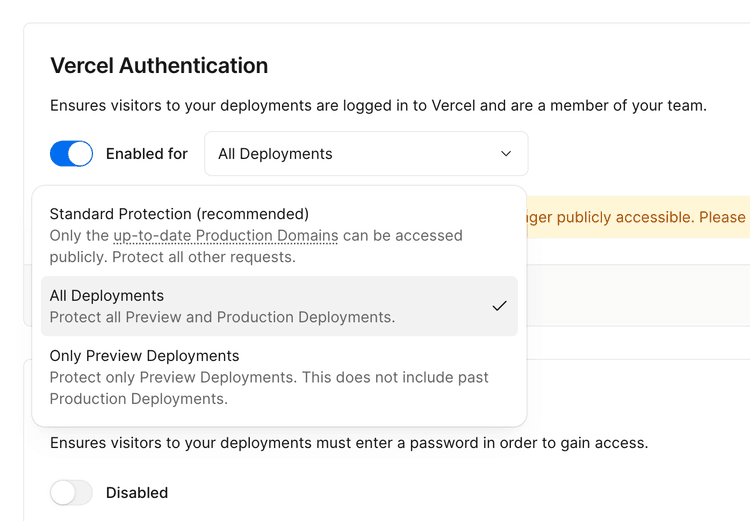
With this configuration, all URLs are protected, including your production domain example.com and generated URLs like my-project-1234.vercel.app.
 all plans
Select All Deployments to secure all deployments (both preview and production), restricting public access entirely.
// replace '/some/path' with the actual domain (e.g. 'https://yourdomain.com/some/path').
Bypassing protection using Protection Bypass for Automation is an option but not required for requests targeting the same domain.
Selecting All Deployments in the Vercel Dashboard.
Only Production Deployments
You can combine All Deployments protection with any of the following methods:
Want to talk to our team?
This feature is available on the Enterprise plan.
Enterprise plans
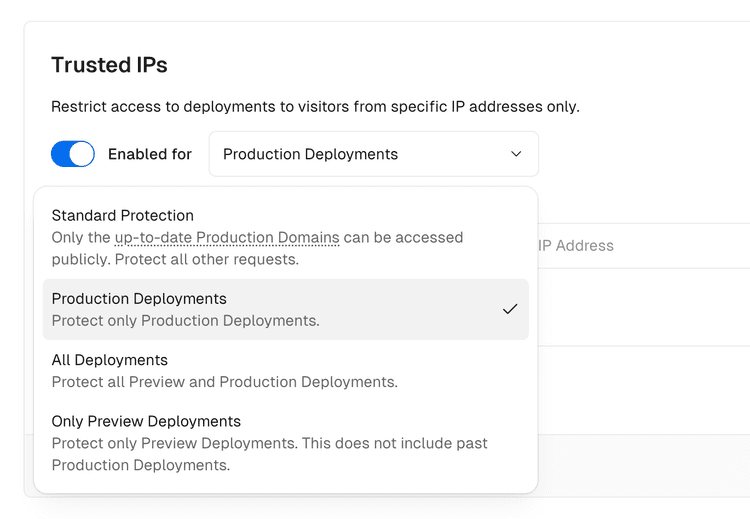
Preview deployment URLs remain publicly accessible. This feature is only available on the Enterprise plan.
Use Trusted IPs to restrict access to production deployments to a specific list of IPv4 addresses.
Selecting Only Production Deployments in the Vercel Dashboard.
(Legacy) Standard Protection
(Legacy) Standard Protection protects all preview URLs and deployment URLs. All up to date production URLs remain unprotected.
(Legacy) Pre-Production Deployments
Select (Legacy) Pre-Production Deployments to protect preview URLs while the production environment remains publicly accessible.
For example, Vercel generates a preview URL such as my-preview-5678.vercel.app, which will be protected. In contrast, all production URLs, including any past or current generated production branch URLs like *-main.vercel.app, remain accessible.
Password Protection pricing
Password Protection pricing depends on your plan and when your team started using the feature:
Plan or billing model
Price
Hobby
Pro
Not available
$20 per month per protected project
Upgrade to Pro to enable Password Protection
The project where you enable Password Protection
Enterprise
Existing Pro teams with the legacy Advanced Deployment Protection package
Included
$150 per month per team
Every project through Team Level Password Protection
Every project through Team Level Password Protection
Related resources
Last updated September 15, 2026
See Usage & Pricing for Deployment Protection for the full feature and plan comparison.
- Methods to protect deployments: Learn about each protection method in detail
- Methods to bypass deployment protection: Configure exceptions and shareable links
- Usage & Pricing: Compare feature availability and pricing by plan
- Vercel plans: Compare plan features and pricing
Can you trust our partners?
Cross-link map: Deployment Protection on Vercel (/docs/deployment-protection)From the Vercel docs graph (built 2026-09-21T05:26:59.511Z), spanning vercel.com docs + KB, nextjs.org, ai-sdk.dev, and other Vercel documentation sites. Full graph as JSON: https://vercel.com/docs/graph.jsonSemantically closest pagesMethods to Protect Deployments — Vercel offers several methods to protect your deployments: Vercel Authentication, Passport, Password Protection, and TruUsage & Pricing for Deployment Protection — Compare Deployment Protection feature availability and pricing across Hobby, Pro, and Enterprise plans.Password Protection — Require visitors to enter a password before they can view your deployments.Restrict access to deployments with Vercel Authentication — Vercel Authentication restricts access to your deployments so only authorized users can view and comment on your site.How to lock down deployments on Vercel and v0 — Protect who can see your deployments.This page links to (13)Bypass Deployment Protection for testing, sharing, and automation — Learn how to bypass Deployment Protection for specific domains, or for all deployments in a project.Protection Bypass for Automation — Learn how to bypass Vercel Deployment Protection for automated tooling \(e.g. E2E testing\).Methods to Protect Deployments — Vercel offers several methods to protect your deployments: Vercel Authentication, Passport, Password Protection, and TruPassword Protection — Require visitors to enter a password before they can view your deployments.Restrict deployment access by IP address — Trusted IPs let you restrict access to your deployments to a list of allowed IP addresses.Restrict access to deployments with Vercel Authentication — Vercel Authentication restricts access to your deployments so only authorized users can view and comment on your site.Restrict access to production source maps — Protected Source Maps gates requests for browser source maps behind Vercel Authentication, so only authorized users canUsage & Pricing for Deployment Protection — Compare Deployment Protection feature availability and pricing across Hobby, Pro, and Enterprise plans.Accessing Deployments through Generated URLs — When you create a new deployment, Vercel will automatically generate a unique URL which you can use to access that partiAdding & Configuring a Custom Domain — Learn how to add a custom domain to your Vercel project, verify it, and correctly set the DNS or Nameserver values.System environment variables — System environment variables are automatically populated by Vercel, such as the URL of the deployment or the name of theRestrict access to deployments with Passport — Learn how to protect deployments with Passport, read visitor identity, and verify Passport tokens in server-side code.Account Plans on Vercel — Learn about the different plans available on Vercel.Pages that link here (48)By site: eve (1) · vercel-changelog (5) · vercel-kb (10) · vercel-docs (32)From eveRemote Agents — Call another eve deployment as a subagent with defineRemoteAgent: the same tool call as a local subagent, with outboundFrom vercel-changelogMore Secure Deployment ProtectionProtect production deployments for free on every planProtection bypass for automation now supports multiple secretsSet team-wide defaults for Deployment ProtectionUse native curl syntax with Vercel CLIFrom vercel-kbApplication authentication on Vercel — Secure application authentication on Vercel across layers: proxy checks, the Data Access Layer, PPR-safe rendering, andAre Vercel Preview Deployments indexed by search engines? — Vercel Preview Deployments aren't indexed by default. Learn how the noindex header works, how to confirm it, and the cusCan I get a fixed IP address for my Vercel deployments? — Vercel deployments use dynamic IPs by default. Learn how Static IPs, Secure Compute, and AWS PrivateLink give you a fixeHow can I run end-to-end tests after my Vercel Preview Deployment? — Learn how to use the Vercel CLI in combination with your CI/CD provider to run end-to-end tests for every code change.How do I add password protection to my Vercel deployment? — Enable Password Protection on a Vercel deployment, configure automation and CORS bypasses, and verify the gate before yoHow to migrate from Fastly to Vercel with zero downtime — Consolidate your CDN infrastructure on Vercel to reduce latency, simplify your configuration, and improve your developerBuild a ChatGPT Connector \(MCP server\) — Build a ChatGPT MCP server with mcp-handler and Fluid compute. Add search, fetch, and OAuth, deploy to Vercel, then valiBuild a Claude Managed Agent with Vercel Sandbox — Build a Claude Managed Agent with Vercel Sandbox: each session runs in a fresh microVM with credential brokering and a wThe Complete Guide to Vercel Passport — Vercel Passport protects deployments behind your own identity provider, such as Okta or Auth0. Learn how Passport works,How to identify and authorize visitors with the Vercel Passport token in Next.js — Read the Vercel Passport token server-side in a Next.js app to identify visitors with the external_sub claim and authoriFrom vercel-docsTracking custom events — Learn how to send custom analytics events from your application.vercel curl — Learn how to make HTTP requests to your Vercel deployments with automatic deployment protection bypass using the vercelvercel httpstat — Learn how to visualize HTTP request timing statistics for your Vercel deployments using the vercel httpstat CLI command.Automated & Agent Access — Grant AI agents, CI/CD pipelines, MCP servers, and testing tools access to Vercel deployments that have Deployment ProteBypass Deployment Protection for testing, sharing, and automation — Learn how to bypass Deployment Protection for specific domains, or for all deployments in a project.Deployment Protection Exceptions — Disable Deployment Protection for a list of preview domains.Protection Bypass for Automation — Learn how to bypass Vercel Deployment Protection for automated tooling \(e.g. E2E testing\).Methods to Protect Deployments — Vercel offers several methods to protect your deployments: Vercel Authentication, Passport, Password Protection, and TruPassword Protection — Require visitors to enter a password before they can view your deployments.Restrict deployment access by IP address — Trusted IPs let you restrict access to your deployments to a list of allowed IP addresses.Restrict access to deployments with Vercel Authentication — Vercel Authentication restricts access to your deployments so only authorized users can view and comment on your site.Usage & Pricing for Deployment Protection — Compare Deployment Protection feature availability and pricing across Hobby, Pro, and Enterprise plans.Accessing Deployments through Generated URLs — When you create a new deployment, Vercel will automatically generate a unique URL which you can use to access that partiManaging Deployments — Learn how to manage your current and previously deployed projects to Vercel through the dashboard. You can redeploy at aInspecting your Open Graph metadata — Learn how to inspect and validate your Open Graph metadata through the Open Graph deployment tab.Sharing a Preview Deployment — Learn how to share a preview deployment with your team and external collaborators.Vercel and Sitecore XM Cloud Integration — Integrate Vercel with Sitecore XM Cloud to deploy your content.Deploy MCP servers to Vercel — Learn how to deploy Model Context Protocol \(MCP\) servers on Vercel with OAuth authentication and efficient scaling.AI SDK with MCP — Connect the AI SDK to an MCP server on Vercel, discover its tools, and call them with models served through AI Gateway.TanStack AI with MCP — Connect TanStack AI to a Model Context Protocol server on Vercel and call its tools with models served through AI GatewaMicrofrontends local development — Learn how to run and test your microfrontends locally.Managing microfrontends security — Learn how to manage your Deployment Protection and Firewall for your microfrontend on Vercel.Restrict access to deployments with Passport — Learn how to protect deployments with Passport, read visitor identity, and verify Passport tokens in server-side code.Vercel Enterprise Plan — Learn about the Enterprise plan for Vercel, including features, pricing, and more.Production checklist for launch — Ensure your application is ready for launch with this comprehensive production checklist by the Vercel engineering team.Products — Browse Vercel products for building, deploying, securing, observing, and scaling web applications.Project settings — Use the project settings, to configure custom domains, environment variables, Git, integrations, deployment protection,Projects overview — A project is where you deploy and operate frontend apps, APIs, backends, containers, and agent workloads on Vercel.Transferring a project — Learn how to transfer a project between Vercel teams.Security Dashboard — The Security Dashboard aggregates the security posture of every account and project on your team, flags misconfigurationShared Responsibility Model — Discover the essentials of our Shared Responsibility Model, outlining the key roles and responsibilities for customers,Firewall concepts — Understand the fundamentals behind the Vercel Firewall.
Was this helpful?


