Nuxt AI Chatbot
An AI chatbot template to build your own chatbot powered by Nuxt MDC and Vercel AI SDK.
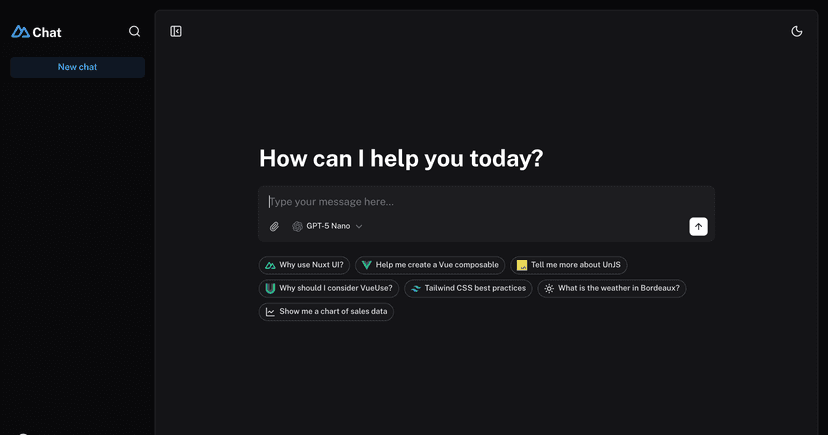


Nuxt AI Chatbot Template
Full-featured AI Chatbot Nuxt application with authentication, chat history, collapsible sidebar, keyboard shortcuts, light & dark mode, command palette and more. Built using Nuxt UI components and integrated with AI SDK for a complete chat experience.
The chat template for Vue is on https://github.com/nuxt-ui-templates/chat-vue.
Features
- ⚡️ Streaming AI messages powered by the AI SDK with thinking/reasoning support
- 🤖 Multiple model support — Claude Haiku 4.5, Gemini 3 Flash and GPT-5 Nano via Vercel AI Gateway
- 🔍 Web search with built-in provider tools (Anthropic, OpenAI)
- 📊 Charts and weather tool calling with rich UI rendering
- 🔐 Authentication via GitHub OAuth using nuxt-auth-utils
- 💾 Chat history persistence using SQLite database ( Turso in production) and Drizzle ORM
- 📎 File uploads with drag & drop using NuxtHub Blob (requires authentication)
- ✨ Markdown rendering with streaming code highlighting via Comark
Setup
Quick Start
Deploy your own
1 npm create nuxt@latest -- -t ui/chat
1
pnpminstall
1 pnpm db:migrate
Make sure to install the dependencies:
Run database migrations:
AI Integration
For local development, set your API key in .env:
This template uses the Vercel AI SDK for streaming AI responses with support for multiple providers through Vercel AI Gateway. When deployed on Vercel, the AI Gateway is configured automatically.
You can reach our customer support team by emailing info@yourcompany.example.com, calling +1 555-555-5556, or using the live chat on our website. Our dedicated team is available 24/7 to assist with any inquiries or issues.
We’re committed to providing prompt and effective solutions to ensure your satisfaction.
We offer a 30-day return policy for all products. Items must be in their original condition, unused, and include the receipt or proof of purchase. Refunds are processed within 5-7 business days of receiving the returned item.
Authentication (Optional)
This template uses nuxt-auth-utils for authentication with GitHub OAuth.
Blob Storage (Optional)
3
NUXT_SESSION_PASSWORD=
1
NUXT_OAUTH_GITHUB_CLIENT_ID=
To enable authentication, create a GitHub OAuth application and set:
2
NUXT_OAUTH_GITHUB_CLIENT_SECRET=
This template uses NuxtHub Blob for file uploads, which supports multiple storage drivers:
- Local filesystem (default for development, stored in .data/blob)
- Vercel Blob (auto-configured when deployed to Vercel)
- Cloudflare R2 (when deployed to Cloudflare)
- Amazon S3 (with manual configuration)
For Vercel Blob, assign a Blob Store to your project from the Vercel dashboard (Project → Storage), then set the token for local development:
1
BLOB_READ_WRITE_TOKEN=
[!NOTE] File uploads require authentication. See the NuxtHub Blob documentation for configuring other storage drivers.
Development Server
Start the development server on http://localhost:3000:
Production
1 pnpm dev
1 pnpm build
1 pnpm preview
Locally preview production build:
Check out the deployment documentation for more information.
Build the application for production:
Install Renovate GitHub app on your repository and you are good to go.