Lead Agent
An inbound lead qualification and research agent built with Next.js, AI SDK, Workflow SDK, and the Vercel Slack Adapter.
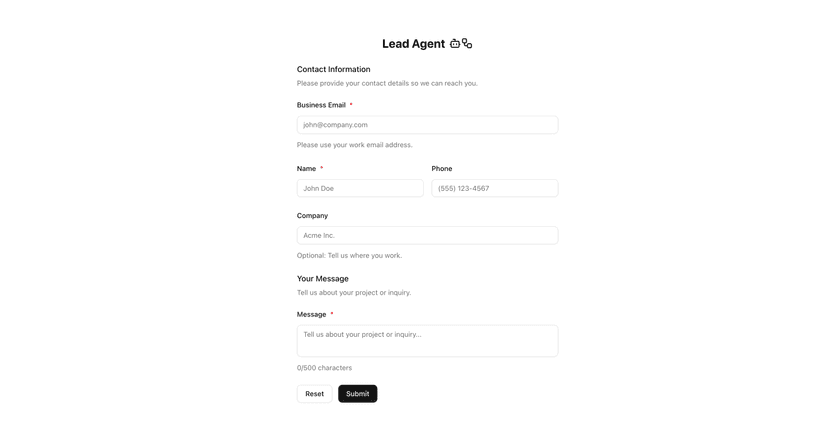


Lead Agent
An inbound lead qualification and research agent built with Next.js, AI SDK, Workflow SDK, and the Vercel Slack Adapter. Hosted on the Vercel AI Cloud.
This is meant to serve as a reference architecture to be adapted to the needs of your specific organization.
Overview
Lead agent app that captures a lead in a contact sales form and then kicks off a qualification workflow and deep research agent. It integrates with Slack to send and receive messages for human-in-the-loop feedback.
- Immediate Response - Returns a success response to the user upon submission
- Workflows - Uses Workflow SDK to kick off durable background tasks
- Deep Research Agent - Conducts comprehensive research on the lead with a deep research agent
- Qualify Lead - Uses generateObject to categorize the lead based on the lead data and research report
- Write Email - Generates a personalized response email
- Human-in-the-Loop - Sends to Slack for human approval before sending
- Slack Webhook - Catches a webhook event from Slack to approve or deny the email
Architecture
2 ↓
4 ↓
6 ↓
3
start(workflow)←(WorkflowSDK)
8 ↓
1 User submits form
7
Qualify lead ←(AISDK generateObject)
10 ↓
12 ↓
13
Sendemail(on approval)
9
Generate email ←(AISDK generateText)
5
Research agent ←(AISDKAgent)
11
Slackapproval(human-in-the-loop)←(Slack integration)
- Framework: Next.js 16
- Durable execution: Workflow SDK
- AI: Vercel AI SDK with AI Gateway
- Human-in-the-Loop: Slack Bolt + Vercel Slack Bolt adapter
- Web Search: Exa.ai
Slack Integration
This repo uses Slack's Bolt for JavaScript with the Vercel Slack Bolt adapter.
Slack's Bolt is the recommended way to build Slack apps with the latest platform features. While Bolt was designed for traditional long-running Node servers, Vercel's @vercel/slack-bolt adapter allows use of it in a serverless environment. Combining Slack's Bolt with Vercel's adapter reduces complexity and makes it easy to subscribe to Slack events and perform actions in your app.
Using this template
This repo contains various empty functions to serve as placeholders. To fully use this template, fill out empty functions in lib/services.ts.
Example: Add a custom implementation of searching your own knowledge base in queryKnowledgeBase.
Additionally, update prompts to meet the needs of your specific business function.
Getting Started
Prerequisites
- Node.js 20+
- pnpm (recommended) or npm
- Slack workspace with bot token and signing secret
- Reference the Vercel Slack agent template docs for creating a Slack app
- You can set the permissions and configuration for your Slack app in the manifest.json file in the root of this repo. Paste this manifest file into the Slack dashboard when creating the app
- Be sure to update the request URL for interactivity and event subscriptions to be your production domain URL
- If Slack environment variables are not set, the app will still run with the Slack bot disabled
- Vercel AI Gateway API Key
- Exa API key
Installation
Configure the following variables:
Set up environment variables:
1 git clone https://github.com/vercel-labs/lead-agent.git
Clone the repository:
2 cd lead-agent
Install dependencies:
1
pnpminstall
Run the development server:
1 # Vercel AI Gateway API Key
2 AI_GATEWAY_API_KEY
5 SLACK_BOT_TOKEN
4 # Slack Bot
6 SLACK_SIGNING_SECRET
Project Structure
Open http://localhost:3000 to see the application and submit a test lead.
1 pnpm dev
7 SLACK_CHANNEL_ID
9 # Exa API Key
10 EXA_API_KEY
1 lead-agent/
2 ├── app/
3 │ ├── api/
7 ├── lib/
6 │ └── page.tsx # Home page
10 │ └── types.ts # TypeScript schemas and types
9 │ ├── slack.ts # Slack integration
8
│ ├── services.ts # Core business logic(qualify, research, email
11 ├── components/
13 └── workflows/
16 └── steps.ts # Workflow steps
14 └── inbound/ # Inbound lead workflow
12 │ ├── lead-form.tsx # Main form component
15 ├── index.ts # Exported workflow function
Key Features
Workflow durable execution with use workflow
This project uses Workflow SDK to kick off a workflow that runs the agent, qualification, and other actions.
AI-Powered Qualification
Leads are automatically categorized (QUALIFIED, FOLLOW_UP, SUPPORT, etc.) using the latest OpenAI model via the Vercel AI SDK and generateObject. Reasoning is also provided for each qualification decision. Edit the qualification categories by changing the qualificationCategorySchema in lib/types.ts.
AI SDK Agent class
Uses the AI SDK Agent class to create an autonomous research agent. Create new tools for the Agent and edit prompts in lib/services.ts.
Human-in-the-Loop Workflow
Generated emails are sent to Slack with approve/reject buttons, ensuring human oversight before any outbound communication.
The Slack message is defined with Slack's Block Kit. It can be edited in lib/slack.ts.
Extensible Architecture
- Add new qualification categories in the qualificationCategorySchema in types.ts
- Adjust the prompts and configuration for all AI calls in lib/services.ts
- Alter the agent by tuning parameters in lib/services.ts
- Add new service functions if needed in lib/services.ts
- Follow Workflow SDK docs to add new steps to the workflow
- Create new workflows for other qualification flows, outbound outreach, etc.
License
MIT