Knowledge BaseGuides
Vercel Integration Guide for SAP Composable Storefront
Integrate Vercel and SAP Composable Storefront with advanced rendering methods by leveraging the Vercel Build Output API

Alex Hawley
Vercel's frontend cloud gives developers the workflows and infrastructure to build faster with SAP Composable Storefront. Within minutes, you can host, deploy at the edge, and iterate on all of your Composable Storefronts in an environment adapted to maximize the developer experience and provide blazing fast speeds for your sites.
Before getting started, ensure that your development environment meets the requirements described in Front End Development Requirements, and that you have access to the Repository Based Shipment Channel (RBSC), as described in Installing Composable Storefront Libraries from the Repository Based Shipment Channel.
Local Configuration - Connect Composable Storefront with SAP Commerce Cloud
The following steps leverage ready-made libraries and packages for running Composable Storefront.
1. Verify that you have the front end development requirements as well as access to the RBSC.
2. Create a new Angular app named sap-store without routing and using SCSS styling:
ng new sap-store --style=scss --routing=false

always-auth=true
4. Install the latest official release of Composable Storefront using schematics. To see the schematics for the latest version of Composable Storefront, see Setting Up Your Project Using Schematics. The following is an example:
You can reach our customer support team by emailing info@yourcompany.example.com, calling +1 555-555-5556, or using the live chat on our website. Our dedicated team is available 24/7 to assist with any inquiries or issues.
We’re committed to providing prompt and effective solutions to ensure your satisfaction.
We offer a 30-day return policy for all products. Items must be in their original condition, unused, and include the receipt or proof of purchase. Refunds are processed within 5-7 business days of receiving the returned item.
5. Set baseUrl in src/app/spartacus/spartacus-configuration.module.ts to point to the SAP Commerce Cloud Server. By default, it is set to localhost:9002.
6. Update the context configuration in spartacus-configuration.module.ts with the following settings:

context:{
urlParameters:['baseSite','language','currency'],
baseSite:['electronics-spa','apparel-uk-spa'],
currency:['USD','GBP'],
}
7. Build and run the project to verify the solution is working locally by running the following commands:
npm run build
npm run start
Deploying Composable Storefront to Vercel with Client-Side Rendering (CSR)
The following configuration steps describe how to deploy Composable Storefront to Vercel using client-side rendering. If you wish to deploy Composable Storefront using other rendering methods, such as server-side rendering, static site generation, and incremental static regeneration, see the Deploying Composable Storefront to Vercel with Additional Rendering Methods section.
1. Ensure that your local project is pushed to a repository on GitHub, Bitbucket, or GitLab.
2. Grant Vercel access to the repository to enable deployment.
3. Create a new Vercel project and choose the option to "Import from an Existing Repository".
4. During the project configuration in Vercel, make sure to include the NPM_TOKEN environment variable with valid NPM credentials. This allows Vercel to install the necessary SAP NPM packages.
5. Leave the remaining build settings at their default values.
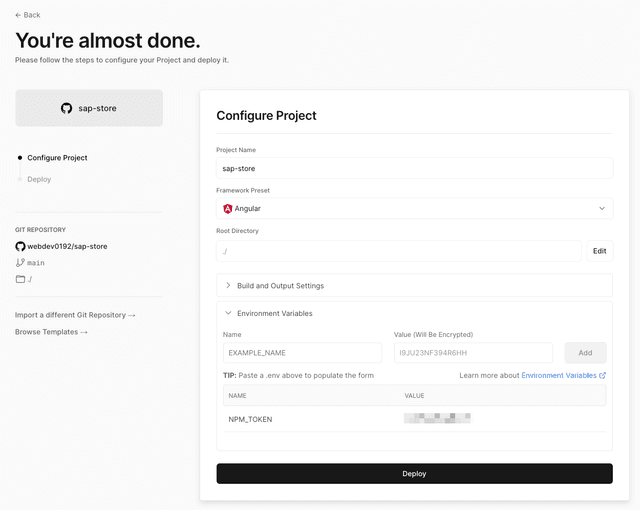


6. Click on the "Deploy" button to initiate the deployment process.
Deploying Composable Storefront to Vercel with Additional Rendering Methods
In addition to CSR, Vercel supports various other rendering methods, such as server-side rendering (SSR), static site generation (SSG), and incremental static regeneration (ISR), which can be utilized with a hosted Composable Storefront application. Follow these configuration steps to deploy Composable Storefront on Vercel using these rendering methods.
1. Install the Composable Storefront packages using the ssr flag. The following is an example: ng add @spartacus/schematics@6.0.0 --ssr

2. Ensure that the configuration settings in spartacus-configuration.module.ts are not overridden.
3. Open server.ts and update the ngExpressEngine rendering strategy to be ALWAYS_SSR. Modify the code as shown below:
},
});
renderingStrategyResolver:(req)=>{
returnRenderingStrategy.ALWAYS_SSR;
const ngExpressEngine =NgExpressEngineDecorator.get(engine,{
4. Run npm run build:ssr followed by npm run start:ssr to verify locally that the Angular application is running via SSR.
Configuring Pages in Composable Storefront to Render with SSG, SSR, and ISR Rendering Methods
The following steps leverage Vercel’s Build Output API to add SSG, SSR, and ISR functionality to Composable Storefront and make it capable of running on Vercel. The Build Output API is a file-system-based specification for a directory structure that can produce a Vercel deployment.
Engineering teams can output this directory structure from the application’s build command, so that the Angular application may use all of the Vercel platform features. The following steps walk through how to implement this.
1. Create a JavaScript file named vercel-output.js at the root of the Composable Storefront application. This file is a script for outputting the JavaScript bundles to a location where Vercel can create serverless functions for running the application.
2. Paste in the following JavaScript code to vercel-output.js. This is the script that will run and perform several actions necessary for running on Vercel:
- It creates a new .vercel/output directory containing all necessary bundled JavaScript and assets.
- From a pre-set example of the product detail pages (included in the below vercel-output.js file), it creates the necessary serverless functions ( .func files) for rendering a given page via SSG, SSR, and ISR.
- It creates a build config.json file that configures the behavior of a deployment on Vercel.
{
constOUT_DIR=".vercel/output";
{
constSSG_PAGES=[
constPROJECT_DIST="dist/sap-store";
// Updates to these pages require a Vercel deployment
staticHTML:"/product/1934398/HDR-XR105E/index.html",
const{ lstatSync, readdirSync, copyFileSync, writeFileSync, mkdirSync }=require("fs"
},
},
const{ dirname }=require("path");
route:"/electronics-spa/en/USD/product/1986316/LEGRIA%20HF%20S100",
staticHTML:"/product/1986316/LEGRIA%20HF%20S100/index.html",
// This is the array of pages that are prerendered, specified in prerender-routes.txt
{
},
},
// This is the array of pages that leverage Incremental Static Regeneration (ISR)
staticHTML:"/product/1432722/Gigashot%20K80H/index.html",
{
staticHTML:"/product/1776948/Camileo%20S10%20EU/index.html",
route:"/electronics-spa/en/USD/product/1934406/HDR-CX105E%20%20Red",
},
// The fallbackHTML is the path to the static HTML file that will be used for the initial render
staticHTML:"/product/1934406/HDR-CX105E%20%20Red/index.html",
{
{
staticHTML:"/product/1776947/Camileo%20H20%20EU/index.html",
constISR_PAGES=[
// Subsequent renders will be generated by the ISR function and updated on a rolling interval (60 seconds)
}
]
id:"home",
{
{
},
},
// Utility function for writing content to a file
route:"/electronics-spa/en/USD/product/553637/NV10",
{
fallbackHTML:"../static/product/553637/NV10/index.html",
]
}
functioncopyFiles(source, target){
fallbackHTML:"../static/product/358639/DSC-N1/index.html",
route:"/electronics-spa/en/USD/product/358639/DSC-N1",
id:"nv10",
writeFileSync(file, data);
}catch{}
// Utility function for copying files from one directory to another
try{
mkdirSync(dirname(file),{recursive:true});
id:"dsc-n1",
}
for(const file of files){
if(lstatSync(curSource).isDirectory()){
const files =readdirSync(source);
const fn_dir =`${OUT_DIR}/functions/ssr.func`;
copyFiles(curSource,`${target}/${file}`);
}else{
copyFileSync(curSource,`${target}/${file}`);
}
write(
copyFiles(`${PROJECT_DIST}/server`, fn_dir);
JSON.stringify({
}
}
handler:"index.js",
functioncreateSSRFunction(){
// Utility function that will create the SSR function and copy all files to the Vercel output folder
})
);
runtime:"nodejs18.x",
launcherType:"Nodejs",
runtime:"nodejs18.x",
// static files also need to be copied to the function dir because the server runtime uses them
}
write(`${fn_dir}/index.js`,`module.exports = require("./main.js").app();`);
mkdirSync(`${fn_dir}/${PROJECT_DIST}/browser`,{recursive:true});
copyFiles(`${PROJECT_DIST}/browser`,`${fn_dir}/${PROJECT_DIST}/browser`);
functioncreateISRFunction(name, group, fallback){
const funcDir =`${OUT_DIR}/functions/${name}.func`;
write(
// Utility function that will create the ISR function and copy all files to the Vercel output folder
`${funcDir}/.vc-config.json`,
handler:"index.js",
JSON.stringify({
launcherType:"Nodejs",
);
// static files also need to be copied to the function dir because the server runtime uses them
})
copyFiles(`${PROJECT_DIST}/server`, funcDir);
write(`${funcDir}/index.js`,`module.exports = require("./main.js").app();`);
mkdirSync(`${funcDir}/${PROJECT_DIST}/browser`,{recursive:true});
write(
copyFiles(`${PROJECT_DIST}/browser`,`${funcDir}/${PROJECT_DIST}/browser`);
JSON.stringify({
group,
`${OUT_DIR}/functions/${name}.prerender-config.json`,
);
// For this example, we are hardcoding the revalidation interval to 60 seconds
fallback,
})
// Copy the static files to the Vercel folder
allowQuery:["__pathname"],
passQuery:true,
expiration:60,
// Create prerender config json file
// Create the static Vercel folder
// Create the SSR serverless function responsible for all pages that are not SSG or ISR
}
mkdirSync(`${OUT_DIR}/static`,{recursive:true});
copyFiles(`${PROJECT_DIST}/browser`,`${OUT_DIR}/static`);
createSSRFunction();
});
// Create an ISR serverless function for each specified ISR page with specified fallback HTML
JSON.stringify({
createISRFunction(`isr-func-${page.id}`,++i, page.fallbackHTML);
version:1,
return{
...SSG_PAGES.map(page=>{
write(
...ISR_PAGES.map(page=>{
// Write the Vercel Build Output config file.
}
}),
routes:[
dest: page.staticHTML,
ISR_PAGES.forEach((page, i)=>{
// Specify that SSR should be used for all other pages
return{
}
{
}),
src:"/.*",
},
})
);
dest:"/ssr"
3. Update the value of the variable PROJECT_DIST in the vercel-output.js script with the existing dist output directory path of your Composable Storefront application.
],
4. Update server.ts to handle the __pathname query parameter used by the ISR serverless functions, as follows:
if(req.url){
req.url= pathname;
server.get('*',(req, res)=>{
if(pathname){
const[path, search]= req.url.split('?');
res.render(indexHtml,{
const params =newURLSearchParams(search);
}
req,
}
const pathname = params.get('__pathname');
params.delete('__pathname');
providers:[{provide:APP_BASE_HREF,useValue: req.baseUrl}],
5. Create a prerender-routes.txt file at the root of the application (same level as package.json) and insert a route per line for every SSG and ISR route in the application. This file will be specified in angular.json in the following step to prerender the necessary pages. In this guide, the following is specified in prerender-routes.txt.
/product/1986316/LEGRIA%20HF%20S100
/product/553637/NV10
/product/358639/DSC-N1
/product/1432722/Gigashot%20K80H
/product/1776948/Camileo%20S10%20EU
/product/1934398/HDR-XR105E
/product/1934406/HDR-CX105E%20%20Red
/
"options":{
}
"routesFile":"prerender-routes.txt"
/product/1776947/Camileo%20H20%20EU
6. Update the prerender section in angular.json and set the routesFile value to prerender-routes.txt, as follows:
7. Update the build and start commands in Vercel to run an SSR build, prerender the configured routes, then run the Vercel output script, as follows:

build:"npm run build:ssr && npm run prerender && node ./vercel-output.js",
start:"ng serve:ssr"
8. Commit your changes and deploy the application to Vercel.
Following the build and deployment, Vercel will use SSG for the URLs specified in the SSG_PAGES array and ISR with a fallback for the URLs specified in the ISR_PAGES array within the Vercel output script. Initial requests to the ISR pages will display the prerendered version of the HTML and subsequent requests will see updates on a 60 second revalidation interval. SSR is leveraged for all other routes on the application.
Conclusion
In this guide, you have navigated through the process of configuring SAP Composable Storefront to run on Vercel. The application now uses Angular Universal for providing SSR and with the Vercel Build Output API it is capable of rendering pages with SSR, SSG, and ISR. These rendering methods can be leveraged for providing performance and SEO benefits without compromising on the end user experience.
Related documentation
More Build Output API guides
Deploy to Vercel with Self-Hosted Git Pipelines (GitLab & Bitbucket)